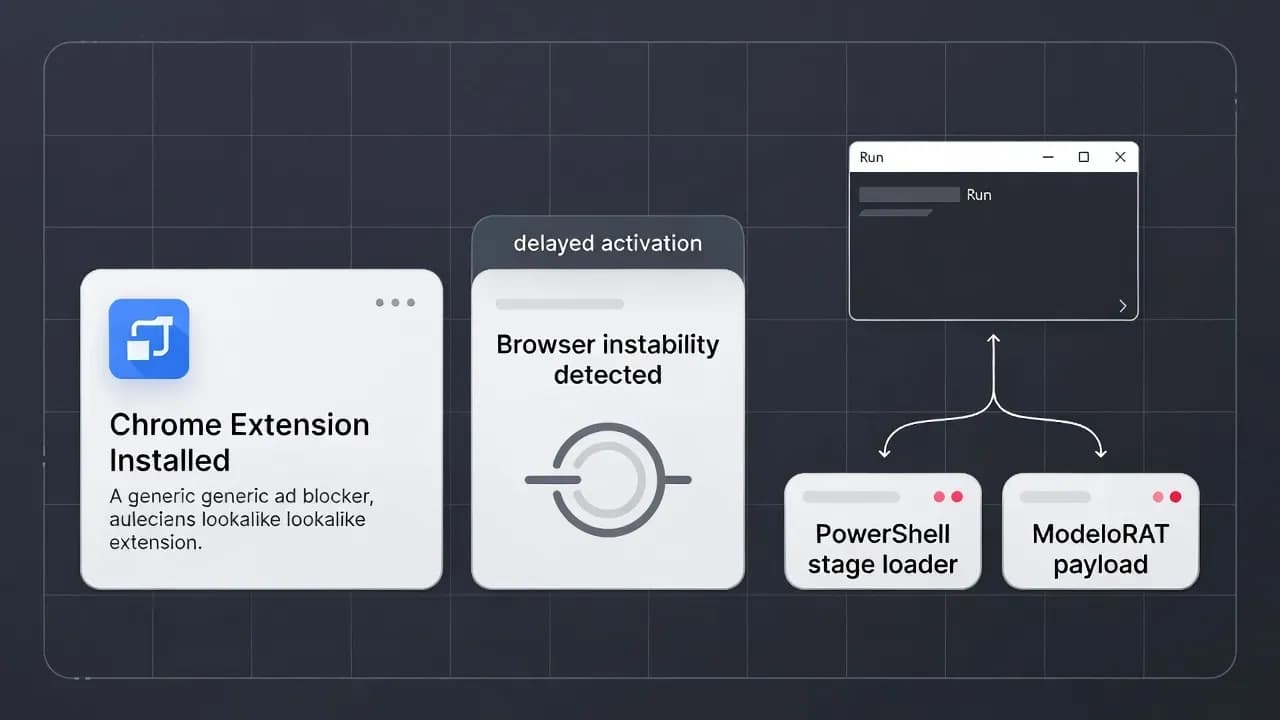
Fake Ad Blocker Extension Crashes Chrome and Edge to Trigger ClickFix Malware Installs in Corporate Environments
A fake ad blocker extension is being used as an initial access lure that turns everyday browser annoyance into a reliable malware delivery workflow. Instead of exploiting a browser vulnerability, the campaign weaponizes user behavior: it intentionally crashes Chrome and Edge to create urgency, then presents a "fix" that convinces victims to run a clipboard-pasted command.

A fake ad blocker extension is being used as an initial access lure that turns everyday browser annoyance into a reliable malware delivery workflow. Instead of exploiting a browser vulnerability, the campaign weaponizes user behavior: it intentionally crashes Chrome and Edge to create urgency, then presents a "fix" that convinces victims to run a clipboard-pasted command. Security teams should care because the operator appears to selectively target domain-joined endpoints, deploying a Python remote access tool (ModeloRAT) specifically in corporate environments. This is a modern blend of malvertising, extension supply-chain trust, and ClickFix-style social engineering that bypasses traditional "patch-and-block" thinking.
What Happened: The Technical Breakdown of the Fake Ad Blocker Extension
The campaign centers on a malicious browser extension called NexShield, promoted as a lightweight privacy-first ad blocker and positioned to look like it was authored by Raymond Hill (the developer associated with uBlock). In practice, NexShield is largely a clone of uBlock Origin Lite with targeted modifications that turn it into an operator-controlled delivery mechanism. The distribution method is the real accelerant: victims encounter malicious ads while searching for an ad blocker, and the ad route can land them on an official storefront listing, giving the extension an undeserved legitimacy boost.
The most distinctive element is that the extension does not immediately behave like obvious malware. It delays execution and only later triggers a deliberate resource exhaustion routine that freezes or crashes the browser. That gap is not accidental. By separating install time from impact time, the operator reduces the chance that users connect the browser instability to the extension they installed earlier. In a real-world enterprise, that delay also reduces the likelihood that helpdesk or EDR triage immediately focuses on the browser extension as the root cause.
Once the browser is destabilized, the campaign pivots into a social engineering stage that resembles ClickFix, but with an important twist: the "error" is real. Many ClickFix lures rely on purely fake screens or simulated OS UI. Here, the extension creates a genuine denial-of-service condition in the browser, which makes the subsequent warning pop-up feel plausible. Huntress referred to this specific variant as CrashFix, because the crash is the persuasion engine.
How CrashFix Turns Browser Instability Into ClickFix Execution
After a forced crash or freeze, the user restarts Chrome or Edge and is met with a pop-up claiming the browser "stopped abnormally" and urging a scan or remediation step. The workflow is designed to be frictionless and repeatable: a user sees a problem, sees a "fix," and follows instructions. The malicious instruction path typically guides the victim to open the Windows Run dialog or Command Prompt, paste from the clipboard, and execute what looks like a repair command.
From a defensive standpoint, this is exactly why ClickFix has become so effective across multiple campaigns. The operator does not need to bypass endpoint protections with an exploit. They only need to get the user to run a command once. That command becomes the pivot point where endpoint telemetry begins, but by then the user believes they are solving a local issue, not executing attacker logic.
Huntress's analysis also highlights why this approach survives common awareness training. The instruction is not "download this malware." It is "fix your browser." The command is delivered via clipboard manipulation, so users are not expected to evaluate the content. In many environments, users are conditioned to follow vendor or helpdesk guidance that involves copy/paste steps, so the behavior blends into a familiar troubleshooting pattern.
Payload Delivery and Targeting: Why Domain-Joined Hosts Get ModeloRAT
The campaign's targeting logic is a key signal that this is not a spray-and-pray nuisance. Huntress reported that the operator distinguishes between corporate and home endpoints by checking whether the machine is domain-joined or in a WORKGROUP configuration. That simple branching decision shapes the payload strategy: domain-joined hosts receive ModeloRAT, described as a previously undocumented Python-based remote access tool, while non-domain hosts may receive alternate content that appears to be lower priority or still in testing.
This enterprise targeting matters because it changes incident response assumptions. A compromised home endpoint is often contained to credential theft and local persistence. A compromised domain endpoint can be an entry point into Active Directory, internal file shares, management planes, and lateral movement. Even if the initial RAT is "just" reconnaissance and command execution, it sets up the operator to deploy follow-on tooling or monetize access via resale. In practical terms, a single infected workstation can become the staging system for broader network compromise.
Huntress described ModeloRAT as capable of reconnaissance, PowerShell execution, registry modification, payload staging, and self-updating. That capability set fits a post-compromise foothold role rather than a single-purpose infostealer. It is the type of implant that supports operator persistence and iterative exploitation, especially if the initial access channel (the extension) is removed later.
Threat Actor Profile: KongTuke and the TDS Ecosystem Behind Malvertising
Huntress attributed the campaign to a threat actor tracked as KongTuke, a name tied to operations observed since early 2025. A useful way to understand KongTuke's value chain is that the group appears comfortable operating at the intersection of malvertising, traffic distribution, and delivery tooling. That is consistent with a broader ecosystem where "traffic" is treated as a resource: operators build and maintain the redirection and delivery paths, then optimize payload selection based on target value.
Recorded Future's reporting on TAG-124 provides important context here. TAG-124 is described as a malicious traffic distribution system used to enable targeted malware delivery at scale, including activity associated with multiple criminal operations. In this model, the storefront lure and extension branding are not just "tricks." They are conversion optimization. The operator wants the victim to self-select by searching for an ad blocker and then complete an install within a trusted UI flow.
This ecosystem framing also explains why defenders should avoid over-focusing on a single domain or extension ID. Infrastructure changes fast. Listing removal does not end a campaign. Operators rotate domains, storefront listings, and ad creatives. What remains stable is the technique: induce trust, create urgency via a real crash, then force user-driven command execution.
Prevention and Detection Strategies for Fake Ad Blocker Extension Campaigns
Enterprises can meaningfully reduce risk here, but it requires treating browser extensions as governed software, not personal preference.
The highest impact control is extension allowlisting through managed browser policies. A deny-by-default posture for extensions is ideal, especially for privileged users and high-risk departments. If a full deny posture is not feasible, start with an allowlist for security-sensitive groups and gradually expand. "Ad blockers" should be treated as security-impacting components, because they can intercept web traffic, modify page content, and influence user workflows.
Second, invest in browser telemetry alongside endpoint telemetry. Many IR teams can reconstruct the PowerShell process tree after execution, but cannot easily answer the question "which extension caused this behavior" without browser-side logs. Centralized extension inventory, install sources, and extension update events are critical for root cause analysis.
Third, hunt for the technique, not just the artifact. High-signal behaviors include:
- Chrome or Edge resource exhaustion followed by forced termination and restart loops
- A browser restart that triggers a pop-up or new window presenting "security issues detected" language
- A suspicious chain where user-driven clipboard paste precedes command execution
- Unusual use of Windows built-in utilities as staging mechanisms (living-off-the-land patterns)
- A time gap between extension installation and malicious behavior, consistent with delayed execution
Finally, train helpdesk and IT staff on the specific social engineering pattern: "browser crashed, run this command to fix it." The most practical awareness message is not "do not click links." It is "never paste and run commands that came from a pop-up or webpage, even if the error looks real."
This fake ad blocker extension campaign is a strong indicator of where practical intrusions are heading: less exploitation, more coercion, and more reliance on trusted delivery surfaces like browser extension stores. CrashFix is effective because it engineers a genuine problem, then offers a frictionless "fix" that moves execution onto the victim's hands. For defenders, the priority is clear: govern extensions, centralize browser telemetry, and treat any clipboard-to-command workflow as a high-risk behavior that needs both policy and detection. If enterprises keep treating the browser as an unmanaged client, CrashFix-style ClickFix attacks will remain a reliable initial access path.
Frequently Asked Questions
No. The campaign abuses a malicious extension plus social engineering. The browser crash is induced by the extension's code, not an exploit in the browser itself.
Because the instability is real. Users experience an actual freeze or crash, which makes the "repair" instructions feel credible and time-sensitive.
Domain-joined endpoints are higher value because they can provide pathways to internal systems and Active Directory. Huntress reported that the more capable RAT payload is reserved for these corporate targets.
Not necessarily. The extension is the delivery mechanism. Once the user has executed commands, additional payloads may persist independently of the extension.
Treat it as a potential initial access event: isolate affected endpoints, review executed commands and follow-on scripts, and validate for persistence and secondary payloads. Also review extension policy and telemetry gaps that allowed the install.
Any enterprise with unmanaged browsers, especially where users can install extensions freely. Finance, healthcare, legal, and MSP environments are high risk because a single foothold can have outsized impact.



Comments
Want to join the discussion?
Create an account to unlock exclusive member content, save your favorite articles, and join our community of IT professionals.
New here? Create a free account to get started.