GhostPoster Malware Campaign: 17 Malicious Browser Extensions Hit Chrome, Edge, and Firefox With 840,000+ Installs
LayerX linked 17 browser extensions across Chrome, Edge, and Firefox to the GhostPoster campaign. The add-ons hide a loader inside PNG icon files, delay activation for days, then fetch remote JavaScript to hijack affiliate traffic, inject tracking, weaken web security headers, and run ad and click fraud at scale.

TL;DR
GhostPoster is a long running malicious browser extension campaign that used seemingly harmless productivity add-ons to quietly monetize and surveil users. Researchers tied 17 extensions across Chrome, Edge, and Firefox to the same infrastructure and tactics, with more than 840,000 cumulative installs. The standout technique is stealthy payload delivery: a loader hidden inside a PNG icon file, delayed activation, then remote JavaScript retrieval to enable affiliate hijacking, tracking injection, weakened web security headers, and ad and click fraud.
What happened
GhostPoster was initially documented in late 2025 after researchers found malicious JavaScript embedded inside extension logo files. New analysis expanded the scope: multiple extension stores and a much larger install base. The campaign appears to have originated in the Microsoft Edge add-ons ecosystem and later spread to Chrome and Firefox, with some listings dating back years.
This is a practical reminder that official extension stores reduce friction, not risk. Store takedowns help, but they do not remove already installed extensions. If the add-on remains installed, it can stay active even after delisting.
Why GhostPoster matters
Browser extensions sit inside a privileged trust boundary:
- They can observe and manipulate webpages
- They can inject scripts and iframes
- They can persist and update silently
- They often blend into normal browsing with no obvious symptoms
GhostPoster uses that position for monetization and control. Even if the campaign is financially motivated, the same delivery path can be repurposed to stage credential theft or initial access tooling later.
How the malware hides: PNG steganography and staged execution
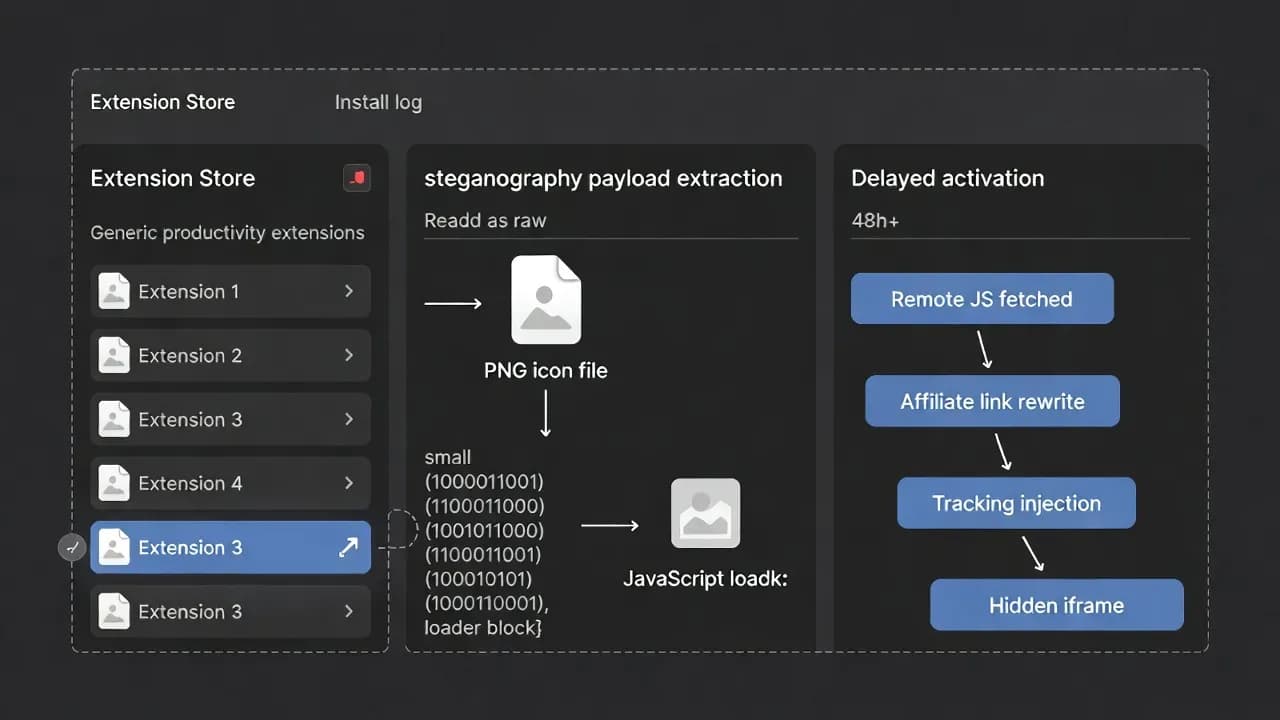
GhostPoster uses a multi stage chain designed to evade both store review and static scanners:
- A loader is embedded inside the binary data of an extension PNG icon
- After install, the extension reads the icon and extracts the hidden bytes
- Execution is delayed for 48 hours or longer, and C2 contact only occurs under specific conditions
- The loader then retrieves additional JavaScript payloads from remote infrastructure
LayerX also described variants that extend dormancy and modularity even further by decoding PNG embedded content into local storage, then later base64 decoding and dynamically executing the next stage. The net effect is a campaign that can survive quick inspections and behave like a sleeper.
What the payload does: monetization plus browser level control
Across reported samples, GhostPoster capabilities include:
- Affiliate hijacking on major ecommerce flows
- Tracking injection, including analytics style tracking added into browsing sessions
- Weakening web security by stripping or manipulating HTTP security headers (for example CSP and HSTS)
- Injecting hidden iframes and scripts used for ad fraud, click fraud, and tracking
- CAPTCHA bypass via multiple mechanisms, enabling automated flows and abuse
This mix of actions signals a mature operator: the goal is long lived revenue and low visibility, not noisy disruption.
Affected extensions and installs
Below is the list of the 17 extensions tied to the GhostPoster cluster and the install counts reported in the writeups.
| Extension name | Reported installs |
|---|---|
| Google Translate in Right Click | 522,398 |
| Translate Selected Text with Google | 159,645 |
| Ads Block Ultimate | 48,078 |
| Floating Player - PiP Mode | 40,824 |
| Convert Everything | 17,171 |
| Youtube Download | 11,458 |
| One Key Translate | 10,785 |
| AdBlocker | 10,155 |
| Save Image to Pinterest on Right Click | 6,517 |
| Instagram Downloader | 3,807 |
| RSS Feed | 2,781 |
| Cool Cursor | 2,254 |
| Full Page Screenshot | 2,000 |
| Amazon Price History | 1,197 |
| Color Enhancer | 712 |
| Translate Selected Text with Right Click | 283 |
| Page Screenshot Clipper | 86 |
Detection: what to hunt in enterprise telemetry
If you run managed browsers, prioritize these signals:
- Extension installs outside policy controls, especially "productivity" tools with vague publishers
- Extension behavior that reads image assets (PNG) and parses raw bytes at runtime
- Long dormancy followed by a sudden burst of network activity to unknown domains
- DOM manipulation at scale, especially hidden iframe injection and link rewriting
- Response header tampering patterns (CSP, HSTS changes) seen in browser security telemetry
- Unexpected access to storage keys that later become executable script content
If you do not centrally log browser events, consider this incident a forcing function. Endpoint telemetry alone often misses the root cause when the actor lives inside the browser.
Mitigation checklist
- Enforce extension allowlisting for Chrome, Edge, and Firefox in managed environments
- Block installs from unmanaged sources and restrict "developer mode" where applicable
- Review extension inventories for the names above and remove suspicious add-ons immediately
- Add detections for extension initiated outbound requests and dynamic script execution patterns
- Limit ecommerce and affiliate exposure for corporate browsing, especially on shared endpoints
- Train users: treat "free productivity extensions" as software, not preferences
Frequently Asked Questions
Known samples were removed from major stores, but installed extensions remain active unless users or admins uninstall them.
Because store review and basic scanners often treat icons as inert media. Hiding executable data inside an image lets the loader bypass simple checks, then extract and run at runtime.
The documented behavior focuses on monetization and tracking, but the same remote JavaScript staging can be repurposed to deliver credential theft, session hijacking, or enterprise initial access tooling.
Deny by default for extensions and allowlist only approved add-ons. Then audit existing endpoints for the extension names and IDs and remove any matches.
Confirm through centralized browser management telemetry that the extension ID is absent, and check that no related outbound domains or dynamic script staging events continue.



Comments
Want to join the discussion?
Create an account to unlock exclusive member content, save your favorite articles, and join our community of IT professionals.
New here? Create a free account to get started.