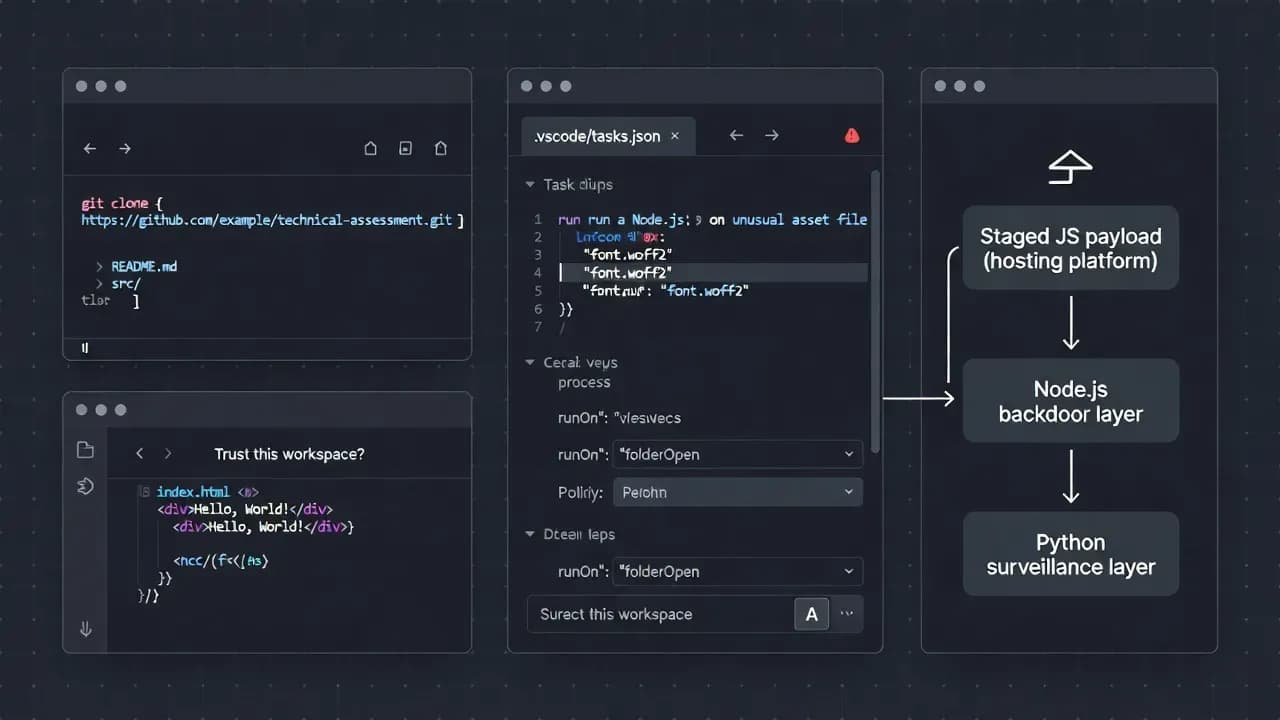
North Korea–Linked "Contagious Interview" Hackers Abuse VS Code Projects to Execute Backdoors When Developers Trust Repos
DPRK-linked actors behind the long-running Contagious Interview campaign are pushing malicious Git repositories disguised as take-home assignments. The trap is workflow-native: when a developer opens the project in Visual Studio Code and clicks Trust, VS Code can process .vscode/tasks.json configurations that the attackers rig to run automatically on folder open.

What's new in this wave
This isn't "just another fake repo." The notable shift is execution that rides on VS Code Workspace Trust and task [automation](/glossary/automation "GLOSSARY:Automation:Automation is the use of technology to perform tasks and processes automatically with minimal human intervention.:"), reducing the need for victims to run a binary or execute a script manually.
Key evolutions seen by multiple researchers include:
- VS Code tasks configured to execute on project open using
runOn: "folderOpen", turning "open the repo" into a trigger. - Remote payload staging on Vercel and rapidly rotating infrastructure to survive takedowns.
- Multi-path fallback: if one delivery path fails, the repo may still contain alternate loaders (including hidden droppers disguised as benign files).
How the attack works (end-to-end)
1) [Social engineering](/glossary/social-engineering "GLOSSARY:Social Engineering:Social engineering is a manipulation technique that exploits human psychology to trick individuals into revealing information, granting access, or performing actions that compromise security.:"): "take-home assignment" as the lure
Targets are approached via recruiting-style outreach (often on LinkedIn) and asked to clone a repo from [GitHub](/glossary/github "GLOSSARY:GitHub:GitHub is a cloud-based platform for hosting Git repositories, collaboration, and software development workflows.:")/GitLab/Bitbucket, open it in VS Code, and review or run it as part of an assessment. Some investigations also observed "partnership proposal" or "[code review](/glossary/code-review "GLOSSARY:Code Review:Code review is the systematic examination of source code to find bugs, improve quality, and share knowledge.:") request" angles aimed at developers and security researchers.
2) The pivot point: VS Code Trust prompt
When a repo is opened, VS Code asks whether to Trust the workspace. The moment the user grants trust, VS Code may process workspace configuration files that enable automation, including tasks.
3) Execution via .vscode/tasks.[json](/glossary/json "GLOSSARY:JSON (JavaScript Object Notation):JSON is a lightweight, text-based data format used to structure and exchange data between applications in a human-readable way.:")
Researchers observed repos embedding a task configured to run automatically whenever the folder is opened. In practice, it can execute Node.js against a disguised payload (for example, JavaScript masquerading as a font-like file) and bootstrap the next stages.
4) Payload staging + toolchain deployment
Observed chains include:
- JavaScript retrieval and execution (including patterns like piping remote content directly into Node.js on [macOS](/glossary/macos "GLOSSARY:MacOS:macOS is Apple’s desktop operating system designed for Mac computers, combining a Unix-based architecture with a graphical user interface.:") for low-friction execution and reduced artifacts).
- BeaverTail (Node.js layer) and InvisibleFerret (Python layer) deployment in the broader Contagious Interview ecosystem, used for data theft, persistence attempts, remote control, and crypto-focused targeting.
- Additional ecosystem overlap: separate investigations reported VS Code task abuse to fetch obfuscated JavaScript that drops Tsunami/TsunamiKit plus XMRig miner in at least one observed malicious-repo case.
Why this matters to enterprises
This technique is effective because it weaponizes normal developer behavior:
- Cloning repos from public platforms is routine.
- VS Code is ubiquitous across engineering orgs.
- "Trust this workspace" becomes a single click that can unlock automation.
For defenders, this shifts the problem from "block suspicious executables" to govern developer [workflows](/glossary/workflows "GLOSSARY:Workflows:Workflows are structured sequences of steps that define how tasks or processes are executed, automated, and monitored.:"):
- Who can open unvetted repos on corp devices?
- What happens when they do?
- What guardrails exist around VS Code trust, tasks, and post-clone validation?
High-signal detections and hunting ideas
Prioritize the behaviors that are hard to explain in benign repos:
VS Code / repo indicators
- Presence of
.vscode/tasks.jsoncontainingrunOn: "folderOpen" - Tasks invoking node against unusual file types or paths (fonts, icons, "dictionary" assets)
- Workspace files that look unrelated to the project's purpose (e.g., hidden tasks, oddly named files)
Execution + network indicators
- Node.js spawning soon after VS Code opens a project (especially without a build/run action)
- Outbound connections to newly registered or unusual domains, including hosting/[CDN](/glossary/cdn "GLOSSARY:CDN (Content Delivery Network):A geographically distributed network of servers that delivers web content to users from the nearest location, improving speed and reliability.:") platforms used for staging
- Frequent beaconing intervals consistent with remote tasking patterns
Data-theft posture
- Access to browser credential stores, .[ssh](/glossary/ssh "GLOSSARY:SSH (Secure Shell):SSH is a cryptographic network protocol for secure remote access, command execution, and encrypted communications.:"), .env, wallet files, or developer config directories
- Unexpected packaging of local files into staging folders
- Secondary Python environment setup and persistence attempts
Mitigation checklist (practical)
Lock down VS Code trust + task execution
- Enforce Restricted Mode by default for untrusted folders/repos; require justification to "Trust."
- Educate developers: never trust a repo received via unsolicited recruiting outreach.
- Add a pre-open habit: inspect
.vscode/contents (especially tasks.json) before trusting.
Put controls around "unknown repo" handling
- Require opening untrusted repos inside: isolated dev VMs, disposable containers, or sandboxed environments
- non-privileged accounts with minimal secrets available
- Keep corporate secrets out of developer home directories where feasible ([token](/glossary/token "GLOSSARY:Token:A token is a digital object used to represent identity, permissions, or access rights in authentication and authorization processes.:") vaulting, short-lived credentials, separate profiles).
Improve visibility
- Centralize telemetry for VS Code process trees and child process creation.
- Monitor for Node.js/Python execution originating from VS Code sessions.
- Block or alert on suspicious automation patterns tied to developer tooling.
Frequently Asked Questions
Not in the classic "memory corruption CVE" sense. It's a workflow abuse: attackers rely on users granting Workspace Trust and on legitimate automation features (tasks) to run attacker-controlled commands.
Because it can enable repo-controlled configuration processing. Once trusted, the workspace can execute tasks and enable behaviors that are intentionally restricted in safer modes.
Developers in crypto, fintech, blockchain, open-source maintainers, and engineers with access to sensitive source code, CI secrets, cloud credentials, or production environments.
Enforce strict workspace trust policies, block "unknown repo" work on corporate endpoints, and monitor VS Code to Node/Python child processes as a high-signal detection.



Comments
Want to join the discussion?
Create an account to unlock exclusive member content, save your favorite articles, and join our community of IT professionals.
New here? Create a free account to get started.