Microsoft has confirmed that KB5120998, the optional Windows 11 preview update released on 27 August 2026, stops some desktop settings from loading and leaves affected machines with a plain black background. The company added the known issue to its Windows release health dashboard on 2 September 2026, covering Windows 11 versions 24H2 and 25H2. Setting the wallpaper again does not fix it.
This is the second confirmed personalization bug in the same optional update, and neither has a workaround. For IT teams the cost is misdiagnosed tickets and lost contrast themes, not downtime, but the safest move is still to keep KB5120998 out of broad deployment.
Key takeaways
- Microsoft confirms that some Windows Desktop settings fail to load after KB5120998, producing a solid black desktop background.
- Slideshow settings and contrast themes can also be affected, which turns a cosmetic bug into an accessibility problem.
- Manually restoring the settings does not work, because the load path fails regardless of the stored value.
- Windows 11 version 24H2 and version 25H2 are listed as affected; no Windows Server release is.
- KB5120998 is optional and non-security, so holding it back costs nothing in patch coverage.
Affected
Microsoft confirms KB5120998 wipes desktop settings
Microsoft has confirmed that KB5120998 stops some Windows desktop settings from loading. On affected machines the custom wallpaper is replaced by a solid black background. The confirmation went up on the Windows release health dashboard on 2 September 2026, roughly a week after the update shipped.
KB5120998 is the optional, non-security preview update for Windows 11 released on 27 August 2026. It takes version 25H2 to build 26200.9278 and version 24H2 to build 26100.9278, and it carries the taskbar position, Start menu and search changes that are due to reach everyone in a later cumulative update.
Per Microsoft's release health entry, the fault is not limited to the wallpaper. Slideshow settings and contrast themes may fail to load in the same way.
Why setting the wallpaper again doesn't stick
The settings are not being overwritten with a black image. They are failing to load. Microsoft describes a load path that breaks regardless of the value stored, so Windows falls back to a default black background instead.
That detail explains the behaviour users kept reporting. You can open Settings, go to Personalization and pick your image again, and it may look fixed. The same load failure returns on the next sign-in or restart. Microsoft states directly that attempting to manually restore customized settings does not work on affected devices.
It is the same shape of failure described in the mouse bug from the same update: a settings read that fails, and a default that wins.
Which builds and devices are affected
Microsoft lists Windows 11 version 25H2 and Windows 11 version 24H2 as the affected clients. No Windows Server release is listed. The trigger is installing KB5120998 or any Windows update released after it.
Beyond that, the affected population is not defined. Microsoft has not published a device count, and it has not named a locale, a graphics configuration, a display scaling setting or a hardware family that predicts the failure. The word Microsoft uses is "some" devices, so treat exposure across a fleet as unpredictable until the entry is updated.
The second personalization bug in the same update
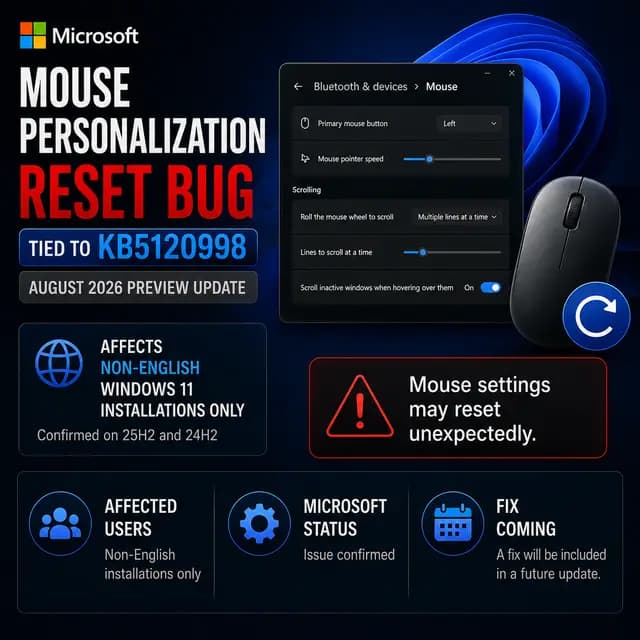
KB5120998 already carried a confirmed known issue against mouse personalization. Microsoft opened that entry on 28 August 2026 and moved it to Confirmed on 1 September, describing cursors and cursor animations reverting to standard settings.
The cause there is stated. Per Microsoft's release health entry, the mouse bug is caused by code components used in non-English Windows installations, where the settings fail to load and a default is used instead. Manual restore fails for the same reason as the desktop issue.
Don't conflate the two bugs
Microsoft has tied only the mouse bug to non-English installations. It has stated no cause for the desktop settings bug. Do not assume French, German or Italian estates are the only ones exposed to the desktop issue.
The two entries read almost identically, which is worth noting for anyone triaging both at once. Microsoft has not said the two bugs share a root cause.
What this means for managed fleets
For an MSP or an internal IT team the cost here is support load, not downtime. A black desktop on a domain-joined machine looks like a broken profile, a failed policy or a licensing problem, so it pulls technicians into the wrong investigation before anyone checks the installed update list.
Contrast themes are the part worth escalating. Those are accessibility settings, and a user who depends on one loses it with no way to put it back. That moves the issue past cosmetic for a small group of people.
There is no security exposure. KB5120998 carries no security fixes, so declining it leaves nothing unpatched.
What admins can do right now
Microsoft has published no workaround, so the options are to hold the update and to handle the machines that already took it.
Keep KB5120998 out of broad deployment. It is optional, which means it normally waits behind a Download and install click in Windows Update. The exception matters in unmanaged and lightly managed estates: devices with "Get the latest updates as soon as they're available" turned on will pull it automatically. Check that toggle in your build baseline, and confirm that your patching tool is not approving preview updates.
For machines already affected, several outlets that tested the earlier reports, including Windows Latest and 4sysops, found that removing KB5120998 restored normal wallpaper behaviour. That is a third-party finding rather than Microsoft guidance, and uninstalling also takes back the taskbar, Start menu and search changes the update introduced.
What to watch next
Microsoft says it is working on a resolution for a future Windows update and has given no date. The next scheduled cumulative update is Microsoft's September 2026 security release, which is the first realistic checkpoint, though nothing in the known issue entry promises the fix arrives with it.
Two things are worth tracking on the release health pages. The first is whether the desktop entry ever picks up a stated cause the way the mouse entry did, since that would tell you which devices to expect trouble on. The second is the delivery method: a Known Issue Rollback would reach unmanaged devices quickly, while a fix folded into a cumulative update lands on your normal patch cycle.
Timeline
Impact & actions
Affected Windows 11 devices lose their desktop wallpaper to a solid black background, and may also lose slideshow settings and contrast themes, with no way for the user to restore them until Microsoft ships a fix.
Security: None. KB5120998 is a non-security preview update.
Recommended actions · Low urgency
- 1Keep KB5120998 out of broad deployment.
- 2Confirm that the automatic latest-updates toggle is disabled in your build baseline.
- 3Check that your patching tool is not approving preview or optional updates.
- 4Brief the helpdesk that a black desktop on a recently updated Windows 11 machine points at KB5120998.
- 5Track the Windows release health entries for 24H2 and 25H2 for a stated cause and a fix.
Response
Vendor
Customer guidance
Microsoft has published no workaround. It says it is working on a resolution for a future Windows update.
FAQ
Does KB5120998 really turn the Windows 11 desktop background black?
Yes, on some devices. Microsoft confirmed on 2 September 2026 that certain desktop settings fail to load after installing KB5120998, and that the background falls back to a solid black colour when that happens. It does not affect every machine, and Microsoft has not said which devices are at risk.
Can I just set my wallpaper again?
Not reliably. Microsoft says manual restoration does not work on affected devices, because the problem stops the settings loading regardless of the value you set. The image may appear correct at first and revert to black on the next sign-in or restart.
Which Windows versions are affected?
Microsoft lists Windows 11 version 24H2 and Windows 11 version 25H2 as affected clients. No Windows Server release is listed. The trigger is KB5120998, released 27 August 2026, or any later Windows update.
Is there a fix or an official workaround?
No workaround has been published. Microsoft says a resolution is coming in a future Windows update and has not given a date. Reports from Windows Latest and 4sysops indicate that uninstalling KB5120998 restores normal wallpaper behaviour, but that is a third-party observation rather than Microsoft guidance.
Should I deploy KB5120998 across a managed fleet?
There is no patching reason to. KB5120998 is an optional preview update with no security fixes, and its improvements are due to reach devices through a later cumulative update. Given two confirmed personalization bugs and no workaround for either, holding it back costs nothing.
The bottom line
Microsoft has confirmed that KB5120998 stops some Windows 11 desktop settings from loading, leaving a black background, and possibly taking slideshow settings and contrast themes with it.
What happens next
What to do