CrashFix Chrome Extension Campaign Delivers ModeloRAT via "ClickFix" Browser-Crash Lures
A fake Chrome ad blocker crashes browsers to push ClickFix commands, then deploys ModeloRAT on domain-joined systems. What to hunt and how to block it.

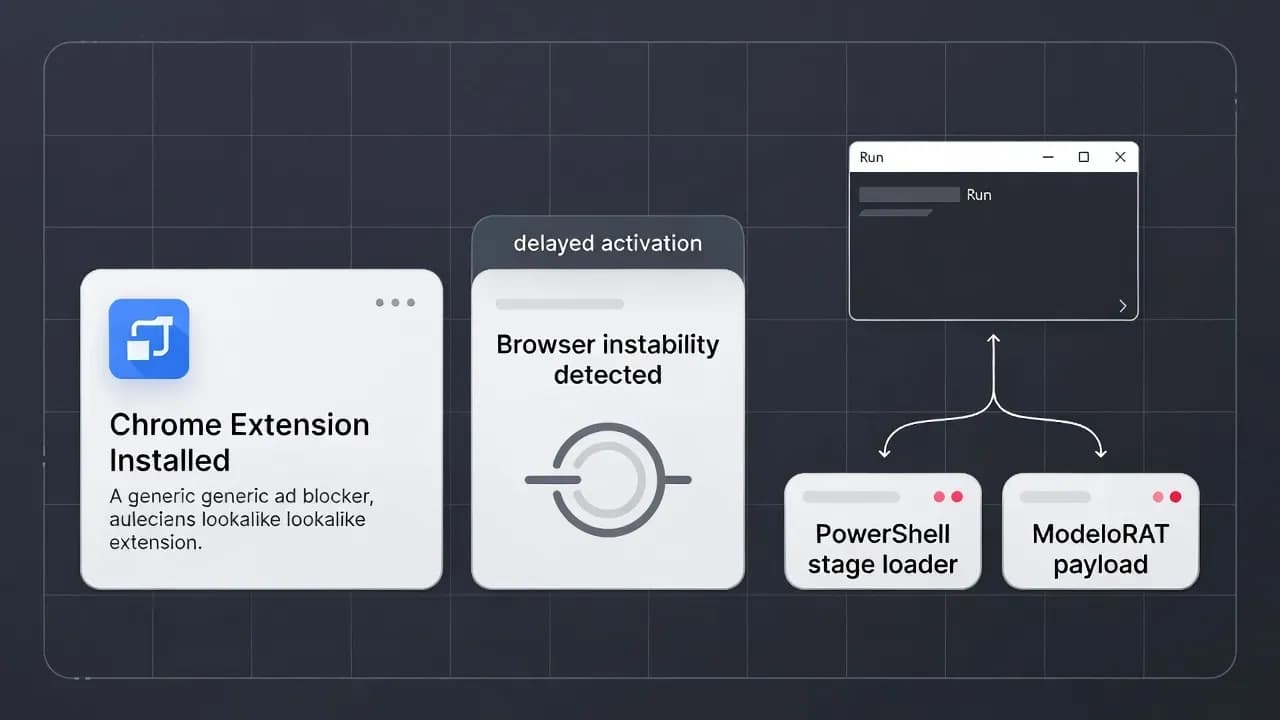
The CrashFix Chrome extension campaign is a modern reminder that "trusted distribution" is not the same as "trusted code." In this operation, a malicious extension impersonating a legitimate ad blocker deliberately destabilizes the browser, then uses frustration as a weapon: it prompts the user to "fix" the problem by pasting a pre-copied command into the Windows Run dialog. That single manual action bridges the gap between browser-level deception and full endpoint compromise, ultimately deploying a previously undocumented Python remote access trojan called ModeloRAT on domain-joined systems. The risk is not limited to individual users. This is the kind of initial access workflow designed for corporate footholds, where one infected workstation can quickly become an Active Directory and lateral movement opportunity.
What Happened: The Technical Breakdown of CrashFix and NexShield
At the center of the campaign is a malicious Chrome extension named "NexShield – Advanced Web Guardian" that masquerades as an "ultimate privacy shield." Threat research describes it as an almost direct clone of uBlock Origin Lite, with small but important modifications that turn a content blocker into an implant delivery mechanism. The social engineering loop is the real innovation: the extension is engineered to crash or freeze the browser on purpose and only then present the user with a credible-sounding "security warning" and a remediation path that requires manual execution. That sequencing matters because it creates a psychological trap. Users do not feel like they are "running a script." They feel like they are recovering from a browser failure.
The "ClickFix" element is not new as a concept, but CrashFix shows how it is evolving. In classic ClickFix campaigns, the victim is typically convinced by a fake webpage (often masquerading as security verification or troubleshooting) to copy and paste a command. Here, the coercion is built into the browser experience itself. The user is guided into pressing Win+R and pasting what appears to be a legitimate repair command, while the extension silently seeds the clipboard with PowerShell that pulls the next stage. In practical terms, that's an attacker-controlled transition from browser permission space to OS-level execution, achieved without exploiting a software vulnerability.
Technically, the campaign also includes guardrails to reduce noise and improve operator efficiency. The malicious behavior is delayed after installation, then triggered repeatedly on a timed cadence. It also appears to check for conditions indicating real user interaction before detonating the crash-and-popup loop, which is a typical pattern for operators who want to avoid detonating in sandboxes and automated analysis environments. From a defender perspective, this matters because "install time" may not align with "execution time," and first-stage telemetry could be separated from the moment the user runs the PowerShell.
Why a Malicious Chrome Web Store Extension Changes the Threat Model
Security teams often treat browser extensions as a user preference problem. CrashFix is a strong argument that extensions deserve the same governance and control rigor as endpoint agents. The Chrome Web Store distribution angle is the key accelerant: it gives malvertising and search-driven installs a layer of legitimacy that bypasses user skepticism. If the extension is "in the official store," many users (and some IT staff) implicitly downgrade their risk perception.
The more uncomfortable point is operational: most enterprises still have inconsistent visibility into extension installs. EDR is good at process trees after the PowerShell runs, but it is not always good at telling you which extension placed the command on the clipboard, which browser profile installed it, which user accepted which permissions, and how that extension behaved over time. Browser telemetry exists, but it's often siloed, unmanaged, or not collected centrally. That creates an observation gap that attackers can exploit.
CrashFix also highlights a structural weakness of "user-mediated execution" attacks. Because the user performs the final execution step, many defensive controls that rely on detecting drive-by exploitation are irrelevant. There is no exploit chain to patch. There is no malicious macro to block. The defense problem becomes policy, governance, and friction: preventing unapproved extensions, limiting PowerShell misuse, and reducing the ability for a single user action to become an execution event.
ModeloRAT on Domain-Joined Hosts: Why This Targets Businesses, Not Browsers
The payload here is not a commodity infostealer "spray." Threat analysis describes ModeloRAT as a Python-based remote access trojan reserved for domain-joined hosts, which is a strong targeting signal. Domain-joined endpoints are valuable because they sit inside trust boundaries: they inherit policies, can access internal resources, and provide a path toward credential material, network shares, and identity services.
This kind of segmentation also tells you something about the operator's economics. Many campaigns indiscriminately infect anything that clicks. CrashFix appears more selective: corporate hosts receive the "VIP" payload, while non-domain targets may receive alternative chains or test payload behavior. For defenders, the implication is simple: if you see CrashFix-like behavior on a corporate endpoint, treat it as a serious initial access attempt, not a nuisance adware event.
From an IR perspective, the operational danger is what happens after initial control. RAT capabilities generally include command execution, file operations, process manipulation, and persistence. Even if the initial infection does not immediately dump credentials, it creates the conditions for follow-on tooling and hands-off execution. In environments where a workstation can reach sensitive administrative surfaces, one compromised endpoint can become the staging ground for lateral movement, helpdesk impersonation, and eventually privileged access.
Threat Actor and Infrastructure: KongTuke, TAG-124, and the "Traffic Broker" Ecosystem
CrashFix is attributed to KongTuke, which overlaps with a broader traffic distribution ecosystem tracked as TAG-124. The most important concept for readers is that this is not just "a malware gang." It is a traffic distribution system (TDS) model, where the infrastructure profiles visitors and redirects only certain targets to malicious payloads. That allows operators to optimize conversion, reduce exposure to researchers, and sell or hand off access to other criminal groups. In practice, a TDS can function like a broker: it's less about building the final malware and more about reliably delivering the right victim to the right payload.
This model aligns with what defenders have observed across the cybercrime market: specialization. One cluster maintains compromised websites and redirect logic, another builds loaders, another runs ransomware, and another monetizes access. For enterprises, that means one initial access event can rapidly change character. A host compromised through a browser extension today can become a ransomware preposition tomorrow if access is sold or shared.
In CrashFix specifically, the ecosystem context matters because it shapes defensive priorities. If a TDS operator is involved, assume you are not the only target, and assume the infrastructure will rotate. Blocking a single domain is not sufficient. You need layered controls: extension allowlisting, browser governance, endpoint execution constraints, and detection logic that focuses on behaviors rather than static indicators.
Prevention and Detection Strategies: How to Block CrashFix-Style "Clipboard-to-Run" Attacks
The shortest path to reducing risk is governance.
First, lock down extension installs. In a managed enterprise, the goal should be "deny by default, allow by exception." If that is politically or operationally difficult, start with a controlled list for high-risk departments and privileged users, then expand. Focus on blocking lookalike extensions that mimic popular security tools, and treat "ad blockers" as software that requires approval, not a personal preference.
Second, control PowerShell as an execution surface. CrashFix relies on a predictable endpoint reality: users can open Run, paste, and execute. If you cannot remove that ability, you can still increase friction and detection. Constrain PowerShell where feasible, log PowerShell script block activity, and alert on suspicious patterns like encoded commands, web-delivered scripts, and unusual parent-child process chains originating from browser processes or explorer.exe immediately after a browser freeze event.
Third, hunt for the unique telemetry of this campaign. The browser crash loop is a gift for defenders if you collect the right signals. Look for repeated browser unresponsiveness followed by user-run commands, repeated timed callbacks, and post-install delays where malicious activity begins an hour later. Where available, correlate browser extension install logs with endpoint execution events. The defender advantage is correlation: attackers rely on the assumption that browser governance and endpoint telemetry are not joined up.
Finally, treat malvertising exposure as an enterprise risk, not a user education footnote. CrashFix starts with users searching for an ad blocker and being redirected via malicious ads or promoted results. Security teams should assume that search-driven software installs are a primary infection path and enforce "software procurement by policy," especially for browsers and security-related add-ons.
Lessons Learned and Industry Implications
CrashFix is the kind of campaign that sits perfectly in today's gap between "web trust" and "endpoint trust." Browser security has improved, exploit chains are harder, and sandboxes are better, so attackers shift to what still works: user-driven execution and supply chain trust cues. They don't need a vulnerability when they can borrow legitimacy from an official store listing and outsource the final execution step to the victim.
The broader trend is that the browser has become an initial access platform. That's not only about phishing pages. It's about extensions, OAuth consent abuse, fake updates, and "fix-it" workflows. If enterprises treat the browser as a commodity client rather than a managed execution environment, they will keep losing on this front. CrashFix is also a warning about defensive blind spots: many orgs can tell you which endpoint ran PowerShell, but cannot reliably tell you which extension prompted it, which tab the user was on, or what policy should have prevented it.
For executives and security leaders, the practical takeaway is measurable: if your environment allows uncontrolled extensions and still treats PowerShell as a default troubleshooting tool, you have a large attack surface that does not require sophisticated exploitation. The fix is not one product. It's a policy posture shift.
The CrashFix Chrome extension campaign is a clean illustration of where modern endpoint compromise is headed: less exploitation, more manipulation; less "download a trojan," more "install a trusted tool and follow the fix." By weaponizing a browser crash loop and combining it with ClickFix-style clipboard execution, the operators created an infection path that blends into normal user troubleshooting behavior. For enterprises, the defense posture is clear: enforce extension allowlists, centralize browser telemetry, and reduce the power of "one paste away" execution surfaces. If you treat the browser as unmanaged and PowerShell as harmless, campaigns like CrashFix will keep turning everyday friction into enterprise intrusion.
Frequently Asked Questions
It's primarily a malicious extension problem paired with social engineering. The campaign does not require exploiting Chrome; it relies on distribution through the Web Store and convincing users to execute an OS command via the Run dialog.
Because it turns the user into the execution mechanism. Many security controls are tuned for exploit detection, not user-mediated execution, and the command often looks like "troubleshooting" rather than malware delivery.
Domain-joined endpoints are valuable footholds. They typically have access to internal resources and identity services, making them better launchpads for lateral movement and privilege escalation than standalone home machines.
Start with browser extension inventory and endpoint telemetry correlation. Identify who installed the extension, what command executed, and what processes spawned afterward. Then isolate affected machines and investigate persistence and secondary payloads.
Ad blockers themselves are not the issue. The risk is impersonation of popular tools and the habit of installing them ad hoc. Enterprises should approve and centrally manage any extension that affects browsing security.
Treat the browser as a managed platform. Extension governance, centralized browser logging, and restricting "easy execution" surfaces like unconstrained PowerShell are now baseline controls, not advanced hardening.



Comments
Want to join the discussion?
Create an account to unlock exclusive member content, save your favorite articles, and join our community of IT professionals.
New here? Create a free account to get started.