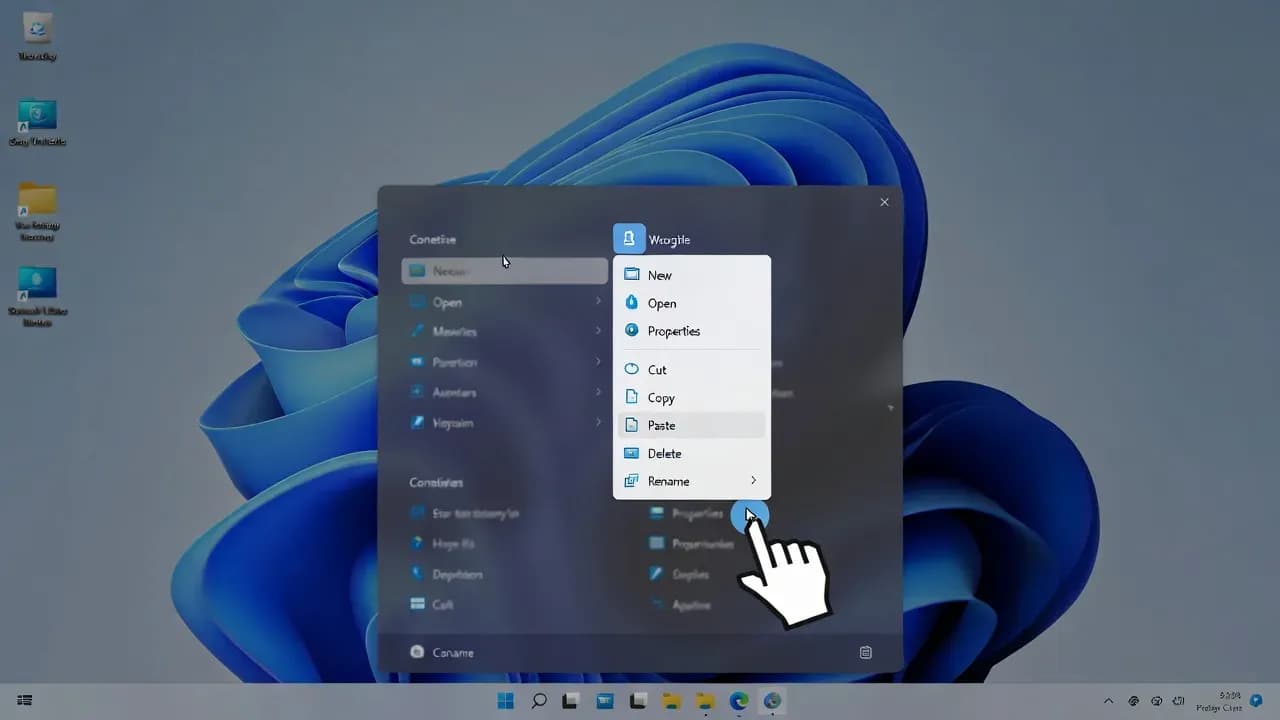
Microsoft Acknowledges Windows 11 Right-Click Menu Clutter; Plans Major Redesign
Microsoft admits the Windows 11 context menu is too cluttered and is working on a redesign to improve usability, streamline workflows, and reduce friction for enterprise and professional users.

Overview
Microsoft has formally acknowledged that the Windows 11 right-click context menu has become overly cluttered and confusing for users. In response to broad feedback from the Windows community - including enterprise IT professionals - the company is planning a redesign of the context menu to streamline usability and improve overall productivity.
The context menu, one of the most frequently used UI elements in Windows, has grown over time due to new features, third-party application integrations, and legacy options that remain visible by default. Microsoft’s new initiative signals a renewed focus on usability and user experience in one of Windows 11’s core interaction patterns.
What changed
Although the redesign is not yet released, Microsoft’s announcement confirms several points:
- Official Recognition: The existing right-click menu is indeed considered overly complex.
- UI Redesign in Progress: Microsoft is working on a new layout intended to be cleaner and easier to navigate.
- User Feedback Driven: The change follows persistent community feedback highlighting usability challenges.
- Enterprise Implications: For IT administrators managing Windows 11 environments, a redesigned menu may reduce support tickets and improve end-user satisfaction over time.
Insiders and early testers may see preview versions via Windows Insider builds as Microsoft refines the experience.
Who is affected
The update will affect a broad range of Windows 11 users:
- End users who rely on context menus for file and system actions
- IT professionals and power users seeking productivity optimizations
- Third-party software vendors that extend the right-click menu
- Enterprises deploying standardized Windows 11 images
Users of heavily customized desktops and enterprise environments with many installed utilities may see the greatest clarity improvements once the redesign arrives.
Technical context
The Windows 11 right-click context menu has historically served multiple functions: file actions, quick access, third-party integrations (e.g., antivirus, development tools), and legacy options (such as “Open with…”) that predate modern UI guidelines.
Over time, this mixture of legacy and modern options has resulted in a menu that appears crowded, especially on systems with numerous applications installed. Microsoft is looking to reorganize the menu items, possibly grouping related actions and hiding less frequently used commands behind expandable sections or progressive disclosure designs.
Business Impact
From a business and IT perspective, a clearer context menu can positively impact day-to-day operations:
- Reduced Training Burden: Less time spent explaining menu functions to users.
- Fewer Support Requests: A more intuitive UI reduces confusion-related helpdesk tickets.
- Standardized Workflows: IT teams can build clearer documentation around a simplified right-click experience.
- Third-Party Tool Compatibility: Vendors may update context menu extensions to align with the new design, improving ecosystem consistency.
While the redesign itself does not introduce new security features or performance gains, it reflects a larger trend of enhancing usability and reducing cognitive load in complex OS ecosystems.
Comments
Want to join the discussion?
Create an account to unlock exclusive member content, save your favorite articles, and join our community of IT professionals.
New here? Create a free account to get started.