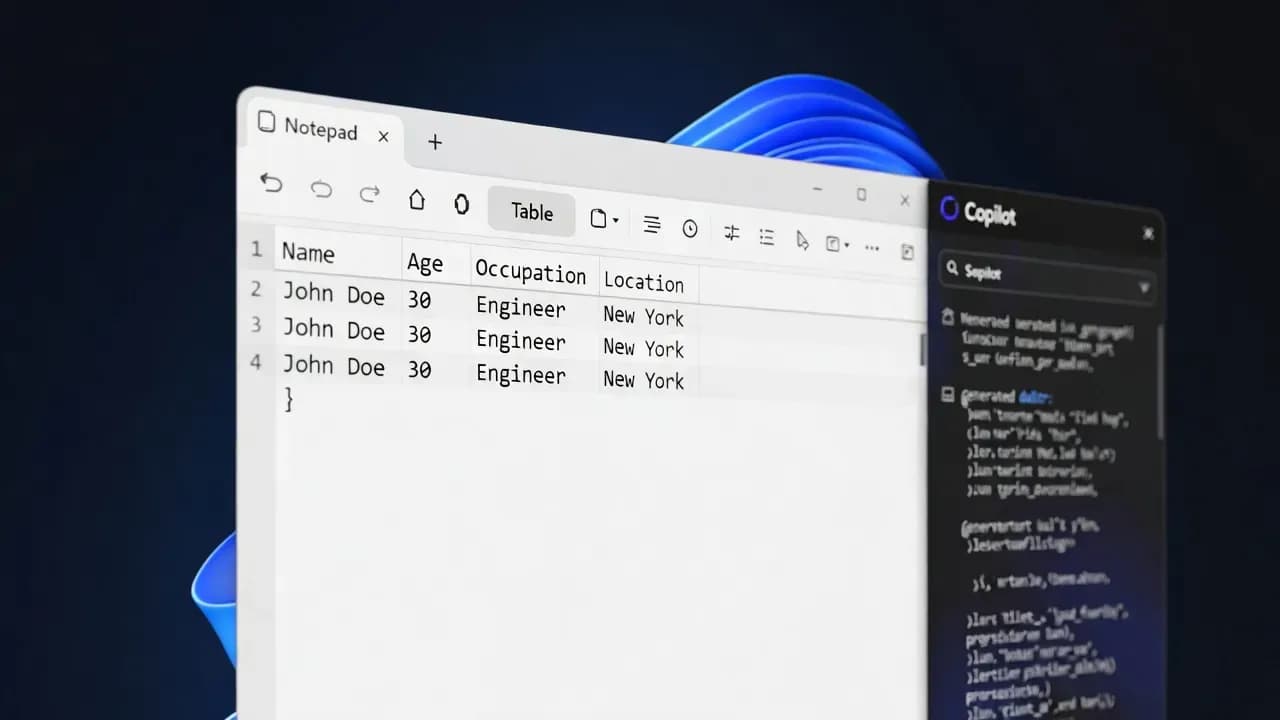
Windows 11 Notepad Gets "Create a Table" for Markdown Tables, Plus Streaming Results for AI Text Actions
Notepad on Windows 11 now supports Markdown tables with a Create a table tool, plus streaming output for AI text actions like Write, Rewrite, and Summarize.

New Markdown table tool in formatting toolbar
Progressive output for Write, Rewrite, Summarize
Delivered via Microsoft Store, not Windows Update
What's new: tables in Notepad, without turning it into Word
Notepad's new tables feature is designed for structure, not layout polish. You can insert a table from the formatting toolbar, pick the size with a simple grid selector, and then type directly into cells. Under the hood, Notepad stores the content as plain text using Markdown table syntax, which makes it easy to paste into tickets, wikis, GitHub issues, and internal docs without breaking formatting.
This is the most important design choice: because the table is plain text, it stays portable. Open the file anywhere, and you still have a readable representation. For IT teams, that is the difference between a "toy feature" and something that will actually get used in operational workflows.
How the table editor works (and why it matters for quick documentation)
The workflow is intentionally simple. After inserting a table, you can add or remove rows and columns through the right-click menu or the table controls in the toolbar. Notepad also supports creating a table by typing Markdown directly, which is useful if you prefer keyboard-first workflows or want to generate structured notes quickly.
Notepad also supports quick formatting inside table cells, including common lightweight styling and hyperlinks. In practice, this turns Notepad into a fast scratchpad for structured data: checklists, mini inventories, port mappings, environment matrices, and troubleshooting tables that do not justify opening a heavier editor.
Streaming AI results: faster feedback for Write, Rewrite, and Summarize
The second change is about responsiveness. Notepad's AI text actions (Write, Rewrite, Summarize) are shifting toward streamed output, where results appear progressively. This is the same psychological win users associate with chat apps: you see output immediately, and you can decide early if the result is going in the wrong direction.
Microsoft's messaging also hints at staged availability. Streaming support is initially tied more closely to Copilot+ PCs for some scenarios, and broader rollout is expected over time. Regardless, the direction is clear: Notepad's AI features are being optimized to feel interactive rather than batch-based.
Enterprise and admin angle: why this is a "small update" that still changes behavior
Because this is a Notepad app update, it will show up differently than a monthly cumulative Windows patch. That matters in managed environments where Store-delivered app updates are controlled. If your organization tightly manages Microsoft Store updates, you will want to confirm how Notepad app updates flow to endpoints and whether your pilot rings see the feature first.
There is also a policy and usability aspect. Notepad now has a "lightweight formatting" identity, and tables are part of that. For teams that want a strict plain-text editor, Notepad includes a setting to disable formatting features. Similarly, Copilot features can be turned off in settings for environments where AI functionality is not desired, not licensed, or not permitted for compliance reasons.
What to do now (practical rollout checklist)
Update Notepad from the Microsoft Store (or your managed app update channel) and validate that the Table option appears in the formatting toolbar.
Run a quick acceptance test: insert a table, add a column, add a row, delete a row, and confirm the file remains readable as plain text.
If you use Copilot features in Notepad, validate whether streaming output appears for Write, Rewrite, or Summarize on your standard hardware profile.
Decide whether your baseline should keep formatting enabled, especially if your users rely on Notepad as a strict plain-text tool.
Frequently Asked Questions
This new feature allows users to insert markdown-formatted tables directly into Notepad. You specify the number of rows and columns, and Notepad generates the markdown table syntax automatically, saving time for developers and writers working with markdown files.
AI streaming results refers to how Copilot-generated content appears in Notepad. Instead of waiting for the entire AI response, text now streams in progressively as it is generated, similar to how ChatGPT displays responses. This provides a more responsive editing experience.
The "Create a Table" markdown feature works without any subscription. However, AI-powered features like Copilot text generation require an active Copilot subscription or Microsoft 365 Copilot access.
These features are rolling out through the Microsoft Store as Notepad app updates. The availability depends on your Windows Insider channel or stable release schedule. Check for updates in the Microsoft Store to get the latest version.
No, Notepad remains a plain text editor. The "Create a Table" feature generates markdown syntax as text, but does not render it visually. For rendered markdown preview, you would still need a dedicated markdown editor or viewer.
These new Notepad features are exclusive to Windows 11. Windows 10 uses a different, older version of Notepad that does not receive these modern feature updates.
Comments
Want to join the discussion?
Create an account to unlock exclusive member content, save your favorite articles, and join our community of IT professionals.
New here? Create a free account to get started.