

Windows 11 KB5124008 Patches Two Exploited Zero-Days in September 2026 Patch Tuesday
The September cumulative update takes 24H2 to build 26100.9445 and 25H2 to 26200.9445, widens Secure Boot certificate targeting, and lands weeks before 24H2 Home and Pro stop receiving updates.

On this page
Key takeaways
- KB5124008 brings Windows 11 24H2 to build 26100.9445 and 25H2 to build 26200.9445.
- The September release fixes CVE-2026-85880 and CVE-2026-81963, both privilege escalation flaws exploited in the wild and both rated CVSS 7.8.
- CISA added both CVEs to its Known Exploited Vulnerabilities catalog on September 8, 2026.
- Quality fixes cover custom mouse cursors, black desktop backgrounds, Teams and Outlook crashes on Arm64 PCs, and Remote Desktop audio redirection.
- Microsoft reports no known issues with the update, and Windows 11 24H2 Home and Pro reach end of updates on October 13, 2026.
What to do now
High urgency- Deploy KB5124008 to pilot rings now, then broadly, prioritizing internet-facing and high-value endpoints.
- Confirm devices report OS build 26100.9445 (24H2) or 26200.9445 (25H2) after the reboot.
- Use an Intune expedite policy for quality updates if your deferral window would delay the rollout.
- Add boot.stl to installation media before applying this update to an existing Windows image.
- Plan the move off Windows 11 24H2 Home and Pro before October 13, 2026.
Microsoft released Windows 11 KB5124008 on September 8, 2026, the September Patch Tuesday cumulative update for versions 24H2 and 25H2. It moves 24H2 to OS build 26100.9445 and 25H2 to 26200.9445, and it carries this month's security fixes along with a servicing stack update, wider Secure Boot certificate targeting and a short list of quality fixes. Two of the flaws patched this month were already being exploited in attacks.
For anyone running a Windows 11 fleet, this is not a routine rollup to defer. Two privilege escalation flaws fixed this month are in CISA's Known Exploited Vulnerabilities catalog, and Windows 11 24H2 Home and Pro editions stop receiving updates on October 13, 2026.
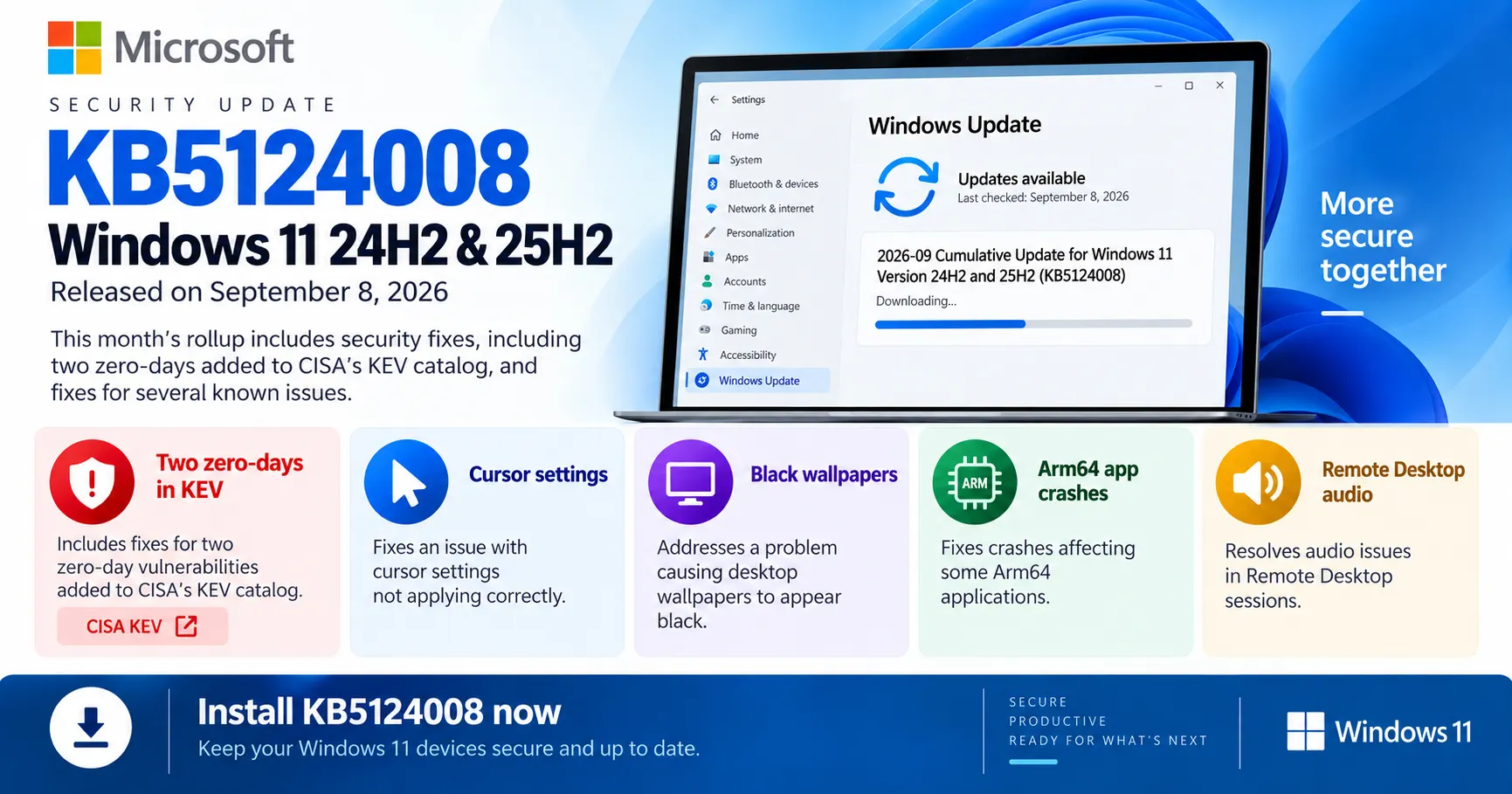
Windows 11 KB5124008, released September 8, 2026, takes 24H2 and 25H2 to builds 26100.9445 and 26200.9445 and delivers fixes for two actively exploited privilege escalation flaws.
Install KB5124008 on Windows 11 24H2 and 25H2. It carries the September 2026 security fixes, including two zero-days in CISA's KEV catalog, plus fixes for cursor settings, black wallpapers, Arm64 app crashes and Remote Desktop audio. Microsoft lists no known issues.
Affected & context
Microsoft released cumulative update KB5124008 on September 8, 2026 for Windows 11 versions 24H2 and 25H2, moving them to OS builds 26100.9445 and 26200.9445. The package carries the September 2026 security fixes, a servicing stack update, wider Secure Boot certificate targeting and several quality fixes.
Two of the vulnerabilities fixed in the September release were already being exploited in attacks, and CISA added both to its Known Exploited Vulnerabilities catalog the same day, which puts the update on a short clock for regulated and federal-adjacent fleets.
Every device running Windows 11 version 24H2 or 25H2, including managed enterprise fleets, MSP-administered endpoints and unmanaged consumer PCs. Windows 11 23H2 and 26H1 receive separate packages.
- Vendors
- Microsoft
- Products
- Windows 11 version 24H2Windows 11 version 25H2
- Geography
- global
- Industry
- all sectors
- CVEs
- CVE-2026-85880CVE-2026-81963
What Microsoft shipped in KB5124008
KB5124008 is the September 2026 Patch Tuesday cumulative update for Windows 11 versions 24H2 and 25H2. Per Microsoft's release notes dated September 8, 2026, it takes 24H2 to OS build 26100.9445 and 25H2 to 26200.9445.
The package also carries servicing stack update KB5124007, version 26100.9441, which Microsoft says improves the reliability of the update installation process. Devices that already have earlier updates download only the new components.
Other Windows 11 releases get their own packages this month. Version 23H2 receives KB5122880 (build 22621.7582) and version 26H1 receives KB5124012 (build 28000.2954). The 24H2 and 25H2 branches share a servicing base, so both get identical fixes.
Two exploited zero-days move this update up the queue
The September release fixes two Windows privilege escalation flaws that attackers were already using. CVE-2026-85880 is a heap-based buffer overflow in Advanced Local Procedure Call, the component Windows processes use to talk to each other. CVE-2026-81963 is a link following flaw in the Windows Update Stack.
Both carry a CVSS score of 7.8 and both let a local attacker reach SYSTEM, per Tenable's September 2026 Patch Tuesday analysis. Neither is remotely exploitable on its own, which is exactly why they matter: they turn a phishing foothold or a low-privilege process into full control of the device.
CISA added both CVEs to its Known Exploited Vulnerabilities catalog on September 8, 2026, the day the patches shipped. Reporting from BleepingComputer and Notebookcheck identifies KB5124008 as the package that delivers these fixes to 24H2 and 25H2.
Patch order
Patch these two first. Everything else in the September release can follow your normal ring schedule.
Quality fixes included this month
Microsoft lists six quality changes in the KB5124008 release notes, most of them fixes for regressions users have been reporting.
- Custom mouse cursor settings, including pointer style and color, failed to display correctly. Selected options now apply as expected.
- Desktop background and other personalization settings could fail to load, leaving a black wallpaper.
- Microsoft Teams and Microsoft Outlook could close unexpectedly on Arm64-based PCs.
- Morocco Standard Time is adjusted for the country's move to permanent UTC+00:00 on September 20, 2026.
- Remote Desktop audio redirection could stop remote session audio from playing on the local device in some configurations.
- OMA-DM client logging now returns more diagnostic detail for device management server connection problems.
The release also updates four built-in AI components to version 1.2608.951.0: Image Search, Content Extraction, Semantic Analysis and Settings Model. The OMA-DM logging change is the one most likely to save an admin time, since it surfaces more detail when a device fails to reach its management server.
Secure Boot certificate work continues
KB5124008 adds what Microsoft calls high confidence device targeting data, widening the set of machines eligible to receive new Secure Boot certificates automatically. This is the continuation of a rollout that has run through most of 2026.
The background matters for planning. Secure Boot certificates used by most Windows devices started expiring in June 2026. Microsoft states that devices which have not yet received the newer certificates will still start normally and will keep installing standard Windows updates, and that certificate delivery continues over the coming months across supported PCs and non-managed business devices.
Managed fleets are a separate track. If you control certificate deployment through your own tooling, this update changes which unmanaged and lightly managed devices Microsoft will reach automatically, not what your managed policy does.
Deployment notes for admins
The update installs automatically from Windows Update and Microsoft Update. Standalone packages are on the Microsoft Update Catalog for WSUS import, Configuration Manager deployment, or DISM-based offline servicing.
One detail is easy to miss. If you apply this update as a dynamic update to an existing Windows image, the boot.stl file has to be included in the installation media. Microsoft warns that leaving it out can stop devices from starting from that media and produce error code 0xc0430001. The file is used during Secure Boot validation and must match the version and architecture of the image.
Microsoft recommends the Update WinPE script rather than a manual copy of boot.stl. For Intune-managed devices, an expedite policy under Devices, Windows, Windows Updates, Quality Updates pushes the September release ahead of your normal deferral window.
Known issues
Microsoft is not currently aware of any issues with this update. That is not a reason to skip pilot rings, but it does remove the usual wait-and-see argument.
What to watch next
The October deadline is the item to plan around. Windows 11 version 24H2 Home and Pro editions reach end of updates on October 13, 2026, which is also the next Patch Tuesday. After that date those devices stop receiving fixes for known issues, time zone updates and monthly security updates. Enterprise and Education editions of 24H2 remain supported until October 12, 2027.
The second thing to watch is the scale of the monthly releases themselves. Trackers disagreed on how many CVEs Microsoft fixed in September: Tenable counted 964, BleepingComputer counted 966, and the Zero Day Initiative logged 972 new CVEs. The gap comes from how each counts advisories spanning multiple products. Whichever figure you use, September was the largest Patch Tuesday of the year so far, and testing windows are getting harder to defend.
Timeline
August preview update ships
Microsoft releases KB5120998, the optional August preview for 24H2 and 25H2. Its changes are rolled into the September security update.
Source: Microsoft Support
Confidence: High
KB5124008 released
Microsoft publishes the September Patch Tuesday cumulative update for Windows 11 24H2 and 25H2, builds 26100.9445 and 26200.9445.
Source: Microsoft Support
Confidence: High
CISA adds two Windows flaws to KEV
CISA adds CVE-2026-81963 and CVE-2026-85880 to the Known Exploited Vulnerabilities catalog, citing evidence of active exploitation.
Source: CISA alert, September 8, 2026
Confidence: High
Morocco moves to permanent UTC+00:00
The time zone change that KB5124008 accounts for takes effect. Devices without the update can show the wrong local time in Morocco.
Source: Microsoft Support
Confidence: High
Windows 11 24H2 Home and Pro reach end of updates
Home and Pro editions of 24H2 stop receiving security and preview updates. Enterprise and Education editions remain supported until October 12, 2027.
Source: Microsoft Support
Confidence: High
Impact
Unpatched Windows 11 24H2 and 25H2 devices remain exposed to two local privilege escalation flaws confirmed as exploited, and miss fixes for personalization, Arm64 app stability and Remote Desktop audio.
Business impact
Organizations subject to KEV-driven remediation requirements need this update on their federal or contractual clock rather than their normal monthly cycle.
Technical impact
Devices move to build 26100.9445 or 26200.9445 and pick up SSU KB5124007. A reboot is required. Image servicing workflows need boot.stl in the installation media to avoid boot failures with error 0xc0430001.
Security impact
Closes two privilege escalation paths to SYSTEM that attackers were already using, plus the rest of the September security fixes.
Affected audience: IT administrators managing Windows 11 fleets, MSPs patching client endpoints, Security teams tracking CISA KEV entries, Consumer and small business Windows 11 users
Action required.
Technical details
- CVEs
- CVE-2026-85880, CVE-2026-81963
- CVSS
- 7.8
- Exploitation
- Exploited in the wild
- Attack vector
- Local privilege escalation. Both flaws require existing low-privilege access and no user interaction, and allow escalation to SYSTEM.
- Affected versions
- Windows 11 version 24H2 before build 26100.9445, Windows 11 version 25H2 before build 26200.9445
- Patched versions
- 26100.9445, 26200.9445
Mitigations
- Install KB5124008 on all Windows 11 24H2 and 25H2 devices.
- Install KB5122880 on Windows 11 23H2 and KB5124012 on Windows 11 26H1.
Technical references
Response
Vendor statement
Microsoft states in the KB5124008 release notes that it is not currently aware of any issues with this update, and that certificate deployment for Secure Boot continues via Windows updates over the coming months.
Authorities
CISA added both exploited Windows flaws to its Known Exploited Vulnerabilities catalog on September 8, 2026, citing evidence of active exploitation and pointing federal civilian agencies to its BOD 26-04 remediation requirements.
Customer guidance
Microsoft offers the update automatically through Windows Update and Microsoft Update, with standalone packages on the Microsoft Update Catalog for WSUS, Configuration Manager and DISM-based servicing. A restart is required.
Response status: Patched
Patch available: Yes
Workaround available: No
FAQ
What build does KB5124008 install?
KB5124008 takes Windows 11 version 24H2 to OS build 26100.9445 and version 25H2 to OS build 26200.9445. It also installs servicing stack update KB5124007, version 26100.9441. Run winver after the reboot to confirm the build.
Does KB5124008 fix actively exploited vulnerabilities?
Yes. The September 2026 release fixes CVE-2026-85880 in Advanced Local Procedure Call and CVE-2026-81963 in the Windows Update Stack. Both are privilege escalation flaws rated CVSS 7.8, and CISA added both to its Known Exploited Vulnerabilities catalog on September 8, 2026.
Are there known issues with KB5124008?
Microsoft states it is not currently aware of any issues with this update. Pilot rings are still worth running before a broad rollout, since Microsoft has added known issues to release notes days after publication in previous months.
Which Windows 11 versions get KB5124008?
Versions 24H2 and 25H2 only. Windows 11 version 23H2 receives KB5122880 (build 22621.7582) and version 26H1 receives KB5124012 (build 28000.2954) in the same September 8, 2026 release.
How do I deploy KB5124008 through WSUS, Configuration Manager or Intune?
The update downloads automatically from Windows Update. For managed fleets, import it into WSUS or sync software updates in Configuration Manager, then approve and deploy it. In Intune, create an expedite policy under Devices, Windows, Windows Updates, Quality Updates and assign it to your Windows 11 device groups.
The bottom line
KB5124008 moves Windows 11 24H2 and 25H2 to builds 26100.9445 and 26200.9445, delivers the September 2026 security fixes including two exploited privilege escalation flaws, widens Secure Boot certificate targeting, and fixes cursor, personalization, Arm64 and Remote Desktop audio bugs.
This is a priority rollup, not a routine one: two of the flaws it fixes are in CISA's KEV catalog, and the deadline for Windows 11 24H2 Home and Pro is five weeks out.
What happens next
Watch for late-added known issues on the Windows release health dashboard, and plan the 24H2 Home and Pro migration before October 13, 2026. The next Patch Tuesday falls on the same date.
What to do
Deploy KB5124008 to pilot rings today and verify the build number after reboot.
Sources
Microsoft Support · Sep 8, 2026 · Primary source
Claims supported
- KB5124008 released September 8, 2026 for Windows 11 24H2 and 25H2, builds 26100.9445 and 26200.9445
- Includes servicing stack update KB5124007, version 26100.9441
- Quality fixes for mouse cursor, personalization, Arm64 Teams and Outlook, Morocco time zone, Remote Desktop audio redirection and OMA-DM logging
- AI components updated to version 1.2608.951.0
- Secure Boot device targeting expansion; certificates began expiring June 2026
- boot.stl requirement in installation media and error code 0xc0430001
- 24H2 Home and Pro end of updates October 13, 2026; Enterprise and Education October 12, 2027
- Microsoft is not currently aware of any issues with this update
Cybersecurity and Infrastructure Security Agency · Sep 8, 2026 · Primary source
Claims supported
- CVE-2026-81963 and CVE-2026-85880 added to the KEV catalog on September 8, 2026
- CVE-2026-81963 is a Windows link following vulnerability
- CVE-2026-85880 is a Windows heap-based buffer overflow vulnerability
Tenable · Sep 8, 2026
Claims supported
- Both zero-days rated CVSS 7.8 and allow escalation to SYSTEM
- CVE-2026-81963 affects the Windows Update Stack; CVE-2026-85880 affects ALPC
- Tenable counted 964 CVEs in the September release
BleepingComputer · Sep 8, 2026
Claims supported
- BleepingComputer counted 966 flaws fixed on Patch Tuesday itself
- Two actively exploited zero-days addressed in the September release
Notebookcheck · Sep 10, 2026
Claims supported
- KB5124008 is the package delivering the two zero-day fixes to Windows 11 24H2 and 25H2