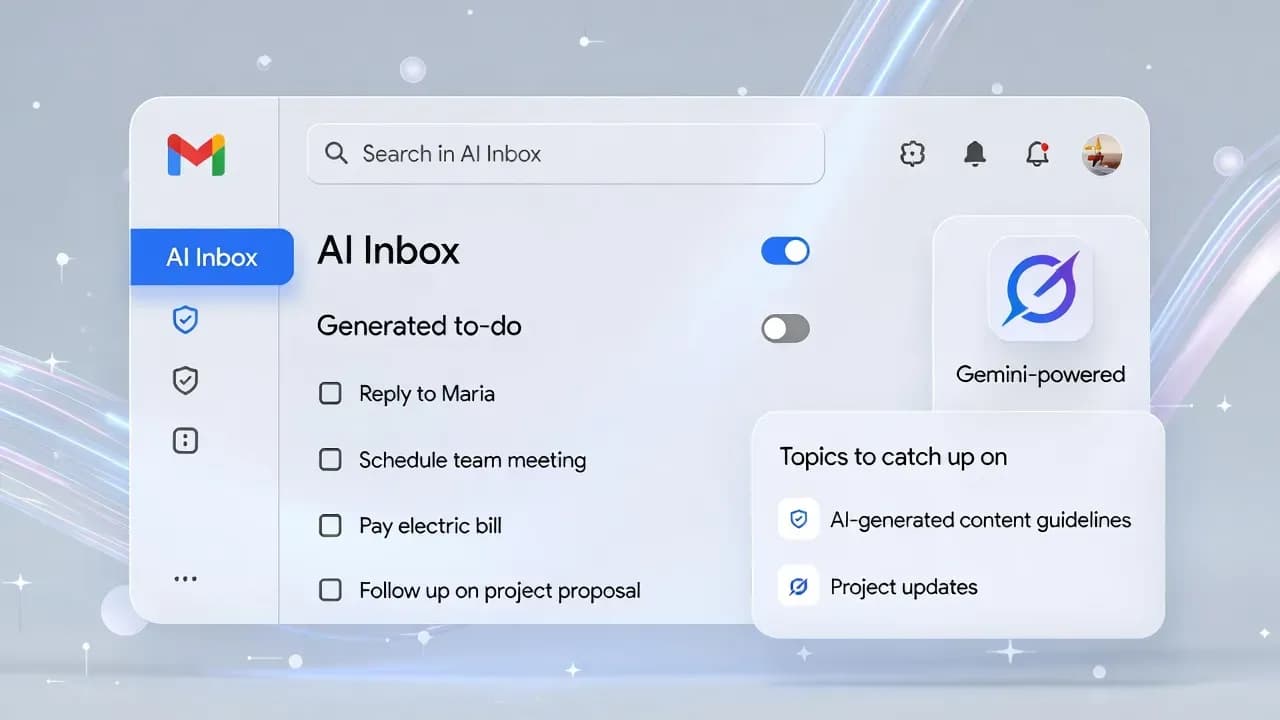
Gmail's new "AI Inbox" uses Gemini to surface to-dos, and Google says it won't train on your emails
Google is testing a new "AI Inbox" view in Gmail powered by Gemini that converts your inbox into prioritized action items and topic summaries. Google says email content is not used to train its AI models, and users can disable the new AI layer, but the feature still raises governance questions for anyone who treats email as a system of record.

Opening: Email as an AI-Powered Dashboard
Email is already where work, finance, logistics, and personal life converge. Google's next bet is to make Gmail less of a message list and more of an operational dashboard. Its new "AI Inbox" experience uses Gemini to surface the tasks your inbox implies, highlight what it believes matters most, and summarize topics so you spend less time scanning and more time acting. The promise is productivity. The real question is trust: what does it mean for an AI system to interpret every message you receive, and how do you keep that power from becoming a privacy and security liability?
Technical and Business Breakdown
AI Inbox is designed as a dedicated inbox experience that sits above the traditional Inbox and behaves like a personalized briefing. Instead of showing a chronological list of messages, it generates a set of "to-dos" and a curated set of topics derived from your incoming mail. Google says prioritization is driven by behavioral and relationship signals such as frequent correspondents, people in your contacts, and relationships the system can infer from message content. Each suggested item is meant to link back to the underlying email so users can verify context rather than blindly trust a generated summary.
This AI layer arrives alongside a broader Gemini expansion inside Gmail. Google is rolling out AI Overviews for long threads, "Help Me Write" for drafting or rewriting emails, and more personalized suggested replies that use conversation context. Some capabilities are intended to be broadly available, while more advanced experiences (like asking your inbox questions or enhanced proofreading) are positioned as subscriber features. The gating matters because it signals Google's commercialization path: Gmail becomes a freemium AI product where basic assistance is widespread, and deeper retrieval or quality improvements are bundled into paid tiers.
Industry Implications
AI Inbox is not just another feature toggle; it changes the mental model of email. For consumers, it reframes Gmail as a life-admin console: reminders, payments, scheduling, and "you should reply to this" guidance, generated continuously. For organizations, even if the first release targets consumer accounts, the direction is obvious: email is being treated as a high-value dataset for agent-like productivity, where "search" becomes "ask," and "reading" becomes "summarize and decide."
That shift will likely increase the volume of AI-assisted actions that happen without explicit user queries. In practice, it can reduce inbox overload for some users, but it can also introduce a new kind of noise: an endless to-do stream produced by imperfect inference. The hiring of AI into the inbox also has downstream effects for security operations and compliance teams, because email often contains regulated data, privileged communications, customer identifiers, and contractual content.
Security and Privacy Analysis
Google's headline assurance is that it won't use user emails to train its AI models, and it emphasizes that AI features can be turned off. That statement addresses the most common fear: "my private messages become training data." However, "not used for training" is not the same as "not accessed." AI Inbox works by analyzing message content to generate outputs, which means the privacy posture depends on execution details: where processing occurs, how data is retained, what telemetry is collected, and how strongly access is isolated from other systems.
This is where governance becomes nuanced. In Workspace, Google has long positioned Gemini as operating under enterprise controls and states that customer Workspace data is not used to train underlying models outside the customer's domain without permission.
Consumer Gmail is a different context with different expectations, and many users blur personal and professional use in a single mailbox. If AI Inbox becomes mainstream, security-conscious users will need clearer controls for compartmentalization: when AI features apply, what they can "see," and how to prevent sensitive threads from being summarized into higher-level artifacts that are easier to exfiltrate or accidentally disclose.
Practical Guidance
If you plan to use AI Inbox, treat it like any other system that produces operational recommendations from sensitive input:
- Validate every suggestion by opening the linked source email, especially for deadlines, payments, and scheduling
- Avoid using AI Inbox as a single source of truth for critical workflows (billing, legal, HR, incident response)
- If you manage a shared household inbox or forward mail across accounts, assume inferred relationships and priority signals can behave unpredictably
- Consider turning AI features off on accounts that receive regulated data, legal correspondence, privileged internal memos, or security notifications
For IT and security teams, plan for user education: "AI can make mistakes" is not a disclaimer, it is an operational reality. The control you need is not only disabling AI, but knowing when AI-created outputs are being relied upon.
Closing
AI Inbox is Gmail's most consequential UX shift in years because it promotes the inbox from a passive archive to an active decision engine. Google's "no training on your emails" promise will calm many concerns, but the broader risk profile does not disappear: interpreting sensitive communications at scale demands strong controls, transparent data handling, and careful defaults. The feature can be legitimately useful if it reduces inbox friction and keeps users in control through verifiable links back to original messages. The success metric is not how impressive the summaries are. It is whether users can trust the system to help without quietly redefining what "private email" means.
Comments
Want to join the discussion?
Create an account to unlock exclusive member content, save your favorite articles, and join our community of IT professionals.
New here? Create a free account to get started.