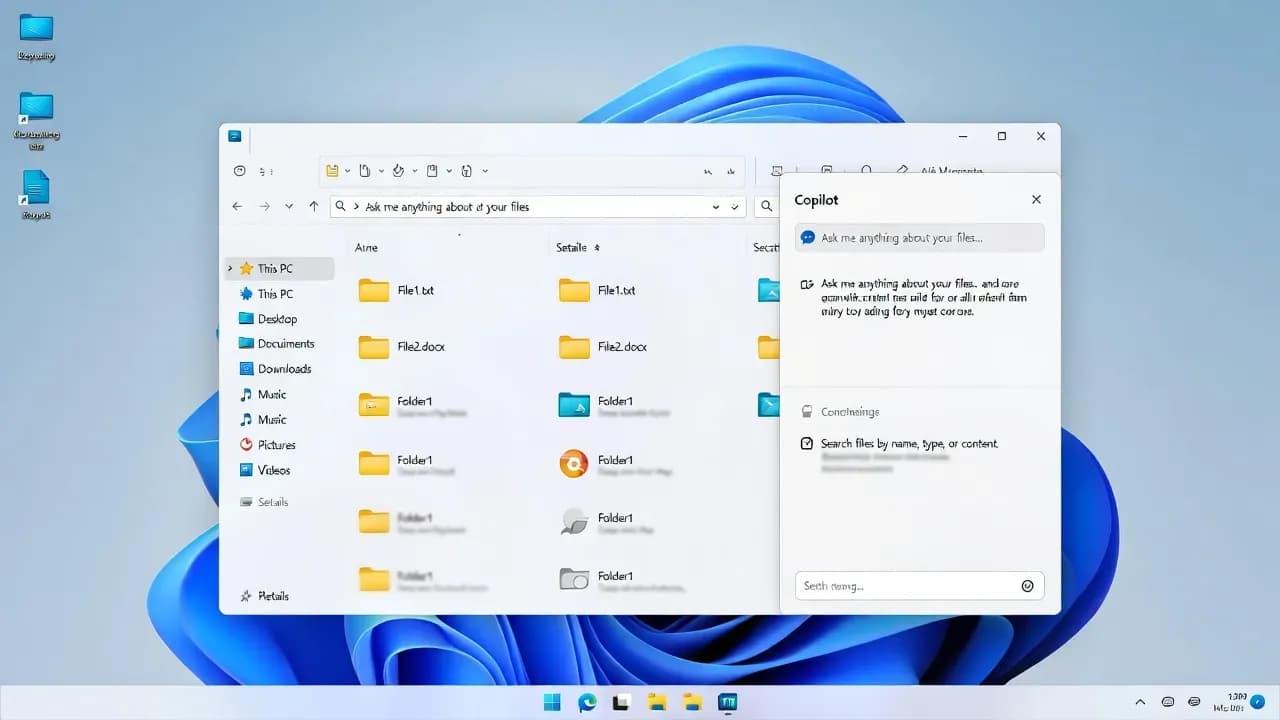
Windows 11 File Explorer May Get an Embedded Copilot Chat Pane in Upcoming Builds
Early signals in Windows 11 preview builds suggest Microsoft is testing a Copilot chat experience that lives inside File Explorer, not just a separate app window, with an option to detach when needed.

File Explorer is becoming the next Copilot surface
Microsoft's Copilot strategy in Windows has followed a clear pattern: start with lightweight entry points, measure usage, then move the assistant closer to the workflows people repeat every day. File Explorer is one of those workflows. It is the place where documents get found, renamed, shared, and staged for upload, and it is also where context matters most, folder paths, file types, recent activity, and metadata.
New indicators in Windows 11 preview builds point to a more direct integration: a Copilot chat view that can live inside File Explorer itself, likely as a docked pane similar to the existing Details or Preview experience. If this ships, it would shift Copilot from an "open another window" interaction to an "in-context" assistant that is always one click away while you browse files.
This matters because it changes the user journey. Instead of launching Copilot separately and dragging context into it, the assistant would be positioned where the context already exists.
What users have today: Copilot entry points, but not true in-app answers
File Explorer already exposes Copilot in limited ways on some systems. The current pattern is closer to a shortcut than an embedded tool: you trigger Copilot from Explorer, but the response is handled outside Explorer in a dedicated app experience. That makes it feel bolted on, and it breaks the flow when you are managing multiple files or navigating deep folder structures.
There are also signs of multiple "flavors" of Copilot being surfaced depending on licensing and configuration, including consumer Copilot and Microsoft 365 Copilot. The practical consequence is that the UI may offer more than one Copilot route, but none of those routes currently behave like a native Explorer pane that can stay open while you work.
An embedded chat pane would be a qualitative change, not just another menu item.
What the new signals suggest: a docked chat view plus a detach option
The most telling detail is that the feature appears designed as an attached experience with an explicit detach control. In other words, the assistant is not only launched from File Explorer, it is meant to be part of the File Explorer window by default, with a way to pop it out when you want more space or a separate workflow.
The internal naming also points toward a dedicated launcher for an "assistant" surface rather than a generic "open app" command. That distinction matters because it implies UI that behaves like a pane, not a redirect.
If Microsoft follows existing Windows UI conventions, the most likely layout is a right-side pane that can coexist with the Details pane concept, enabling quick Q and A on the current selection without leaving the folder.
Why Microsoft wants Copilot in Explorer
File Explorer is where users run into friction that feels small but adds up: figuring out which document is the latest, summarizing a file before sending it, understanding what is inside a folder of similarly named PDFs, or locating the right image among near-duplicates. A Copilot pane is a natural place to offer "explain, summarize, extract, compare" style actions.
From Microsoft's perspective, it is also strategic. If the assistant is visible in a core shell app, it becomes part of the daily muscle memory of Windows, not just another icon on the taskbar.
The risk is also obvious: if the pane becomes noisy, hard to disable, or unclear about what data is being sent for processing, it will trigger backlash fast, especially in managed enterprise environments.
What it could mean for IT teams and enterprises
If an embedded Copilot pane ships broadly, IT orgs will need to treat it like any other capability that touches corporate data flows. The integration point is not just a UI change. It affects user behavior at the moment they select files, which can change how often content is submitted for summarization or analysis.
Three questions will matter most in real deployments:
| IT concern | Why it matters in File Explorer | What to prepare |
|---|---|---|
| Data handling and compliance | Explorer is the front door to sensitive files | Define policy and guidance for which data types can be used with AI features |
| User experience control | "Always visible" features create helpdesk noise | Ensure the organization can configure or disable the surface consistently |
| Licensing and identity context | Consumer Copilot and M365 Copilot can behave differently | Align expected behavior with your tenant, device profile, and user licensing |
Even without final details, the operational playbook is familiar: validate in a pilot ring, document expected behavior, then decide whether to adopt, limit, or disable.
Timeline reality: this is still a preview signal, not a product commitment
It is important to separate "strings and hidden controls" from "announced and shipping." Windows 11 preview builds often contain experiments that never graduate to stable releases, or ship later with a different UI than early indicators suggest.
The smart posture is cautious curiosity: assume it may arrive, plan for how it would be managed, and avoid making firm commitments until Microsoft documents the experience and the controls.
For users, the upside is a more seamless assistant. For enterprises, the deciding factor will be manageability: clear toggles, predictable policy behavior, and transparent data handling.

Comments
Want to join the discussion?
Create an account to unlock exclusive member content, save your favorite articles, and join our community of IT professionals.
New here? Create a free account to get started.