Fake Fortinet Sites Weaponize AI Search Summaries to Steal VPN Logins
Fake Fortinet sites are not a new concept, but this campaign is a meaningful escalation because it targets how people discover software in 2026, not just how they download it.

Fake Fortinet Sites and AI Search Summaries: Why This Campaign Changes the Threat Model
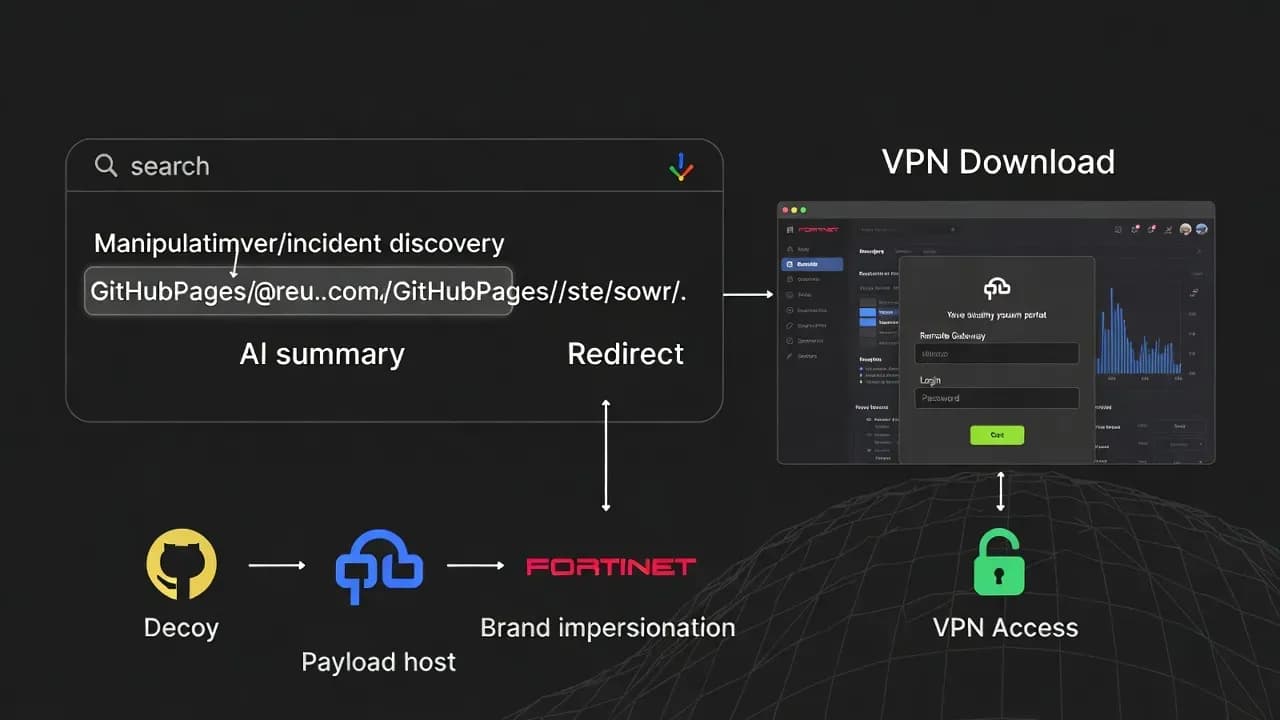
Enterprise defenders have spent years training users to avoid suspicious email attachments and unexpected links, but fewer organizations have a mature control story for "search-based trust." In this incident, the initial user intent is legitimate: the victim searches for instructions on downloading Fortinet VPN software. The compromise begins when modern search experiences compress the web into a short "answer" that looks authoritative and, in some cases, is generated by an AI system that does not reliably separate "trusted hosting" from "trusted intent." When an AI summary surfaces a GitHub Pages URL as the recommended next step, the victim's internal risk model shifts. GitHub is widely perceived as reputable, so the presence of a github.io domain can feel like validation, even if the content itself is malicious. That is the core novelty here: the attacker is optimizing for machine-mediated discovery and human assumptions about platform legitimacy.
This shifts the defender's threat model in two ways. First, the attacker's entry point is not a message you control, such as email, but an external discovery flow you rarely monitor directly. Second, the attacker can scale by targeting "how-to" keywords that large numbers of legitimate users search for, especially during remote work onboarding, device refresh cycles, or incident response activity when admins may need to reinstall clients quickly. The broader lesson is that AI summaries can become an involuntary distribution layer for threat actors who publish content in a format that AI systems are likely to scrape. That makes "content placement" and "search surface manipulation" a first-class security risk, particularly for software vendors and enterprises that depend on widely downloaded remote access tools.
What Happened: The Multi-Stage Redirect Chain Built to Defeat Crawlers and Trap Humans
The described attack chain is engineered for selective targeting. Instead of sending victims directly to a phishing domain, the attackers reportedly begin with a decoy landing page hosted on GitHub Pages. This design has two practical benefits. It helps bypass simplistic domain reputation checks, and it provides a programmable layer where the attacker can decide who gets redirected and who sees harmless content. The campaign reportedly checks the referrer header and only triggers the redirect if the visitor arrives from major search engines. That detail matters because it reflects an evasion mindset: many security scanners, sandboxes, and threat crawlers do not reproduce realistic referrer flows. If the redirect logic does not fire for non-search traffic, automated systems may misclassify the page as benign, and the attacker buys time.
Once the referrer condition is met, the victim is redirected to the phishing destination that mimics Fortinet's visual design. The social engineering is not generic "enter your password." It is contextual: the site asks for a "Remote Gateway," "Login," and "Password," framing the request as a configuration prerequisite for the installer. This is an important behavioral tell. Legitimate software download portals do not require corporate VPN credentials to download a client package. By requesting gateway and login details, the attacker is explicitly targeting enterprise VPN authentication rather than consumer-level credentials. After the victim submits the information, the flow attempts to reduce suspicion by initiating a download from a separate host. In some cases, reporting indicates the download may deliver a legitimate FortiClient installer so the user feels the process worked, which delays detection and increases the chance that stolen credentials are used before the victim alerts IT.
Technical Breakdown: How the Credential Harvesting Works and Why It Is High-Impact for Enterprises
From a technical perspective, the phishing site's most dangerous feature is not its HTML or its branding. It is the data it captures and the implied next steps. By collecting the VPN gateway, username, and password, the attackers obtain everything required to attempt VPN authentication against the targeted environment, particularly where password-only VPN is still allowed or where MFA enforcement is inconsistent across user groups. Even where MFA exists, stolen credentials can still be valuable. They can be used to identify valid usernames, trigger push fatigue patterns if approvals are weak, or enable follow-on phishing that references the correct gateway and VPN profile details. In other words, the attacker is not only stealing a password. They are stealing context that makes future deception significantly more convincing.
Defenders should also interpret the delivery flow as a deliberate operational strategy. Providing a legitimate installer after harvesting credentials is a classic "calm the victim" technique. If the user receives what they expected, they are less likely to report the incident, and they may even share the "helpful link" with colleagues. That creates internal propagation without the attacker needing to compromise internal email. For security teams, this is a worst-case combination: the initial activity looks like ordinary browsing, the user receives a plausible installer, and the organization only sees the damage later when the stolen credentials are used. That timeline inversion is why this incident should be treated as high severity even though the initial step is "just phishing." In enterprise environments, VPN credentials represent privileged reach, not just account access. A VPN session can be the starting point for endpoint compromise, lateral movement, and data theft, especially where split-tunnel policies and conditional access controls are weak.
Affected Organizations and Industries: Who Gets Hit First and Who Gets Hurt Most
The most obvious targets are enterprises that use Fortinet VPN and have a user base that regularly searches for "Fortinet VPN download" or related how-to queries. That includes organizations onboarding remote staff, MSPs supporting multiple tenants, and IT teams responding to client reinstall needs. The campaign's design suggests it is specifically hunting for high-probability enterprise users rather than random consumers. The presence of "Remote Gateway" as a required field is a strong clue: it forces the victim to provide the organization-specific endpoint that will later be attacked. This is not only credential theft. It is a targeting mechanism that binds stolen credentials to the correct infrastructure.
The sectors most exposed tend to share operational traits rather than business types. Any organization with distributed endpoints, frequent contractor access, and pressure to keep remote access friction low is at higher risk. MSP ecosystems are particularly sensitive because a compromise of one admin's VPN credentials can enable access to multiple customer environments, depending on how remote access is architected. There is also a secondary exposure path: helpdesk and IT support staff often search for official download links while assisting users. That creates a concentration of high-value identities engaging in the exact browsing behavior the attacker is targeting. In short, the first victims may be "the people who fix VPN issues," which is exactly the identity set an attacker wants to compromise.
How Organizations Can Respond: Immediate Actions That Reduce the Blast Radius
Response should begin with the assumption that any credentials submitted to the phishing flow are compromised. That means enforcing credential resets for affected accounts, reviewing recent VPN authentication logs for suspicious access, and validating whether any successful VPN sessions originated from unusual geographies, new devices, or atypical time windows. If your VPN platform supports conditional access-like controls, tighten them temporarily: require MFA for all VPN access, restrict access by device posture where possible, and reduce session lifetimes for high-risk groups until you establish confidence. The incident is not purely a web threat. It is an identity and remote access threat, so the response must be led jointly by IAM and network security operations, not only by email or web filtering teams.
Containment also requires breaking the internal re-sharing loop. If users received a functioning installer after entering credentials, some may recommend the link to others. A clear internal advisory should state that FortiClient downloads must be obtained only through known official Fortinet download pages or your internal software distribution system, and that any portal asking for VPN credentials before download is malicious by definition. From a detection standpoint, review proxy logs and DNS telemetry for lookups and HTTP connections to the reported domains and the GitHub Pages redirect. Even if the victim did not submit credentials, the visit itself indicates exposure and possible future targeting. Treat those visits as an opportunity to reach out, educate quickly, and reduce repeat occurrences.
Prevention and Detection Strategies: Hardening "Software Discovery" as a Security Control
Long-term mitigation requires acknowledging a hard truth: user education alone does not solve search-driven compromise. Organizations need practical controls that reduce the chance a user will ever land on a fake Fortinet site. The most effective approach is to eliminate the need to search at all. Provide a sanctioned internal portal for software downloads, use endpoint management to deploy FortiClient through trusted channels, and publish a short internal runbook that includes the one approved download path. If you cannot centralize distribution, at least encourage staff to bookmark the official Fortinet download page and access it directly rather than via search results. This is a low-cost control that meaningfully reduces exposure to SEO-driven manipulation.
Detection should focus on the pattern, not just the domains. The technique of using a reputable hosting platform as a redirector and then filtering redirects based on referrer is transferable. Today it is Fortinet. Tomorrow it is another VPN vendor, a browser update, or an enterprise agent. Build detections around "user searches for a vendor download, then is redirected through an intermediary hosting domain, then lands on a lookalike page that requests credentials unrelated to download." Web gateway telemetry, DNS filtering, and secure browser features can all contribute. For enterprises with mature security stacks, consider enabling credential phishing prevention controls where available, and ensure your password manager or secure browser features warn users when credentials are entered into non-approved domains. The most resilient posture treats web discovery as a controlled workflow, not an ad hoc activity.
Frequently Asked Questions
They target a high-impact asset: VPN access. If an attacker obtains valid VPN credentials, they may gain direct connectivity into corporate networks without needing an exploit. The campaign also uses a realistic installer workflow that reduces user suspicion and delays reporting.
AI summaries can present a link as a "recommended step," which users interpret as vetted guidance. If the AI scrapes attacker-controlled content hosted on a trusted platform, it can unintentionally amplify malicious instructions. This changes the security problem from link filtering to discovery integrity.
A legitimate software download portal does not require your VPN gateway, username, and password to download an installer. Any site that asks for corporate VPN credentials as a prerequisite for downloading software should be treated as malicious. Always validate the domain carefully and prefer direct bookmarks or internal distribution.
Reset the user's password immediately, confirm MFA is enforced for VPN access, and review VPN sign-in logs for suspicious sessions. Treat the credentials as compromised even if there is no evidence of immediate misuse. Also alert the broader organization to prevent internal re-sharing of the malicious link.
All three. The SOC monitors and blocks malicious domains and patterns, IAM ensures strong authentication and risk controls for remote access, and IT reduces exposure by distributing software through trusted channels. The most effective mitigation is removing the need for users to search for installers in the first place.


Comments
Want to join the discussion?
Create an account to unlock exclusive member content, save your favorite articles, and join our community of IT professionals.
New here? Create a free account to get started.