
Intune Wipe for Windows: The Three Reset Options Explained

- Level
- Intermediate
- Reading time
- 33 min
- Concept
- The Intune Wipe action for Windows devices
- Last reviewed
- September 15, 2026
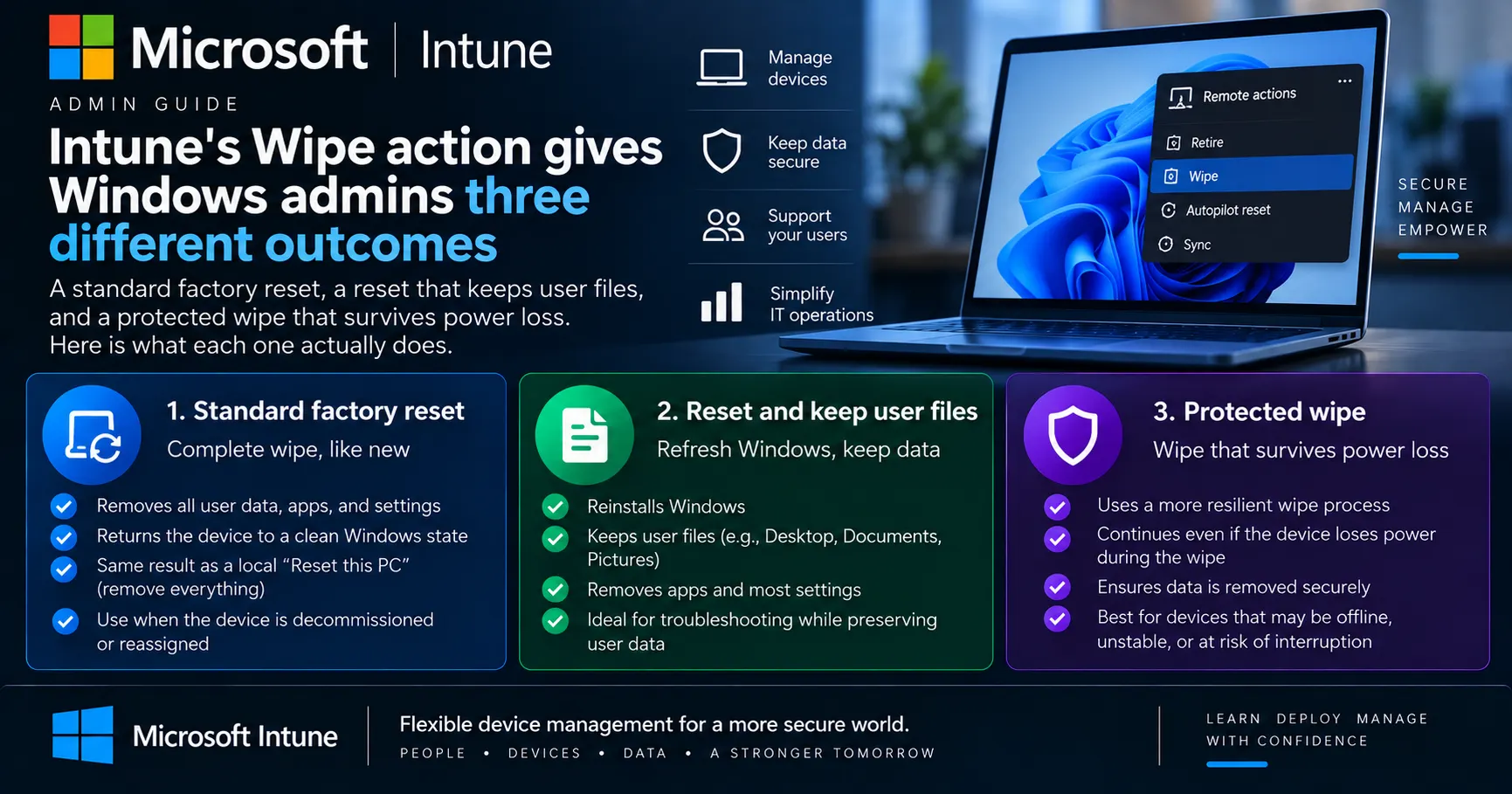
Table of contents
The Wipe action in Intune looks like a single destructive button, but on Windows it produces three different results depending on which options you tick. One resets the machine and leaves it in an out-of-box state. One resets it while keeping the user's files and accounts, and leaves the device enrolled. One overwrites free space and keeps retrying through power loss, and Microsoft warns it can leave some hardware unable to start again. Picking the wrong one either leaves recoverable data on a retired laptop or bricks a machine you meant to reuse.
Key takeaways
- The Windows Wipe pane has two checkboxes, which produce three distinct outcomes mapped to doWipe, doWipePersistUserData and doWipeProtected.
- Keeping the enrollment state keeps the device in Intune. It does not unenroll the machine, and it does not keep user-installed apps.
- The protected wipe overwrites free space and continues through power loss, but Microsoft warns it can leave some devices unable to boot.
- Wipe does not clean up the Entra ID device record or the Autopilot registration. Those are separate steps.
- For a personally owned device, Retire is almost always the right action instead, because Wipe destroys personal data.
Quick explanation
In simple terms
Wipe is the Intune button that tells a company device to erase itself and start over. On Windows you can choose how thorough that erasure is, and whether the user's own files survive it.
Technical definition
Wipe is an Intune remote device action that Execs a node on the Windows RemoteWipe CSP at the device's next MDM check-in. doWipe performs a standard push-button reset, doWipePersistUserData performs a reset equivalent to Reset this PC with Keep my files, and doWipeProtected performs a reset that overwrites free space and resumes after interruption.
Definition
Wipe is an Intune remote action that factory resets a managed device and removes personal and organizational data, apps and configuration. On Windows, the admin can shape that reset three ways: a standard wipe, a wipe that preserves user accounts and files, or a protected wipe that keeps going even if the device loses power.
Wipe is one of Intune's remote device actions. It tells a managed device to factory reset itself, restoring default settings and clearing personal and organizational data, apps and configuration. Microsoft documents it as the action for retiring, repurposing, resetting for troubleshooting, or securely erasing a lost or stolen device.
The action itself supports many platforms: Android Enterprise corporate-owned devices (COSU, COBO, COPE), AOSP, ChromeOS, iOS/iPadOS, macOS, tvOS 10.2 and later, visionOS 1.1 and later, and Windows. Each platform gets its own set of options, which is why the confirmation pane looks different depending on the device you selected.
On Windows, those options resolve to three outcomes. Leave both checkboxes clear and you get a plain factory reset. Select Wipe device, but keep enrollment state and associated user account and the device resets while keeping user accounts and files, staying enrolled in Intune. Select Wipe device, and continue to wipe even if device loses power and Windows overwrites free space and keeps retrying until the job is done.
Each outcome maps to a different node in the RemoteWipe CSP on the client: doWipe, doWipePersistUserData, and doWipeProtected. The names in the admin center changed as Microsoft rolled out the new device view, but the underlying nodes did not.
Why it matters
Core concepts
One action, three Windows outcomes
The Windows wipe pane offers two independent-looking checkboxes, but the documented behaviour resolves into three distinct resets.
Microsoft documents the Windows options as three cases rather than a matrix. With no options selected, the device resets to factory settings and deletes all user data, settings and MDM policies. With Wipe device, but keep enrollment state and associated user account, it resets while preserving user data, user accounts and important settings, and it stays enrolled. With Wipe device, and continue to wipe even if device loses power, it deletes everything, overwrites free space, and keeps going through interruption.
The newer device view in the admin center presents these as three labelled choices rather than checkboxes, which is why recent screenshots look different from older runbooks. The outcomes and the CSP nodes behind them have not changed.
Example
A helpdesk operator resetting a laptop for a new starter picks the plain reset. The same operator responding to a stolen laptop picks the power-loss option.
Why it matters — Runbooks written against the old checkbox UI still work, but screenshots in them will not match what the operator sees.
Standard wipe (doWipe)
The default reset with no options selected, which returns the device to factory settings and deletes all user data, settings and MDM policies.
doWipe is the baseline. Microsoft describes it as equivalent to running Reset this PC > Remove everything with Clean Data set to No and Delete Files set to Yes. Files are deleted, but the drive is not scrubbed to resist forensic recovery.
Its failure mode is worth knowing. If a doWipe reset starts and is then interrupted, the PC attempts to roll back to its pre-reset state. If that rollback fails, the recovery environment takes no further action and the machine can be left unusable, needing a Windows reinstall. The node has been available since Windows 10 version 1511.
Example
A laptop returned by a leaver gets a standard wipe before it goes back into the spares pool.
Why it matters — This is the option most admins actually want, and the one that behaves most predictably on hardware you intend to keep.
Keep enrollment and user account (doWipePersistUserData)
A reset that preserves user data, user accounts and important settings while removing MDM policies, leaving the device enrolled in Intune.
doWipePersistUserData is equivalent to Reset this PC > Keep my files. Microsoft is explicit that MDM policies and settings are removed but the device remains enrolled in Intune, so this is not an offboarding action.
What "keep my files" actually preserves is narrower than the label suggests. Per Microsoft's push-button reset documentation, it keeps user accounts and group memberships, domain settings, wireless network profiles, themes, international settings and privacy settings, plus files on non-OS partitions. It refreshes \Windows, \Program Files, \ProgramData and each profile's AppData folders, and it does not preserve user-acquired Store apps or user-installed desktop applications. The AppData folders land in C:\Windows.old.
Example
A machine with a corrupted policy state gets reset this way so the user keeps their documents but the device rebuilds its management configuration.
Why it matters — Admins who read "keep user data" as "keep everything" get support calls about missing applications the same afternoon.
Protected wipe (doWipeProtected)
A reset that deletes everything, overwrites free space to hinder recovery, and continues even if the device loses power.
doWipeProtected exists because doWipe can be defeated by simply power cycling the machine mid-reset. Microsoft describes the protected node as functionally similar to doWipe, except that it keeps retrying until the reset completes, and it cleans the partitions if it fails or is interrupted. That is what makes it the documented choice for lost and stolen devices.
It carries a blunt warning. Microsoft states the option can prevent some devices from starting up again, because the process may interfere with boot recovery or firmware protections, and advises using it only on corporate-owned devices where full data destruction is required and recovery procedures exist. The node has been available since Windows 10 version 1703.
Example
A laptop reported stolen from a car park is wiped with this option, on the assumption the hardware will never come back.
Why it matters — Choosing it as a "more thorough" default rather than for a lost-device scenario risks turning recoverable hardware into scrap.
What Wipe does not do
The action resets the endpoint, but it leaves directory and provisioning records intact.
A completed wipe does not tidy up the rest of your tenant. Microsoft's own guidance points admins to two follow-up steps: deregistering the device from Windows Autopilot where applicable, and removing its record from Microsoft Entra ID.
Skipping those leaves stale objects behind. Microsoft notes that lingering records muddy device inventory and can leave stale access permissions that affect compliance and reporting. On a device destined for reuse in the same tenant you usually want the Autopilot registration to stay, so this is a judgement call rather than a checklist item.
Example
A retired laptop no longer appears in Intune after a wipe, but its Entra ID object keeps showing in compliance reports until someone deletes it.
Why it matters — Offboarding that stops at the wipe leaves the tenant carrying objects for hardware that no longer exists.
Who is allowed to run it
Wipe requires a role carrying the Remote tasks/Wipe permission plus visibility into the target device, and it may require a second approver.
Microsoft lists Help Desk Operator and School Administrator as built-in roles that can run the action. A custom role works too, provided it includes the Remote tasks/Wipe permission and permissions that give visibility into managed devices, for example Organization/Read and Managed devices/Read. Wipe permission alone is not enough if the account cannot see the device.
On top of RBAC, the action may be governed by an Intune access policy requiring Multiple Administrative Approval. Where that applies, a second administrator has to approve before the wipe proceeds. There is also a ceiling: a tenant can submit up to 500 Wipe actions per day, counted across individual actions, bulk actions and Graph API calls.
Example
An MSP grants technicians a custom role with Remote tasks/Wipe and read access, then puts MAA in front of it so no single technician can wipe a client's fleet alone.
Why it matters — Wipe is irreversible, so the approval design around it matters as much as the option you select.
How it works
The admin selects an outcome, not a procedure
In the admin center, the operator picks the device, chooses Wipe, and selects the Windows options. The choice describes the end state wanted: full reset, reset keeping files, or reset that cannot be interrupted.
Admin center: choose wipe behaviour
Example — Two checkboxes in the classic pane, three labelled choices in the new device view.
Intune translates the choice into a CSP node
The service resolves the selection to one of three RemoteWipe CSP nodes: doWipe, doWipePersistUserData or doWipeProtected. The same translation happens whether the request came from the portal, a bulk action, or the Microsoft Graph wipe API.
Intune service: map to CSP node
Example — Selecting the power-loss option resolves to doWipeProtected.
Approval and tenant limits are evaluated
If an access policy requires Multiple Administrative Approval, the request waits for a second administrator. The request also counts against the tenant's daily ceiling of 500 wipe actions across all submission paths.
Policy gate: MAA and daily limit
Example — A bulk wipe of 200 devices consumes 200 of the day's 500 actions.
The device receives the command at check-in
The command sits queued until the Windows client contacts Intune over the MDM channel. A device that is offline, powered down or off the network receives nothing until it next connects.
MDM channel: device check-in
Example — A stolen laptop that never comes online keeps its data indefinitely.
Windows rebuilds itself through push-button reset
The client Execs the CSP node and Windows runs a push-button reset, reconstructing the OS from runtime system files in the component store rather than from a separate recovery image, and restoring the updated state rather than the factory-preinstalled one.
Windows client: push-button reset
Example — Installed updates survive the rebuild, so the machine does not come back years out of date.
Data handling diverges by node
This is where the three paths separate. doWipe deletes files and rolls back if interrupted. doWipePersistUserData refreshes system locations while preserving accounts and personal files. doWipeProtected overwrites free space and cleans partitions rather than abandoning a failed attempt.
Divergence: delete, persist, or overwrite
Example — Interrupt a standard wipe and Windows tries to roll back. Interrupt a protected wipe and it resumes.
Directory cleanup happens separately
The endpoint is now reset, but the tenant still holds records. Removing the Autopilot registration and the Entra ID device object are separate administrative steps that Intune does not perform as part of the wipe.
Tenant cleanup: Autopilot and Entra ID
Example — The device disappears from Intune but remains visible in Entra ID until deleted.
Use cases
Retiring corporate hardware
IT admins, asset managersA device leaving service is reset to an out-of-box state so it can be sold, donated or scrapped without carrying organizational data.
A three-year-old fleet laptop gets a standard wipe before being handed to an IT asset disposal vendor.
Benefit — Removes personal and organizational data, apps and configuration in one action.
Reassigning a device between users
IT admins, MSP techniciansA machine coming back from a leaver is reset so the next user starts clean, then re-enrolled through normal provisioning.
A returned laptop is wiped, then reprovisioned through Autopilot for a new starter.
Benefit — Predictable baseline for the next user with no residue from the previous one.
Responding to a lost or stolen device
Security teams, IT adminsWhere the hardware is presumed gone, the protected wipe maximises the chance that the reset completes and that data is hard to recover.
A laptop reported stolen is queued for a protected wipe so a power cycle cannot interrupt the reset.
Benefit — The reset resumes after interruption instead of being defeated by a power cycle.
Resetting a broken device without losing the user's work
Helpdesk, MSP techniciansWhen a machine's configuration is beyond repair but the user's files matter, the keep-enrollment option rebuilds Windows while preserving accounts and personal files.
A device with a corrupted policy state is reset with user data preserved, then picks up policy again as it stays enrolled.
Benefit — Avoids a full rebuild and a data restore for a problem that is only configuration deep.
End-of-term bulk resets
Education IT, School AdministratorsShared or student devices are reset in bulk between cohorts so each term starts from a known state.
A school resets a cart of shared laptops at the end of the academic year before reassigning them.
Benefit — One operation across many devices instead of touching each machine.
Benefits
Three outcomes from one action
The same remote action covers reuse, repair and loss scenarios without needing separate tooling or a technician at the keyboard.
The same Wipe button serves both a reassignment and a stolen-device response, with different options selected.
Reset survives interruption when it needs to
The protected option keeps retrying and cleans partitions on failure, closing the gap where a thief could defeat a reset by pulling the power.
Microsoft documents this as the reason doWipeProtected exists alongside doWipe.
The rebuild lands on an updated Windows, not a factory image
Push-button reset reconstructs Windows from the component store and restores installed updates and current drivers, so a reset device is not years behind on patching.
A laptop reset after two years in service comes back with its installed updates intact.
Guarded by role-based access and optional dual approval
The Remote tasks/Wipe permission plus device visibility controls who can run it, and access policies can require a second administrator to approve.
An MSP requires MAA on wipe so no lone technician can reset a client fleet.
Scriptable through Microsoft Graph
The wipe action is exposed through the Graph managedDevice API, so offboarding can be automated alongside identity and licence steps.
A leaver workflow calls the Graph wipe action as one step in a larger automation.
Limitations
There is no undo and no partial scope
HighWipe resets the whole device. You cannot pick folders, exclude a profile, or reverse the action once the client has begun.
Workaround — Use Retire to remove only company data, or Delete to remove only the Intune record. For irreversibility risk, put Multiple Administrative Approval in front of the action.
The protected wipe can leave a device unbootable
HighMicrosoft warns that the continue-through-power-loss option can prevent some devices from starting up again, because the process may interfere with boot recovery or firmware protections.
Workaround — Restrict it to corporate-owned devices where full data destruction is required and a recovery procedure exists. Do not use it as a default for routine resets.
Nothing happens until the device checks in
HighThe command sits queued until the Windows client contacts Intune. A device that is offline, powered off or has been reinstalled outside management never receives it.
Workaround — Pair the wipe with identity-side controls such as revoking sessions and disabling the account, which do not depend on the endpoint cooperating.
Built-in erasure is not a certified sanitization standard
MediumThe protected option overwrites free space to hinder recovery, but Microsoft's push-button reset documentation states that the data erasure feature is aimed at consumers and does not meet government and industry data erasure standards. Intune's wipe documentation makes no compliance claim either.
Workaround — Where a formal sanitization standard applies, treat the wipe as a first step and follow your organization's approved media destruction or certified erasure process.
Keeping user data still removes installed applications
MediumThe keep-enrollment option preserves accounts and personal files, but it is equivalent to Reset this PC with Keep my files, which does not preserve user-acquired Store apps or user-installed desktop applications, and refreshes AppData and ProgramData.
Workaround — Warn the user before running it, and expect to redeploy applications through Intune afterwards. Application settings in AppData can be retrieved from C:\Windows.old if the user needs them.
Wipe leaves tenant records behind
MediumThe action resets the endpoint but does not remove the Entra ID device object or the Windows Autopilot registration, which can leave stale records affecting inventory, compliance and reporting.
Workaround — Make Autopilot deregistration and Entra ID cleanup explicit steps in the offboarding runbook, and skip them deliberately when the device is being reused in the same tenant.
A daily tenant ceiling applies
LowA tenant can submit up to 500 Wipe actions per day, counted cumulatively across individual device actions, bulk device actions and Graph API requests.
Workaround — Stage very large reset campaigns across days, or contact Microsoft support to request a limit change.
An interrupted standard wipe can still ruin a machine
MediumIf a doWipe reset is interrupted, Windows attempts to roll back. If the rollback fails, the recovery environment takes no further action and the device may need a full Windows reinstall.
Workaround — Wipe devices on mains power where possible, and keep installation media or a network provisioning path available for recovery.
Architecture
Wipe is a command that travels from the Intune service to a configuration service provider on the Windows client, and the interesting behaviour happens at the client end. Intune decides which node to call and enforces who may call it. Windows decides what actually gets erased, using the same push-button reset engine that powers Reset this PC. The directory objects in Entra ID and Autopilot sit outside that path entirely, which is why a successful wipe still leaves records behind.
Intune admin center and Graph wipe API
Entry points for the action. Individual device actions, bulk device actions and Graph API requests all land on the same service-side path and share the same daily tenant ceiling.
A scripted wipe through the Graph managedDevice wipe action counts against the same 500-per-day limit as a click in the portal.
Intune RBAC and access policies
Decides whether the caller may run the action, using the Remote tasks/Wipe permission plus device visibility, and optionally holding the request for Multiple Administrative Approval.
Help Desk Operator can wipe. A custom role needs Remote tasks/Wipe plus reads such as Organization/Read.
MDM channel
Delivers the queued command to the device at its next check-in. Nothing happens on a device that never connects.
A powered-off laptop stays untouched until it boots and syncs.
RemoteWipe CSP
The client-side interface that receives the Exec. Its doWipe, doWipePersistUserData and doWipeProtected nodes define the three Windows behaviours.
doWipeProtected is available from Windows 10 version 1703, doWipePersistUserData from 1709.
Push-button reset engine and recovery environment
Performs the actual rebuild, reconstructing Windows from the component store and applying the keep-files or remove-everything behaviour. Also the component that attempts rollback when a standard wipe is interrupted.
Drivers and installed updates are restored as part of the rebuild rather than reverting to factory state.
Microsoft Entra ID and Windows Autopilot records
Hold the device identity and provisioning registration. Neither is touched by the wipe, so both need separate handling when a device is genuinely leaving the estate.
Deregistering from Autopilot is a distinct step documented alongside the wipe action.
Data flow
An operator or script submits the wipe against a specific managed device. Intune checks the caller's role and any access policy requiring a second approver, then queues the command with the chosen CSP node and counts it against the tenant's daily limit. At the device's next MDM check-in, the Windows client receives the Exec and hands off to the push-button reset engine, which rebuilds the OS from the component store and applies the node's data behaviour: delete and roll back on failure, persist accounts and files, or overwrite free space and keep retrying. Status flows back to Intune. The Entra ID object and any Autopilot registration remain until an administrator removes them separately.
Integrations: Microsoft Graph API (managedDevice wipe action), Microsoft Entra ID device objects, Windows Autopilot registration, Intune access policies for Multiple Administrative Approval, Windows RemoteWipe CSP
Architecture limitations
Examples
Offboarding a leaver's corporate laptop
An employee leaves. IT has the laptop back and wants it in the spares pool by the end of the week.
A standard wipe with no options selected is the right call. It resets to factory settings and removes user data, settings and MDM policies, and if something goes wrong the device attempts to roll back rather than scrubbing itself into an unrecoverable state. The protected option would add risk with no benefit, because the hardware is physically in hand.
A laptop stolen from a car
A sales laptop is reported stolen overnight. It holds cached corporate data and the hardware is not expected back.
This is the documented case for the continue-through-power-loss option. A standard wipe could be defeated by power cycling the device mid-reset, whereas the protected node keeps retrying and cleans partitions if it fails. The trade-off, that the device may not boot again, is acceptable because nobody plans to recover the hardware.
Rebuilding a device without losing the user's files
A finance user's machine has a broken policy and profile state. A rebuild is faster than troubleshooting, but the user has local files that are not fully synced.
The keep-enrollment option resets the OS while preserving user accounts and personal files, and the device stays enrolled so policy reapplies. The user needs a clear warning first: user-installed applications will not survive, and application data under AppData is refreshed, landing in C:\Windows.old.
A BYOD phone where Wipe is the wrong action
A contractor finishes an engagement. Their personally owned device was enrolled to access company mail.
Wipe would factory reset personal hardware and destroy the owner's data. Retire is the correct action: Microsoft documents it as removing company data, unenrolling the device and removing managed apps, settings and MDM profiles while preserving personal data.
Comparisons
Wipe vs Retire vs Retire
Wipe resets the whole device. Retire removes only the company footprint and leaves personal content alone. The choice usually follows device ownership rather than the reason for offboarding.
| Criterion | Wipe vs Retire | Retire |
|---|---|---|
| Effect on personal data | Deleted, unless the keep-user-data option is selected | Preserved. Microsoft states personal data is not removed |
| Enrollment | Device leaves management, unless the keep-enrollment option is selected, in which case it stays enrolled | Device is unenrolled from Intune |
| Scope of removal | Factory reset: data, apps and configuration | Managed apps, settings and MDM-deployed profiles only |
| Typical device | Corporate-owned hardware being retired, reassigned or presumed lost | Personally owned or BYOD devices leaving organizational control |
| Timing | Runs at the device's next check-in | Also runs at the next check-in; the device may still show in the admin center until then |
When to choose — Retire for personally owned devices. Wipe for corporate hardware you intend to reset, reuse or destroy.
Learn moreWipe vs Autopilot Reset vs Autopilot Reset (RemoteWipe AutomaticRedeployment)
Both rebuild the machine, but Autopilot Reset is designed to keep the device attached to the organization, while Wipe is designed to cut it loose.
| Criterion | Wipe vs Autopilot Reset | Autopilot Reset (RemoteWipe AutomaticRedeployment) |
|---|---|---|
| Enrollment and identity | Removed, unless the keep-enrollment option is selected | Kept. The device stays enrolled in Microsoft Entra ID and MDM |
| Settings carried over | None by default. The keep-user-data option preserves accounts, files and some settings | Wi-Fi profiles plus settings such as region, language and keyboard |
| CSP node | doWipe, doWipePersistUserData or doWipeProtected | AutomaticRedeployment/doAutomaticRedeployment |
| Intended scenario | Retirement, reassignment, loss or theft | Returning a device in place to a known-good managed state |
When to choose — Autopilot Reset when the device is staying with the organization and you want it back on the network quickly. Wipe when it is leaving, or when you need data gone.
Learn moreMyths, corrected
Myth
"Wipe device, but keep enrollment state" unenrolls the device from management.
Correction
It does the opposite. Microsoft documents that MDM policies and settings are removed but the device remains enrolled in Intune. The option is a repair tool, not an offboarding action.
Why it happens: The word "wipe" implies a clean break, and secondhand summaries of the new admin center labels have described this option as unenrolling the device. The wording in the admin center pane is explicit about keeping the enrollment state.
Myth
"Keep user data" means the user's machine comes back exactly as it was.
Correction
It preserves user accounts, files and a defined set of settings, but it is equivalent to Reset this PC with Keep my files. User-acquired Store apps and user-installed desktop applications are not preserved, and AppData and ProgramData are refreshed.
Why it happens: The option label speaks about data, and users hear "nothing will be lost". Applications live in exactly the locations push-button reset refreshes.
Myth
The secure erase option is simply a safer, more thorough version of the normal wipe.
Correction
Microsoft warns it can prevent some devices from starting up again, because the process may interfere with boot recovery or firmware protections, and advises using it only where full data destruction is required and recovery procedures are in place.
Why it happens: "High security" reads like a strictly better setting rather than a trade-off, so it gets picked as a cautious default on hardware the organization actually wants back.
Myth
A wipe removes the device from the tenant.
Correction
The endpoint is reset, but the Microsoft Entra ID device object and any Windows Autopilot registration remain. Microsoft documents both as separate follow-up steps.
Why it happens: The device stops appearing in Intune, which looks like complete removal until someone runs a compliance report.
Myth
Overwriting free space makes the drive forensically clean to an industry standard.
Correction
The protected option does overwrite free space to hinder recovery, but Microsoft's push-button reset documentation says the data erasure feature is aimed at consumers and does not meet government and industry data erasure standards.
Why it happens: "Prevents data recovery" is easy to read as a formal sanitization guarantee rather than a practical deterrent.
Myth
Queuing a wipe on a stolen laptop means the data is gone.
Correction
The command only executes when the device next checks in with Intune. A machine that stays offline, is reinstalled from external media, or has its drive removed never receives it.
Why it happens: The admin center reports the action as sent, which feels like completion rather than a queued instruction.
Practical implications
For admins
Write the three outcomes into your runbook by name and by CSP node, not by screenshot, because the admin center labels changed with the new device view while the behaviours did not. Default to the standard wipe for anything you plan to reuse. Treat the protected wipe as a lost-device action with a signed-off reason, and add Autopilot and Entra ID cleanup as explicit steps after the reset.
For MSPs
Wipe is the remote action most likely to generate a client dispute, so control it structurally rather than by training. Scope technician roles to the clients they support, require the Remote tasks/Wipe permission deliberately rather than inheriting it, and put Multiple Administrative Approval in front of wipe for tenants where a mistaken reset would be contractually painful. Keep the 500-per-day tenant ceiling in mind before scheduling a large refresh.
For business
Device resets sit on the critical path of joiner, mover and leaver processes. The practical questions for the business are who authorises a wipe, how quickly it happens after a loss report, and whether personal devices are ever in scope. Getting the Retire versus Wipe boundary wrong on a personal device is a data-protection conversation, not an IT one.
For security
A queued wipe is not a control you can rely on, because it depends on the device connecting. Pair it with identity-side actions that take effect immediately, such as revoking sessions and disabling the account, and rely on disk encryption as the real protection for data at rest on a lost machine. If your policies reference a sanitization standard, the built-in erasure does not claim to meet one.
For end users
A wipe is not recoverable and users should be told before, not after. For the keep-user-data option, set expectations clearly: files and the sign-in survive, installed applications do not, and application settings under AppData are moved to C:\Windows.old rather than preserved in place.
Cost impact
Remote wipe is part of Windows edition entitlements rather than a separate purchase. Microsoft lists it as supported on Windows Pro, Enterprise, Pro Education and SE, and Education, with entitlements granted by Windows Pro, Enterprise E3 and E5, and Education A3 and A5 licences. The real cost is operational: an unnecessary protected wipe on reusable hardware can turn a laptop into a write-off.
Operational impact
Expect the device to be out of service for the length of a full Windows rebuild plus reprovisioning, and longer where free space is overwritten. Large campaigns need staging against the daily tenant limit. Where MAA applies, factor in the wait for a second approver, which is exactly the delay you want on an irreversible action.
Decision guide
Use when
- The device is corporate-owned and is being retired, reassigned or repurposed
- A corporate device is lost or stolen and data destruction outranks hardware recovery
- A machine's configuration is beyond repair and a rebuild is faster than troubleshooting
- Shared or student devices need a clean baseline between cohorts
Avoid when
- The device is personally owned. Use Retire instead
- You only want to clear a stale record from the console. Use Delete instead
- The device should stay attached to the organization through the rebuild. Use Autopilot Reset instead
- You want the hardware back in service and are tempted by the protected option's stronger-sounding label
Requirements
- A role carrying Remote tasks/Wipe, such as Help Desk Operator or School Administrator, or a custom role including that permission
- Permissions giving visibility into and access to the managed device, for example Organization/Read and Managed devices/Read
- A supported Windows edition: Pro, Enterprise, Pro Education or SE, or Education
- The device must check in with Intune for the action to run
- Approval from a second administrator where an access policy requires Multiple Administrative Approval
Alternatives
- Retire: removes company data and unenrolls, preserving personal data
- Delete: removes the device record from Intune
- Autopilot Reset: rebuilds the device while keeping it enrolled in Entra ID and MDM
- Fresh Start: reinstalls Windows and removes manufacturer-installed apps
Related terms
The Windows configuration service provider that exposes the remote reset nodes, including doWipe, doWipePersistUserData and doWipeProtected, which Intune's Wipe action calls.
The Windows feature behind Reset this PC. It rebuilds Windows from runtime files in the component store rather than a separate recovery image, restoring an updated state rather than the factory-preinstalled one.
An Intune remote action that removes company data, unenrolls the device and removes managed apps, settings and MDM profiles, while preserving personal data.
Multiple Administrative Approval (MAA)
An Intune access policy model that requires a second administrator to approve certain actions, including Wipe, before they proceed.
Autopilot Reset
A reset triggered through the RemoteWipe CSP's AutomaticRedeployment node that rebuilds the device while keeping it enrolled in Microsoft Entra ID and MDM and preserving Wi-Fi profiles and settings such as region and keyboard.
Stale device record
A device object left in Microsoft Entra ID after the physical device is gone, which can distort inventory and reporting and leave lingering access permissions.
Frequently asked questions
What are the three Intune wipe options for Windows?
A standard wipe with no options selected, which factory resets the device and deletes all user data, settings and MDM policies. A wipe that keeps the enrollment state and the associated user account, which preserves user data and accounts while removing MDM policies and leaving the device enrolled. And a wipe that continues even if the device loses power, which deletes everything, overwrites free space to prevent recovery, and keeps retrying through interruption.
Does "keep enrollment state" unenroll the device from Intune?
No. Microsoft documents that MDM policies and settings are removed but the device remains enrolled in Intune. If you want the device out of management, use Retire, or run a wipe without that option selected.
Does the keep-user-data option preserve installed applications?
No. It is equivalent to Reset this PC with Keep my files, which does not preserve user-acquired Microsoft Store apps or user-installed desktop applications. It also refreshes the AppData folders in each profile, though those are placed in C:\Windows.old. Accounts, personal files and a defined set of settings such as wireless profiles and international settings are preserved.
Is the secure erase option safe to use on any device?
No. Microsoft warns the option can prevent some devices from starting up again, because the wipe may interfere with boot recovery or firmware protections. It advises using it only on corporate-owned devices where full data destruction is required and recovery procedures are in place, which in practice means lost and stolen hardware.
What is the difference between Wipe and Retire in Intune?
Wipe factory resets the device and removes personal and organizational data. Retire removes company data, unenrolls the device and removes managed apps, settings and MDM-deployed profiles, while leaving personal data intact. Retire is the right action for personally owned devices.
Which permissions are needed to wipe a device?
An account with the Help Desk Operator or School Administrator built-in role, or a custom role that includes the Remote tasks/Wipe permission along with permissions providing visibility into and access to managed devices, such as Organization/Read and Managed devices/Read. An access policy may also require a second administrator to approve.
How many devices can I wipe in one day?
A tenant can submit up to 500 Wipe actions per day. That limit is cumulative across individual device actions, bulk device actions and Microsoft Graph API requests. Organizations that need a higher ceiling can contact Microsoft support to request a change.
Does wiping a device remove it from Microsoft Entra ID and Autopilot?
No. The wipe resets the endpoint only. Removing the Entra ID device object and deregistering the device from Windows Autopilot are separate steps. Leaving them in place can create stale records that affect inventory, compliance and reporting, though you will usually keep the Autopilot registration for a device staying in the tenant.
What happens if a wipe is interrupted?
It depends on the option. A standard wipe attempts to roll the PC back to its pre-reset state, and if that rollback fails the device may be unusable and need a Windows reinstall. The protected wipe is built for interruption: it keeps trying until the reset completes and cleans the partitions if it fails.
Conclusion
Intune's Wipe action reaches many platforms, but on Windows it resolves into three outcomes backed by three RemoteWipe CSP nodes. The standard wipe resets and rolls back if interrupted. The keep-enrollment wipe preserves accounts and files, removes installed applications, and leaves the device in Intune. The protected wipe overwrites free space, survives power loss, and carries Microsoft's warning that it can leave hardware unable to boot. None of them clean up Entra ID or Autopilot.
Main takeaway
If the device is personally owned, read up on Retire before doing anything else. If you are formalising who may run these actions, look at Intune RBAC and Multiple Administrative Approval next. And if you automate offboarding, the Graph managedDevice wipe action is the scriptable path.
Reader feedback
Written reviews
Loading reviews…