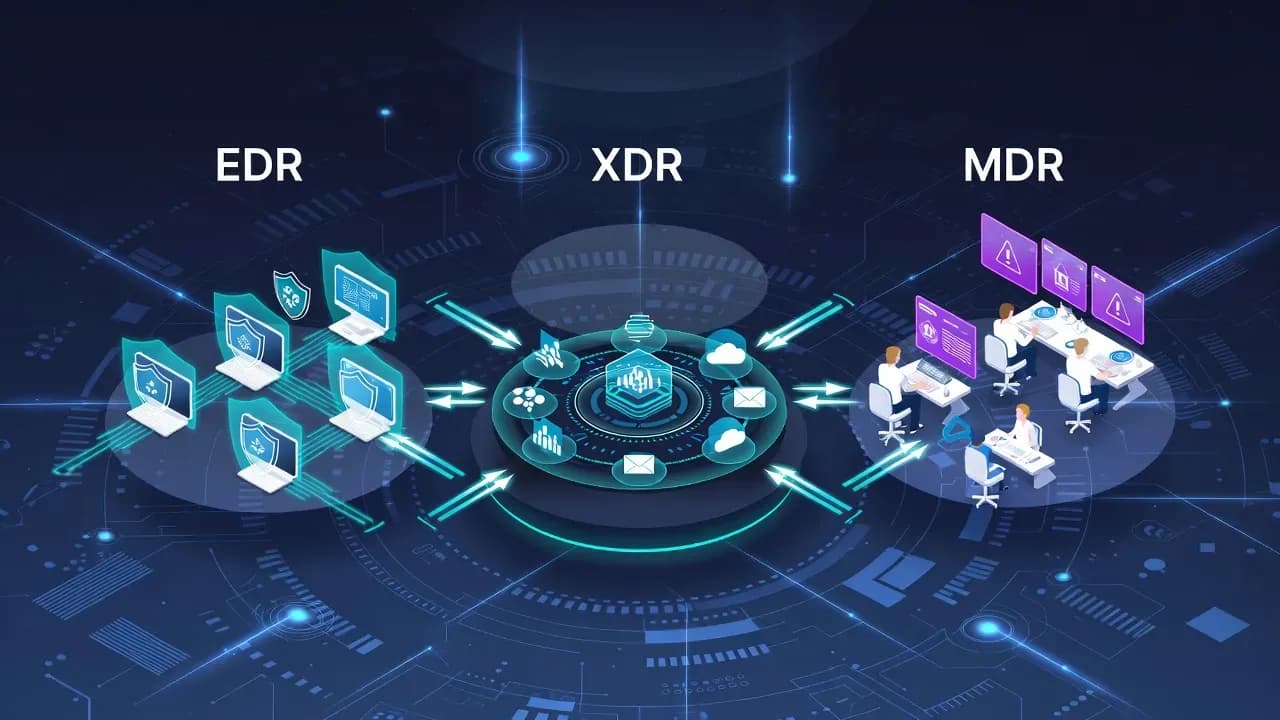
What Is EDR vs XDR vs MDR: The Differences Explained
EDR, XDR, and MDR represent different approaches to threat detection and response. Understanding when to use each - and how they complement each other - is critical for building an effective security strategy.

of breaches take months to discover without proper detection capabilities, according to Mandiant research
Why EDR, XDR, and MDR Matter Now
The cybersecurity market has fragmented threat detection into dozens of competing solutions, each claiming to be the "one tool you need." This fragmentation creates real problems for IT decision-makers:
- Purchasing decisions become political rather than technical
- Organizations deploy tools that don't integrate properly
- Security teams operate in silos with incompatible data
- Threat actors continue compromising networks despite massive security investment
EDR, XDR, and MDR are NOT competitors fighting for your budget. They represent fundamentally different architectural approaches to threat detection and response. Understanding the distinctions allows you to choose correctly rather than following vendor marketing.
The Evolution of Enterprise Threat Detection
To understand why these technologies exist, you need to understand the problems they each solve.
2010-2013: The Antivirus Crisis
Traditional antivirus relied on signature matching - essentially asking "is this file on our known-bad list?" This approach worked against known malware but failed catastrophically against:
- Zero-day exploits (previously unknown vulnerabilities)
- Polymorphic malware (constantly changing to evade signatures)
- Fileless attacks (executing malicious code in memory without creating files)
- Sophisticated threat actors who understood signature evasion
By 2013, antivirus had become theater - it looked like protection but provided minimal actual security.
2013-2015: EDR Emerges
Endpoint Detection and Response emerged as the answer to antivirus's fundamental limitations. Instead of matching files against a blocklist, EDR agents installed on endpoints continuously recorded system activity: process execution, file writes, network connections, registry modifications. This behavioral data flowed to a central console where security analysts could detect threats based on behavioral patterns rather than signatures.
EDR was revolutionary. It worked. Organizations deployed it and actually detected real attacks that antivirus had missed.
2018-2020: The EDR Limitation Emerges
Organizations deployed EDR broadly and discovered its architectural limitation: EDR only sees what happens on endpoints. Modern attacks rarely confine themselves to endpoint activities. An attacker might compromise credentials through phishing email, use those credentials to access cloud infrastructure, and exfiltrate data through legitimate cloud services - all without triggering meaningful endpoint alerts.
2020-2022: XDR Emerges
Extended Detection and Response represents the architectural response to EDR's limitations. Rather than focusing narrowly on endpoints, XDR aggregates security data across multiple domains: endpoints, network, email, cloud, identity. By correlating events across these domains, XDR can detect attack patterns that would be invisible to any single domain-specific tool.
2018-Present: MDR as Operational Response
While XDR addressed technological limitations, MDR addressed an equally fundamental problem: most organizations lack the expertise to operate sophisticated security tools effectively. A well-configured EDR or XDR generates hundreds of alerts daily. Each alert requires investigation. MDR acknowledges this reality by having external specialists operate security tools on behalf of the organization.
EDR: Endpoint Detection and Response
EDR provides deep visibility into endpoint activity, enabling detection of threats that bypass preventive controls. Understanding EDR's technical foundation helps explain its capabilities and limitations.
What EDR Actually Does
A software agent installed on endpoints (laptops, servers, workstations) continuously records system activity and provides tools for investigating and responding to incidents.
| Data Collected | Purpose | Example Detection |
|---|---|---|
| Process execution | Detect malicious process chains | PowerShell spawning from Word document |
| File operations | Track malware delivery and staging | New executable in temp directory |
| Network connections | Identify command and control | Outbound connection to known-bad IP |
| Registry modifications | Detect persistence mechanisms | Run key modification |
| Memory operations | Catch fileless attacks | Suspicious memory injection |
| Authentication events | Identify credential abuse | Multiple failed logins |
EDR Agent Architecture
Each EDR agent maintains three critical functions:
1. Behavioral Telemetry Collection
The EDR agent instruments the operating system to record system activity at multiple levels. This telemetry is continuously recorded regardless of whether any threat is detected. The agent buffers this data and sends it to the central EDR console for analysis.
Data volume is substantial: a single endpoint might generate 10-100GB of telemetry daily depending on system activity. This is why EDR solutions require robust backend infrastructure.
2. Local Detection and Prevention
While telemetry streams to the central console, the agent performs local detection based on locally-stored detection rules:
Rule: Detect PowerShell encoded command execution
IF (process name = "powershell.exe"
    AND command line contains "-EncodedCommand"
    AND process parent != "explorer.exe")
THEN Alert + Optionally block
Local detection provides faster response for high-confidence threats. Central detection analyzing aggregated telemetry provides more sophisticated analysis.
3. Incident Response Capabilities
When a threat is confirmed, the EDR agent can execute response actions:
- Endpoint isolation: Disconnect from network (prevents lateral movement)
- Process termination: Kill malicious process
- File quarantine: Move suspected malware to quarantine storage
- Memory dump: Capture system memory for forensic analysis
What EDR Does NOT See
Typical EDR Platforms
- CrowdStrike Falcon: Cloud-native, excellent threat intelligence
- Microsoft Defender for Endpoint: M365 integration, good value
- SentinelOne Singularity: Strong autonomous response
- Trend Micro Apex One: Traditional enterprise deployment
XDR: Extended Detection and Response
XDR extends detection and response capabilities beyond endpoints to encompass the entire attack surface. It adds significant complexity by correlating data across multiple domains.
reduction in mean time to detect reported by organizations using XDR compared to siloed security tools
The XDR Vision
Modern attacks span multiple domains. An attacker might:
- Email: Send phishing message with malicious link
- Identity: Steal credentials through fake login page
- Cloud: Use stolen credentials to access SaaS application
- Endpoint: Download additional tools to compromised workstation
- Network: Move laterally to high-value targets
EDR sees step 4. XDR sees all five steps and connects them into a single attack narrative.
XDR Data Ingestion and Normalization
XDR platforms accept data from heterogeneous sources:
| Source | Data Type | Example Events |
|---|---|---|
| Endpoint (EDR) | Process telemetry | cmd.exe /c whoami executed |
| Network | IDS/proxy logs | Unusual outbound connection |
| Message metadata | Suspicious attachment received | |
| Cloud | Platform activity | Permission changes in Azure |
| Identity | Auth events | Login from unusual location |
The challenge: Each source speaks a different "language." XDR solves this by normalizing all data into a common schema, enabling correlation across domains.
XDR Correlation Rules
Once data is normalized, XDR applies correlation rules that connect events across domains:
Rule: Detect email→endpoint→network attack chain

IF (
    Email event: attachment sent to user
    AND Endpoint event: attachment executed (within 5 min)
    AND Endpoint event: Process creates network connection to C2
    AND Network event: Unusual outbound traffic to non-standard port
)
THEN
    Correlation confidence: HIGH
    Attack pattern: Email→Execution→C2 communication
    Alert: CRITICAL
Without XDR, each event would be logged separately in different systems. Human analysts might never connect them.
XDR Architecture Types
Native XDR: Single vendor provides endpoints, network, email, cloud, and identity security as tightly integrated components.
- Example: Microsoft Defender XDR (endpoints, email, identity, cloud through tightly integrated stack)
- Advantage: Deep integration, single console
- Disadvantage: Vendor lock-in, may require replacing existing tools
Open XDR: Platform ingests data from multiple vendors regardless of source.
- Example: Stellar Cyber, ReliaQuest GreyMatter
- Advantage: Keep existing investments, best-of-breed flexibility
- Disadvantage: Integration quality varies, more complex management
Typical XDR Platforms
- Microsoft Defender XDR: Native XDR for Microsoft shops
- CrowdStrike Falcon Complete: EDR-centric XDR
- Palo Alto Cortex XDR: Network-centric XDR
- Trend Micro Vision One: Broad coverage
MDR: Managed Detection and Response
MDR adds human expertise to technology. While EDR and XDR provide tools, MDR provides the skilled analysts who use them effectively.
The Staffing Reality
MDR acknowledges this reality: instead of expecting every organization to build and staff internal security operations centers, external specialists operate security tools on behalf of the organization.
What MDR Actually Provides
| Service | Description | Value |
|---|---|---|
| 24/7 Monitoring | Security team watches your environment continuously | Threats don't wait for business hours |
| Alert Triage | Filter thousands of alerts, escalate real threats | Reduces noise, focuses on what matters |
| Investigation | Determines breach scope, identifies attack patterns | Expert analysis without hiring experts |
| Response | Recommend or execute remediation actions | Faster containment of active threats |
| Threat Hunting | Proactively search for hidden threats | Find what automated detection misses |
Two MDR Models
Managed EDR / Bring Your Own Tech
Provider operates your existing EDR platform. You maintain the technology license; they provide the expertise.
- Example: Arctic Wolf managing your CrowdStrike deployment
- Advantage: Keep existing technology investments
- Disadvantage: Provider must support your specific platform
Native Managed
Provider supplies both technology AND service. You don't maintain a separate tool.
- Example: CrowdStrike Falcon Complete (includes EDR + managed service)
- Advantage: Single vendor, integrated support
- Disadvantage: May require replacing existing tools
What MDR is NOT
Typical MDR Providers
- Arctic Wolf: Strong for mid-market, bring-your-own-tech model
- Expel: High-touch service, excellent communication
- Red Canary: Strong threat hunting, technical depth
- CrowdStrike Falcon Complete: Native managed with CrowdStrike tech
- SentinelOne Vigilance: Native managed with SentinelOne tech
EDR vs XDR vs MDR: Direct Comparison
These technologies serve different purposes and often complement each other. Understanding the distinctions helps you choose correctly.
Head-to-Head Comparison
| Dimension | EDR | XDR | MDR |
|---|---|---|---|
| What you buy | Product (software) | Product (platform) | Service (expertise) |
| Who operates it | Your team | Your team | External team |
| Scope of visibility | Endpoints only | Endpoints + Network + Email + Cloud + Identity | Whatever your tools cover + expert analysis |
| Implementation time | Weeks to months | Months to quarters | Weeks (if using provider's tech) |
| Requires internal expertise | YES (sophisticated) | YES (very sophisticated) | NO (provider has expertise) |
| Cost model | Per-endpoint/year | Per-endpoint/year + integration costs | Per-endpoint/month |
| Detection breadth | Endpoint-centric | Cross-domain correlation | Limited by tools + human investigation |
| Investigation capability | Single-domain | Multi-domain unified | Depends on provider, typically strong |
| Response speed | Depends on your team | Automated or manual | Typically faster (24/7 coverage) |
| False positive rate | High (requires tuning) | Medium (better with correlation) | Low (human filtering) |
Cost Reality Check
| Solution | Typical Cost | Example (500 endpoints) |
|---|---|---|
| EDR | $50-150/endpoint/year | $25-75k/year |
| XDR | $100-300/endpoint/year | $50-150k/year |
| MDR | $15-50/endpoint/month | $90-300k/year |
| Internal SOC (5 analysts) | ~$500-1000k/year | Salary + tooling |
For small organizations (50-200 endpoints), MDR is often cheaper than building internal capability. For large organizations (1000+ endpoints), EDR or XDR becomes more cost-effective per endpoint.
Decision Quick Reference
Choosing Between EDR, XDR, and MDR: Decision Framework
The choice between these approaches depends on organizational factors, not just technical capabilities.
Factor 1: Your Security Maturity
Level 1: No dedicated security team
If your organization lacks dedicated security staff, you have no path to success with EDR or XDR alone. These tools generate hundreds of alerts daily; effective operation requires trained analysts investigating and responding.
→ Recommendation: MDR with provider-supplied EDR. The external team handles alert triage and investigation.
Level 2: Small security team (1-3 people), no 24/7 coverage
Your team can operate EDR effectively during business hours. For nights and weekends when your team isn't working, external MDR provides coverage.
→ Recommendation: EDR internally + MDR for nights/weekends. Hybrid approach balances cost and coverage.
Level 3: Dedicated SOC with 24/7 coverage (5+ analysts)
Your team has the expertise and coverage to operate sophisticated tools. Choice between EDR and XDR depends on your environment.
→ Recommendation: XDR if hybrid/cloud infrastructure; EDR may suffice if purely on-premise.
Factor 2: Your Infrastructure Architecture
| Infrastructure Type | Recommendation | Reasoning |
|---|---|---|
| On-premise focused | EDR likely sufficient | Primary attack surface is endpoints |
| Hybrid or multi-cloud | XDR strongly recommended | Need cross-domain visibility for lateral movement |
| Cloud-native (SaaS + cloud infra) | XDR required | Endpoints aren't your primary attack surface |
Factor 3: Regulatory Requirements
SOC2, HIPAA, PCI-DSS required?
Compliance frameworks typically require evidence of monitoring, incident response capability, and regular security assessments. MDR can help satisfy these requirements through continuous monitoring and evidence collection.
→ Recommendation: Managed option (MDR) can simplify compliance.
Factor 4: Budget Reality
| Budget Range | Recommended Approach |
|---|---|
| $0-50k/year | MDR with provider tech, or accept higher risk |
| $50-200k/year | EDR + part-time MDR, or small internal team |
| $200-500k/year | XDR + small dedicated team (2-3 analysts) |
| $500k+/year | Build dedicated SOC with in-house XDR |
XDR vs SIEM: Understanding the Difference
One of the most confusing aspects of modern security architecture is the relationship between XDR and SIEM. Both aggregate data, both enable investigation, both are often discussed as competing technologies. In practice, they're complementary.
SIEM: Comprehensive Log Aggregation
Security Information and Event Management (SIEM) emerged to solve a specific problem: organizations generated enormous volumes of logs from hundreds of systems and had no way to analyze them together.
SIEM provides:
- Log collection from virtually ANY source (servers, applications, databases, firewalls, custom apps)
- Long-term storage (years of log history)
- Compliance reporting (generate audit reports for regulatory requirements)
- Custom analytics (build arbitrary correlation rules)
- Investigation capability (query across entire organization's logs)
SIEM limitations:
- Massive data volumes mean alerting is noisy (thousands of alerts, many false positives)
- No built-in threat intelligence (you must build detection rules yourself)
- Investigation requires expertise (SIEM data is complex)
- Response is manual and slow
Typical SIEM platforms: Splunk, IBM QRadar, Elastic Stack, Microsoft Sentinel
XDR: Targeted Threat Detection
XDR focuses narrowly on threat detection and response. Unlike SIEM's comprehensive log ingest, XDR focuses on security-relevant data.
XDR provides:
- Threat detection with built-in intelligence (vendor provides optimized detection rules)
- Automated correlation across security domains
- Response automation (can automatically execute response actions)
- Faster investigation (data is pre-correlated, not raw logs)
XDR limitations:
- Limited to security data (doesn't ingest HR systems, business app logs, etc.)
- Shorter history (typically 90-365 days, not years)
- Less useful for compliance reporting
- Cannot build arbitrary analytics on non-security data
When You Need Both
In mature security organizations, both typically exist:
| Function | Tool | Why |
|---|---|---|
| Day-to-day threat detection | XDR | Fast detection, automated response |
| Compliance reporting | SIEM | Long-term retention, audit trails |
| Historical forensics | SIEM | Years of log data for post-incident analysis |
| Active incident response | XDR | Real-time correlation, immediate action |
| Custom business analytics | SIEM | Flexibility for non-security queries |
Common EDR/XDR/MDR Mistakes to Avoid
Detection and response deployments fail for predictable reasons. Learn from others' mistakes.
Mistake 1: Deploying XDR Without Operational Capability
Solution: Start with high-confidence detection rules only. Gradually increase sensitivity as team capability grows. Plan analyst staffing BEFORE deploying XDR.
Rule of thumb: 10-30 alerts per analyst per 8-hour shift is manageable. 100+ alerts is unsustainable.
Mistake 2: "MDR Will Replace Our Internal Team"
MDR provides monitoring and investigation, NOT operational control. MDR cannot:
- Implement your security policies
- Configure your tools long-term
- Participate in your incident response planning
- Make strategic security decisions
Solution: MDR complements, doesn't replace. Maintain at least one senior internal security person for policy, escalation, and vendor relationships.
Mistake 3: "We Bought XDR, Why Do We Need SIEM?"
XDR doesn't retain logs for 5+ years (compliance requirement). XDR doesn't ingest non-security logs. XDR can't build custom analytics on arbitrary data.
Solution: Both serve different purposes. XDR for threat detection/response; SIEM for compliance/forensics.
Mistake 4: "We'll Deploy EDR for Critical Systems Only"
Attackers compromise non-critical systems first (less monitored), then use them to move laterally to critical systems. By the time you detect compromise, attacker already has high-value access.
Solution: Deploy EDR to ALL endpoints. The cost difference between protecting 50% and 100% of endpoints is small (~$50-100/endpoint/year).
Mistake 5: "We Have EDR, We're Protected"
EDR only sees endpoints. Modern attacks span email, cloud, identity, and network. If your attacker compromises cloud credentials through phishing and accesses cloud resources directly, EDR sees nothing.
Solution: Understand EDR's limitations. For hybrid/cloud environments, XDR or layered security is essential.
Mistake 6: Ignoring Alert Tuning
Default EDR/XDR configurations generate excessive alerts. Many organizations leave defaults, become overwhelmed, and ignore alerts entirely.
Solution: Dedicate time to tuning during first 90 days. Reduce false positives through baseline tuning. Review alert volumes weekly until manageable.
Real Attack Scenarios: EDR, XDR, MDR in Practice
Understanding how each technology responds to actual attacks clarifies when each is most valuable.
Scenario 1: Ransomware Attack (EDR Shines)
Attack timeline:
- 9:00 AM: Malicious email arrives, user downloads attachment
- 9:05 AM: User clicks attachment, execution begins
- 9:10 AM: Ransomware begins encrypting files
With EDR:
- 9:06 AM (1 min after execution): EDR detects suspicious process behavior
- 9:07 AM: EDR alerts analyst who confirms malware
- 9:08 AM: Analyst isolates endpoint
- Outcome: Ransomware contained, minimal damage
Without EDR:
- 9:00 AM-2:00 PM: Ransomware spreads undetected
- 2:00 PM: User notices encrypted files
- Outcome: Hours of spread, extensive damage
Why EDR was critical: Entire attack happened at endpoint level; EDR sees it in real-time.
Scenario 2: Credential Compromise (XDR Shines)
Attack timeline:
- 9:00 AM: Attacker steals admin credentials through phishing
- 9:15 AM: Attacker authenticates to Azure AD using stolen creds
- 9:30 AM: Attacker grants additional Azure permissions
- 10:00 AM: Attacker exfiltrates data to external storage
With EDR only:
- EDR sees NOTHING (no endpoint activity)
- Admin's laptop isn't compromised, all activity appears legitimate
- Outcome: Breach goes undetected
With XDR:
- 9:16 AM: Identity system detects auth from unusual location
- 9:31 AM: Cloud logs show unusual permission changes
- 9:35 AM: XDR correlates events, alerts analyst
- 9:45 AM: Analyst disables compromised account
- Outcome: Breach detected before data exfiltration
Why XDR was critical: Attack spanned identity + cloud (not endpoint). XDR saw across domains.
Scenario 3: After-Hours Breach (MDR Shines)
Attack timeline:
- Day 1, 11:30 PM: Attacker compromises endpoint via malware
- Day 2-8: Attacker establishes persistence, moves laterally (after hours)
- Day 9: Data exfiltration begins
Internal Team Only (No 24/7):
- Days 1-8: After-hours; no one monitoring
- Day 10: Business hours, analyst finally notices
- Outcome: Attacker had 9 days undetected
With MDR (24/7 Coverage):
- Day 2, 12:15 AM: MDR team gets alert, investigates
- Day 2, 1:00 AM: MDR confirms malware, isolates endpoint
- Outcome: Attacker detected after 2 hours, not 9 days
Why MDR was critical: Breach occurred during non-business hours. MDR's 24/7 coverage caught it immediately.
Implementation Roadmap: EDR/XDR/MDR Deployment
A realistic timeline for deploying detection and response capabilities.
Phase 1: Assessment (Weeks 1-4)
| Activity | Output | Why It Matters |
|---|---|---|
| Endpoint inventory | Count by OS, location | Determines licensing cost |
| Application inventory | What runs on endpoints | Identifies compatibility issues |
| Current security tools | Existing EDR, AV, SIEM | Determines integration needs |
| Incident history | Past breaches, near-misses | Informs detection priorities |
| Compliance requirements | SOC2, HIPAA, PCI-DSS | Shapes vendor selection |
Phase 2: Technology Selection (Weeks 5-12)
For EDR selection, evaluate:
- CrowdStrike Falcon, Microsoft Defender for Endpoint, SentinelOne
- Key differentiators: management UI, response automation, integration with existing tools
For XDR selection, decide:
- Native XDR (single vendor) vs Open XDR (multi-vendor)
- Key question: Do you want to standardize or keep existing tools?
For MDR selection, decide:
- Bring-your-own-tech (Arctic Wolf, Expel) vs Native (CrowdStrike Complete)
- Key question: Replace existing tools or keep them?
Pilot deployment:
- 50-100 endpoints minimum
- 4-week evaluation period
- Measure: detection quality, false positive rate, performance impact
Phase 3: Production Deployment (Weeks 13-24)
| Week | Milestone | Activities |
|---|---|---|
| 13-16 | 25% deployed | One department or location, close monitoring |
| 17-20 | 50% deployed | Address issues from 25% phase, expand |
| 21-24 | 100% deployed | Complete coverage, phase out legacy tools |
Phase 4: Operational Optimization (Months 7-12)
Month 7-8: Build operational procedures
- Alert triage procedures (which alerts require immediate attention?)
- Incident response playbooks (if EDR detects X, do Y)
- Escalation procedures (when to escalate to leadership?)
Month 9-10: Threat hunting
- Proactively search for threats that automated detection misses
- Build new detection rules based on findings
Month 11-12: Capability assessment
- Measure: Mean time to detect, mean time to respond, false positive rate
- Adjust detection rules based on assessment
Frequently Asked Questions
Q: We have EDR deployed. Why would we need XDR?
EDR is excellent for endpoint-based attacks, but modern attacks rarely confine themselves to endpoints. An attacker might compromise credentials through email, access cloud apps directly, and exfiltrate data - all without triggering endpoint alerts. XDR correlates events across these domains, catching attacks EDR would miss.
If your environment is pure on-premise and endpoint-focused, EDR may suffice. If you have cloud, SaaS, or hybrid infrastructure, XDR becomes valuable.
Q: We have an internal SOC. Why use MDR?
Your internal SOC is valuable. MDR complements it:
- 24/7 coverage when your team isn't available
- Specialized expertise for complex threats
- Surge capacity during major incidents
- Proactive threat hunting
Many mature organizations use a hybrid model: internal SOC for strategic security, MDR for 24/7 coverage.
Q: Can I mix vendors (CrowdStrike EDR + Palo Alto XDR)?
Yes, through Open XDR. CrowdStrike publishes endpoint telemetry that Palo Alto Cortex XDR can ingest. Advantages: keep existing investments, best-of-breed flexibility. Disadvantages: integration quality varies, support complexity.
Q: How do I know if my EDR/XDR is working?
Measure through:
- Red team testing: Do your tools detect simulated attacks?
- Mean Time to Detect (MTTD): Target <1 hour for sophisticated attacks
- False positive rate: Target <10%
- Breach discovery method: Found by your tools or external notification?
Key Takeaways
Frequently Asked Questions
EDR focuses exclusively on endpoints such as laptops, servers, and workstations, collecting telemetry and detecting threats at the endpoint level. XDR extends this by correlating data across multiple security domains including endpoints, network, email, cloud, and identity to detect attacks that span your environment. XDR provides broader visibility across the organization while EDR provides deeper endpoint-specific capability. Most XDR platforms include EDR functionality as one component of the broader platform.
XDR and SIEM have overlapping capabilities but serve different primary purposes. XDR focuses on threat detection and response with vendor-provided detections optimized for security operations. SIEM provides broader log management, compliance reporting, and custom analytics across all data sources. Many organizations use both: XDR for day-to-day security operations and SIEM for compliance requirements and long-term log retention. The boundaries are blurring as XDR platforms add SIEM-like capabilities and SIEMs incorporate XDR-style detection.
Most XDR platforms include EDR capabilities as part of the integrated stack, so you typically don't need a separate EDR if you're deploying native XDR from a single vendor. However, if you're using open XDR that integrates with existing tools rather than providing its own endpoint protection, you still need a separate EDR solution. The answer depends entirely on your XDR architecture and whether it includes native endpoint protection or relies on third-party integrations.
MDR provides three things most organizations struggle to build internally. First, it delivers 24/7/365 monitoring coverage without the expense of building and staffing a security operations center. Second, it supplies security expertise to investigate alerts effectively and respond appropriately, expertise that's expensive and difficult to hire. Third, it provides continuously updated threat intelligence and detection content from dedicated research teams. You can build all of these internally, but it requires significant sustained investment in people, process, and tooling.
MDR typically costs between $15-50 per endpoint per month depending on service scope and SLA requirements. For a 500-endpoint organization, that translates to roughly $90,000-$300,000 annually. Building a 24/7 internal SOC requires minimum five to seven analysts to cover all shifts with redundancy, plus a manager, plus tooling - easily exceeding $800,000 annually in fully-loaded costs. For most mid-market organizations, MDR is significantly more cost-effective until you reach the scale where internal operations become economical.
Yes, many MDR providers offer bring-your-own-technology models where they operate your existing EDR platform. Providers like Arctic Wolf, Expel, and Red Canary support multiple EDR platforms and can layer their service on top of your current investments. However, some MDR services like CrowdStrike Falcon Complete and SentinelOne Vigilance require their own EDR stack as part of the service. Evaluate whether the MDR provider supports your specific platform before committing.
Traditional MSSPs primarily monitored security logs and forwarded alerts to customers for action - essentially outsourced alert queuing. MDR providers actively investigate alerts to filter false positives, determine threat scope, and take response actions. The detection and response in MDR is the key differentiator - MDR providers do the analysis work rather than simply passing alerts along. Many traditional MSSPs have evolved to offer MDR services as customer expectations have shifted.
Measure detection efficacy through red team exercises, purple team testing, or breach and attack simulation tools that test whether your XDR detects known attack patterns. Track operational metrics including Mean Time to Detect, Mean Time to Respond, false positive rates, and investigation closure times. Review whether security incidents are being caught by XDR or discovered through other means like user reports or external notifications. Effective XDR should demonstrate measurable improvements in these metrics over time.
MDR providers access your security telemetry to perform monitoring and investigation. Data handling practices vary by provider - some store data in their cloud infrastructure, others query your systems in real-time without persistent storage. Key questions to ask include where data is stored, how long it's retained, who has access to it, and what happens to data if you terminate the service. Ensure the provider's data practices meet your compliance requirements, particularly for regulated industries.
For small businesses without dedicated security staff, MDR with provider-supplied EDR is typically the best starting point. You get endpoint protection plus 24/7 expert monitoring without needing to build internal security capability. The MDR provider handles detection, investigation, and response while you focus on running your business. As you grow, you can evaluate whether to bring capabilities in-house or expand to XDR-based MDR services for broader coverage across your environment.
Comments
Want to join the discussion?
Create an account to unlock exclusive member content, save your favorite articles, and join our community of IT professionals.
New here? Create a free account to get started.