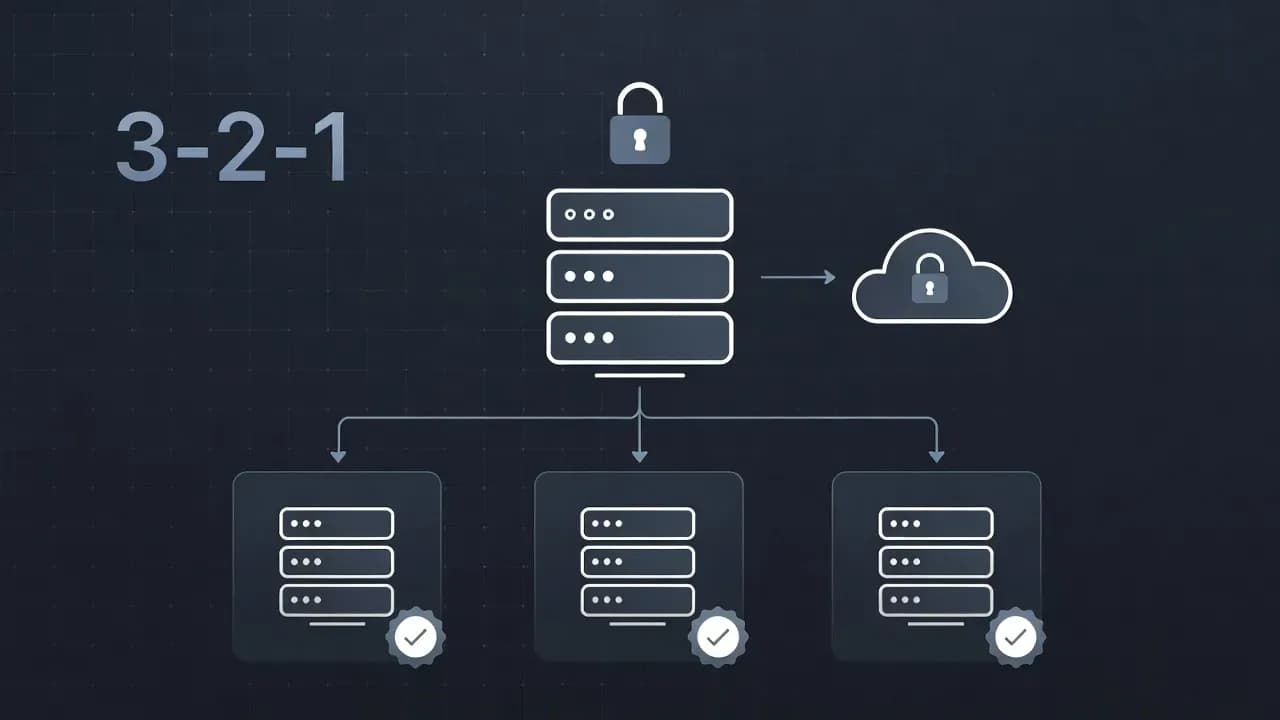
The 3-2-1-1-0 Backup Rule Explained (NAS, Cloud, Immutability, and Ransomware Reality)
A premium, practical guide to the 3-2-1-1-0 backup rule. Learn how ransomware targets backups, how immutability works, and see real NAS and cloud setups that actually restore.

A short story from real incidents (why this matters)
In many ransomware cases, encryption is not the first move. Attackers often spend days inside the environment:
They harvest credentials, map file shares, identify the backup product, and locate the backup repository. Then they do something that changes everything: they try to destroy your recovery options before encrypting production.
That is why organizations get hit twice:
- Production gets encrypted
- Backups are deleted, encrypted, or rendered unusable
The 3-2-1-1-0 rule is designed to break that chain. It forces you to build at least one copy that an attacker cannot modify, and it forces you to prove restores in advance.
What each number really means (and what people get wrong)
3 copies: what "independent" actually means
"Three copies" should not be three copies that all depend on the same admin credential or the same storage platform.
A practical interpretation:
- Copy 1: your live data (servers, endpoints, SaaS, NAS shares)
- Copy 2: a fast local restore copy (NAS or backup repository for speed)
- Copy 3: a second backup copy that survives compromise (offsite, and preferably immutable)
Why two backup copies matter: one can silently fail (corruption, retention bug, misconfig, partial encryption, incomplete application consistency). Two gives you a second chance.
2 media: failure-mode diversity, not marketing vocabulary
"Different media" is best understood as different failure modes.
Good pairs:
- Local NAS disk + cloud object storage
- Local backup appliance + secondary site repository
- Disk-based backups + offline export (tape or detached storage)
Weak pairs:
- NAS A replicated to NAS B with the same admin plane
- Two repos on the same hypervisor cluster
- Backups stored as a writable SMB share in the same domain
If one compromise can reach both, you did not meaningfully diversify.
1 offsite: defend against site loss and full-environment compromise
Offsite is your protection against:
- Fire, flood, theft
- Total site outage
- A ransomware event that wipes local infrastructure
Cloud is common because it is operationally simpler than maintaining a second physical site. The key is to treat it as a separate security zone, not just "another folder in the cloud".
1 offline or immutable: the ransomware firewall for backups
This is the most important upgrade.
Offline (air gapped) means the backup copy is not continuously reachable from production networks. If attackers cannot reach it, they cannot delete it.
Immutable means the backup copy is stored with retention rules that prevent modification or deletion until the retention period expires. This is often implemented using WORM-like retention or object storage lock mechanisms.
A simple truth: if a compromised admin can log in and delete your offsite backups, you do not have the "1".
0 errors: the part that turns "backup" into "recovery"
"0 errors" is not a slogan. It is an operational standard:
- Jobs succeed
- Integrity checks succeed
- Restore tests succeed
- Alerts reach humans who respond
A backup that cannot be restored is not a backup. It is a bill.
The ransomware backup kill chain (how attackers break recovery)
Understanding the attack path helps you build controls that matter.
- Initial access (phishing, exposed VPN, stolen credentials)
- Privilege escalation (local admin to domain admin, token theft)
- Recon (find backup server, NAS, cloud accounts, documentation)
- Disable recovery (stop jobs, delete snapshots, purge repositories)
- Encryption and extortion (file shares, VMs, endpoints, sometimes AD)
- Pressure (deadlines, data leak threats, repeated encryption attempts)
Your goal with 3-2-1-1-0 is to make step 4 fail. If step 4 fails, ransomware becomes a recovery event, not an existential crisis.
Immutability explained for IT teams (no hype, just mechanics)
Immutability is effective when it is enforced below your backup software, at the storage layer, with rules that cannot be bypassed by normal admin access.
What "immutable" should guarantee
- Backups can be written
- Backups cannot be modified
- Backups cannot be deleted until retention ends
- Retention cannot be shortened by regular admins
The two most common immutability mistakes
- Immutability exists, but the same admin can disable it
- Retention is too short, so attackers simply wait out the window (or you roll over clean points too quickly)
Immutability vs snapshots: do not confuse them
Snapshots are extremely useful for fast rollback and accidental deletion protection, but they can be deleted if an attacker gains snapshot admin rights. Treat snapshots as a speed layer, not your last line of defense.
Practical architectures that meet 3-2-1-1-0
Architecture A: Small business with NAS + cloud immutability
Best for: SMB, small IT teams, MSP-managed sites
Goal: Fast local restore plus ransomware-safe offsite
How it maps to 3-2-1-1-0:
- 3 copies: production + local backups + offsite backups
- 2 media: NAS disk + cloud object storage
- 1 offsite: cloud bucket in a separate account
- 1 immutable: object storage retention enabled
- 0 errors: weekly restore tests, monthly full restore rehearsal
Implementation notes (what actually matters):
- Separate credentials for backup operations vs production admin
- Store offsite backups in a separate cloud tenant/account with restricted roles
- Do not expose NAS management interfaces to the open internet
- Prefer backup protocols that do not require a writable SMB share as a repository
Architecture B: MSP baseline for multiple clients (tenant isolation)
Best for: MSPs who need repeatable, auditable recovery
Goal: Standardize security controls and prove recoverability
Key design choices:
- Per-client isolation at the repository level (not just folder-level)
- Break-glass access separated from daily operations
- Automated restore verification to detect silent failures
Operationally, this architecture wins because it scales: you can measure backup health like a service, not like a set of ad hoc jobs.
Architecture C: Virtualization (VMware or Hyper-V) with tiered recovery
Best for: Organizations with VM-heavy workloads
Goal: Restore fast locally, survive ransomware with immutable offsite
A strong pattern is:
- Local repository for rapid VM restores and granular file recovery
- Immutable offsite repository for worst-case events
- Periodic "clean-room" restore rehearsal for one tier-1 service
"0 errors" in practice: what you should test (and how often)
Teams often test "a file restore once" and assume they are done. For ransomware resilience, test at three levels:
Level 1: File restore (daily or several times per week)
Pick random files from different systems, restore them, verify contents.
Level 2: System restore (weekly or bi-weekly)
Restore one representative VM or server image into an isolated network. Validate boot, services, and authentication.
Level 3: Service restore (monthly or quarterly)
Restore a real business service (example: line-of-business app + database + file share). Measure:
- Actual RTO (time to recover service)
- Actual RPO (how much data you lose)
- Dependencies that were not documented (DNS, certificates, IAM)
The goal is not perfection. The goal is to remove unknowns before an incident removes your options.
Why backups fail during ransomware (and the fixes that work)
Below are the most common failure patterns seen in real recoveries.
1) Backup infrastructure shares the same identity plane as production
If the backup server is domain-joined and managed with the same highly privileged accounts, attackers will reach it quickly.
Fix:
- Separate backup accounts and roles
- MFA for backup consoles
- Limit inbound management access to known admin networks
2) Repositories are writable and deletable with one set of credentials
If a compromised admin can delete or encrypt the repository, ransomware will.
Fix:
- Implement immutable retention offsite
- Separate write permissions from delete permissions
- Use a dedicated cloud account/tenant for backup storage
3) Replication overwrites clean data with encrypted data
"Replication" is not "backup". Sync can propagate damage immediately.
Fix:
- Keep versioned backups with retention and multiple restore points
- Monitor change-rate anomalies (sudden spikes, mass renames, new extensions)
4) Retention windows are too short
If you only retain a few days, late detection can leave you with only infected restore points.
Fix:
- Extend retention for critical datasets
- Keep at least one longer retention tier (weekly or monthly points)
5) Restore paths were never tested
In many incidents, the job history is green, but restores fail due to permissions, missing encryption keys, broken application consistency, or undocumented dependencies.
Fix:
- Schedule restore tests
- Maintain a recovery runbook
- Store required credentials and keys in a secure vault
6) Monitoring exists, but there is no response
Backup failures often sit unresolved for weeks.
Fix:
A 14-day blueprint to implement 3-2-1-1-0 (without boiling the ocean)
This is intentionally realistic. Most teams can execute it without pausing operations.
Days 1 to 2: Classify data and define recovery targets
Identify:
- Tier-1 services (identity, finance, customer systems)
- Acceptable RPO and RTO by tier
- Data sources you often forget (SaaS, endpoints, NAS shares)
Days 3 to 5: Separate access and harden management
- Create dedicated backup operator accounts
- Enable MFA for management portals
- Restrict management interfaces (VPN, allowlists, admin subnets)
Days 6 to 9: Add immutable offsite storage
- Set up offsite object storage in a dedicated account
- Enable immutability and set retention
- Ensure daily operations cannot shorten retention or purge data
Days 10 to 12: Automate verification and alerting
- Configure integrity checks where supported
- Implement restore verification jobs
- Route alerts to humans with escalation
Days 13 to 14: Run a real restore rehearsal
Restore at least one tier-1 service into an isolated network. Time it. Document it. Fix what broke.
Common mistakes (fast to read, expensive to learn)
- RAID is not backup. It improves availability, not recoverability.
- Snapshots are not your last line of defense. Treat them as a speed layer.
- Sync is not backup. It can replicate encryption instantly.
- One admin to rule them all fails. Separate identities and roles.
- Retention that is too short is a trap. Keep enough history for late detection.
- No restore tests means no confidence. Prove recovery regularly.
Conclusion
The 3-2-1-1-0 rule is not a checklist for compliance. It is a survival model for modern incidents.
If you implement only two improvements this quarter:
- Add immutable offsite backups
- Schedule restore tests until your team can restore under pressure
That is the difference between "we have backups" and "we can recover".
Frequently Asked Questions
Not if ransomware is a realistic risk. Small businesses are targeted precisely because recovery is often weak. The "1 immutable/offline" and "0 verified" parts are what prevent a total loss.
Long enough to survive late detection. If you discover an incident weeks after initial compromise, a 7-day retention window can be useless. Align retention to your detection maturity and risk tolerance.
Snapshots are valuable, but they can be deleted if an attacker gains sufficient privileges. True immutability is enforced by retention rules that cannot be bypassed by standard admins.
You need at least one of them. Higher-risk environments often implement both: immutable offsite plus periodic offline exports.
Start with what you can: frequent file restores across systems, monthly restore of one server or VM into an isolated network, quarterly restore of one business service and validate real functionality.
Comments
Want to join the discussion?
Create an account to unlock exclusive member content, save your favorite articles, and join our community of IT professionals.
New here? Create a free account to get started.