Windows Security Identifiers (SIDs) Explained: How They Work
Security Identifiers (SIDs) are the fundamental identifiers used by Microsoft Windows to uniquely represent users, groups, and system principals. Unlike usernames, which can change, SIDs remain constant and are central to access control, authentication tokens, and permissions enforcement across local and domain environments.

What Are Security Identifiers (SIDs)?
A Security Identifier (SID) is a unique, immutable alphanumeric string that the Microsoft Windows operating system uses to identify security principals - including user accounts, groups, computers, and services - within its security framework. SIDs are a core component of Windows authentication and access control, enabling the system to enforce permissions accurately even when user names or group names change.
SIDs are issued at the time an account or object is created by an authority such as the local security authority or a domain controller in Active Directory. Once assigned, a SID remains associated with that principal for its lifetime and is never reused for another object. This immutability is a key factor in maintaining consistent access control across system changes.
How SIDs Work in Windows Security
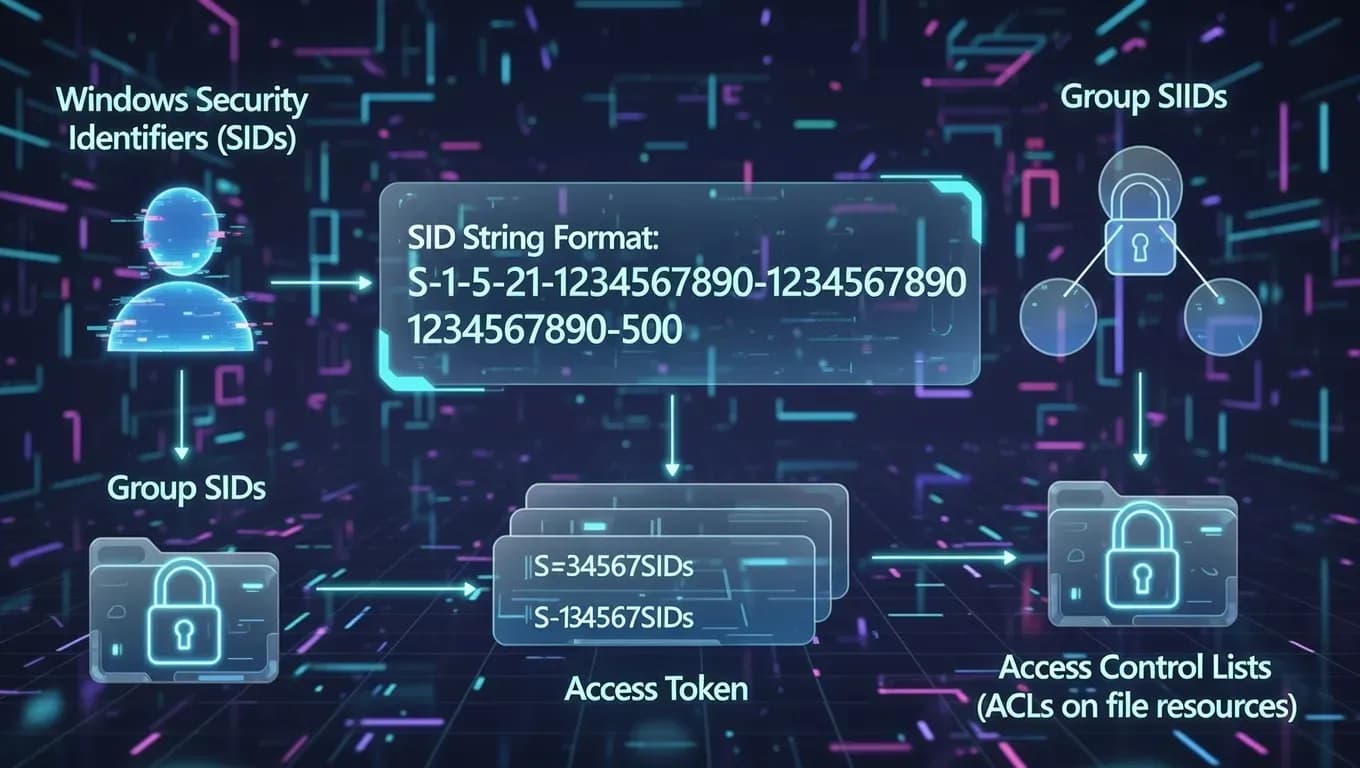
When a user logs into a Windows system, the operating system creates an access token that includes:
- The user’s SID
- The SIDs of any groups the user belongs to
- The user’s privilege levels
This access token is then used throughout the session whenever the system evaluates permissions for resources such as files, registry keys, or networked services. Windows references these SIDs against Access Control Lists (ACLs) attached to resources to allow or deny actions.
SID Structure and Format
Windows SIDs have a standardized format that typically looks like:
S-Revision-IdentifierAuthority-SubAuthority1-...-SubAuthorityN-RID
- S indicates this is a SID
- Revision defines the version of the SID format
- IdentifierAuthority indicates the authority that issued the SID
- SubAuthority values define the domain or machine context
- RID (Relative Identifier) uniquely identifies the principal within its scope
For example, a SID such as S-1-5-21-3623811015-3361044348-30300820-1013 encodes both the issuing authority and the unique identifier for a specific account or group.
Well-Known and Built-In SIDs
Windows defines several well-known SIDs representing generic principals used for standard system accounts and groups. These SIDs have fixed values across systems and include:
- S-1-5-18 - LocalSystem account
- S-1-5-19 - LocalService
- S-1-5-20 - NetworkService
- S-1-1-0 - Everyone (all users)
- S-1-2-0 - Local users
These well-known SIDs make it possible to write access policies and system descriptions that work regardless of the specific domain or machine context.
Why SIDs Matter
Persistent Identity
Unlike human-readable account names, which can be renamed or duplicated, SIDs provide a persistent, unique identifier that ensures consistent access control and auditing across system changes and domain migrations.
Access Control and Authorization
Because ACLs store SIDs rather than names, permission checks can be performed efficiently and securely. This also prevents confusion when account names change, as the underlying SID still maps to the original security principal.
Domain and Local Scope
In domain environments, a SID consists of a domain component followed by a Relative Identifier (RID), enabling unique identification across a large enterprise. Local accounts on standalone machines have their own SIDs issued by the local security authority.
How SIDs Are Used in Practice
System administrators and security teams encounter SIDs in scenarios such as:
Auditing and Security Logs
Windows security logs reference SIDs when reporting login events, rights assignments, and access attempts. Administrators often translate SIDs back to friendly names using built-in tools for analysis.
Group Policy and Access Policies
Permissions defined in Group Policy Objects (GPOs) or ACLs are tied to SIDs, ensuring that defined rights persist even as user names change.
Migration and Cleanup
When migrating users between domains or performing account cleanup, understanding SID associations prevents orphaned permissions and access issues.
Tools and Troubleshooting
Windows provides tools and APIs to translate between SIDs and human-readable account names:
- PowerShell:
Get-ADUser,Get-ADGroupcan return SIDs. - Command-line:
whoami /userdisplays current user SID. - Registry: Local SIDs for machine accounts can be found under security hives.
Administrators should avoid manually editing SIDs, as this can corrupt access control structures and lead to security gaps.
Conclusion
Security Identifiers (SIDs) are integral to the Windows security model, enabling consistent, immutable identification of accounts and groups across authentication, access control, and auditing mechanisms. Their design ensures robust permission enforcement even in complex domain and enterprise environments, making them a foundational concept for administrators and security professionals alike.
Understanding SID architecture and use cases helps with troubleshooting access issues, managing permissions, and securing Windows infrastructure effectively.
Frequently Asked Questions
A Security Identifier (SID) is a unique and immutable identifier used by Windows to represent users, groups, computers, and system accounts. Unlike usernames, SIDs never change and are the real references used by Windows to enforce permissions and access control.
Usernames can be renamed or duplicated, which would break permission consistency. SIDs provide a stable identity layer, ensuring that access rights remain intact even if an account name is changed or moved within a domain.
No. Each SID is guaranteed to be globally unique within its scope (local system or Active Directory domain). Once a SID is assigned, it is never reused, even if the account is deleted.
When an account is deleted, its SID remains stored in ACLs as an orphaned SID. Windows can no longer resolve it to a name, but the permission entry still exists until it is manually removed.
Comments
Want to join the discussion?
Create an account to unlock exclusive member content, save your favorite articles, and join our community of IT professionals.
New here? Create a free account to get started.