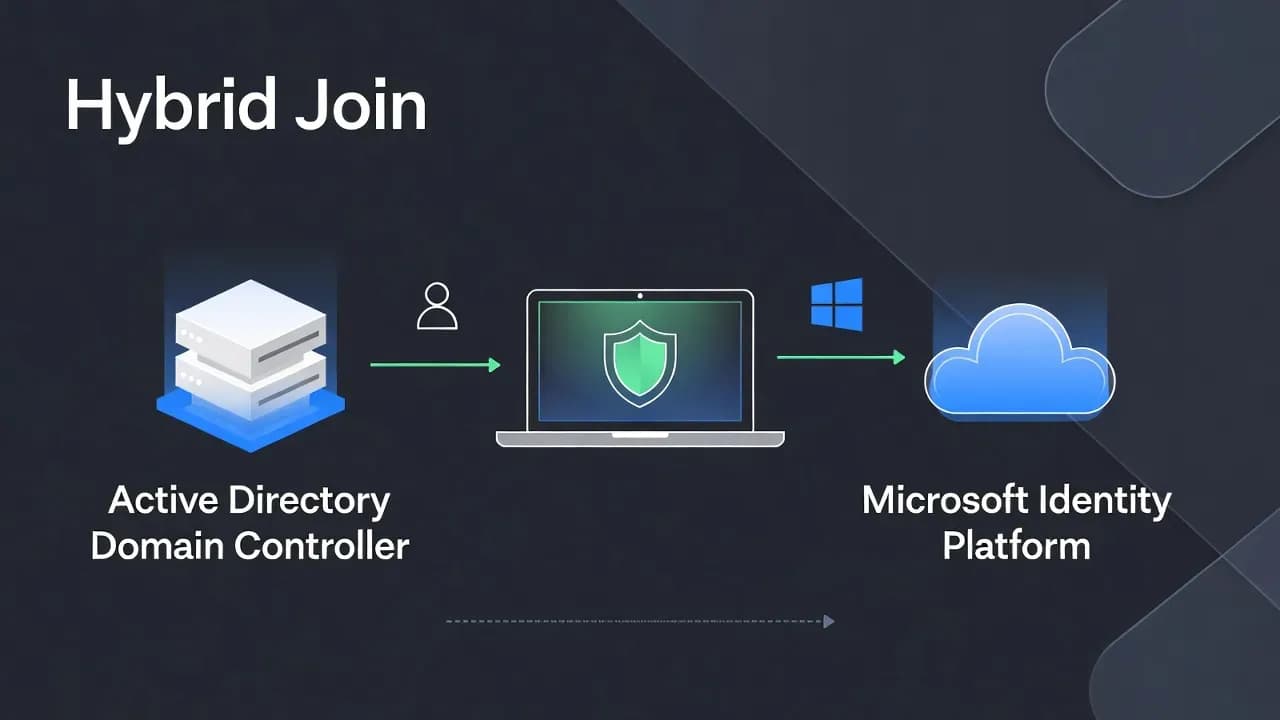
Azure AD vs Active Directory: A Deep Architectural Explanation for Microsoft 365 (2026)
Active Directory and Azure AD share a name and both "do identity," yet they were built for different eras of computing. Active Directory Domain Services (AD DS) was designed to control resources inside a trusted corporate network. Azure AD, now Microsoft Entra ID, was designed to control access to applications in a world where networks are untrusted by default. This explainer breaks down trust assumptions, authentication protocols, control planes, and operational outcomes for architects and security engineers.

Introduction: why this comparison still creates confusion in 2026
Active Directory and Azure AD share a name and both "do identity," yet they were built for different eras of computing. Active Directory Domain Services (AD DS) was designed to control resources inside a trusted corporate network. Azure AD, now Microsoft Entra ID, was designed to control access to applications in a world where networks are untrusted by default.
That naming overlap is the source of most architectural mistakes. Teams assume Entra ID is simply "Active Directory in the cloud," then try to recreate LDAP hierarchies, OUs, and GPO-driven management in an identity system that is not built for that. The result is usually confusion, security gaps, or brittle hybrids that are hard to operate.
This explainer breaks the topic down the way architects and security engineers should: trust assumptions, authentication protocols, control planes, and operational outcomes. The goal is not to declare a winner. The goal is to understand why both exist, what each one is optimized for, and how they work together in modern Microsoft 365 environments.
Active Directory: an identity system designed for infrastructure control
Active Directory Domain Services (AD DS) is a directory service for storing and organizing objects such as users, groups, and computers, and for making that directory data available to authorized users and administrators on a network.
The important detail is not "directory." It is where AD DS derives its security strength. AD DS assumes the organization owns the network, controls the endpoints, and can maintain reliable connectivity between clients and domain controllers. In that environment, AD DS becomes a powerful control system for infrastructure:
- Central authentication for domain resources
- Central authorization through group membership and ACLs
- Centralized configuration via Group Policy
- Strong integration with Windows protocols and services
Group Policy is one of the clearest examples of AD's infrastructure-first mindset. It is designed to enforce configuration and security settings for users and computers by using the hierarchical structure of AD.
The practical AD DS mental model
If you want a compact, operational model, think of AD DS as three tightly coupled parts:
- Directory database: authoritative record of users, groups, computers
- Domain controllers: authentication and policy infrastructure
- Windows integrated controls: Kerberos, NTLM fallback, Group Policy, file and print security, service accounts
This model is extremely effective for on-prem file servers, legacy line-of-business apps, Windows-based server estates, and networks where identity and device management are inseparable.
The trust assumptions behind Active Directory
AD DS security is not only about the protocol. It is about the implicit trust boundary.
Active Directory environments typically assume:
- The internal network is more trustworthy than the public internet
- Domain-joined devices are managed and expected to follow policy
- Authentication requests occur inside predictable network paths
- Many resources remain reachable only from "inside"
Those assumptions still hold in some datacenters. They break down in modern work patterns: remote employees, unmanaged networks, SaaS apps, mobile-first access, and a high rate of credential phishing.
This is why "lifting and shifting" AD concepts into cloud access patterns often fails. AD DS was built to secure infrastructure inside a perimeter. Cloud access has no perimeter to rely on.
Azure AD (Microsoft Entra ID): identity without a network perimeter
Microsoft Entra ID is Microsoft's cloud-based identity and access management service used to manage identities and control access to apps, data, and resources.
This is not a domain service. Entra ID is optimized for a different question:
Who is allowed to access this application right now, under these conditions?
That question implies the network is untrusted. It implies users sign in from anywhere. It implies access needs to be continuously evaluated based on context such as device state, sign-in risk, and policy.
Entra ID is built around:
- Authentication to applications, not to a domain
- Token-based protocols and federation at internet scale
- Policy-driven access control through Conditional Access
Entra ID authentication is token-first by design
Entra ID fully supports standards-based modern authentication flows via the Microsoft identity platform, including OAuth 2.0 and OpenID Connect, and also supports SAML for enterprise SSO scenarios.
This is a fundamental architectural shift from Kerberos tickets inside a domain to tokens issued by an authorization server. It enables:
- Internet-scale sign-in
- Conditional policy enforcement
- Stateless application architectures
- Better compatibility with SaaS and mobile apps
Identity versus infrastructure: the core conceptual difference
The cleanest way to remember the difference is to separate the control planes:
- AD DS is infrastructure identity.
- Entra ID is application access identity.
Here is the comparison that usually resolves the confusion:
| Dimension | Active Directory (AD DS) | Azure AD (Microsoft Entra ID) |
|---|---|---|
| Primary purpose | Infrastructure control and domain authentication | Identity and access control for apps and resources |
| Trust anchor | Domain membership and internal network assumptions | Identity plus context and policy |
| Authentication target | Domain resources (servers, shares, on-prem apps) | Applications and cloud services |
| Core protocols | Kerberos, NTLM, LDAP, GPO processing | OAuth 2.0, OpenID Connect, SAML, tokens |
| Device dependency | Strong (domain join is central) | Optional (device signals improve trust) |
| Security model | Perimeter and credential protection | Zero Trust oriented policy enforcement |
This is why Entra ID cannot "replace AD DS" in a literal way. It replaces legacy access models, not domain controller functions.
Why Entra ID is not "Active Directory in the cloud"
The misconception persists because the old name "Azure Active Directory" suggested continuity. The product is different by design.
Entra ID does not provide domain controllers, and it does not expose AD DS primitives such as:
- Kerberos domain authentication services
- LDAP directory services
- Organizational Units and GPO processing as a domain feature set
Instead, Entra ID provides cloud IAM capabilities: authentication, app access management, and policy controls.
So what do you do when you need AD DS-like features in the cloud?
The missing piece many people overlook: Microsoft Entra Domain Services
Microsoft Entra Domain Services provides managed domain services such as domain join, Group Policy, LDAP, and Kerberos/NTLM authentication without deploying and maintaining domain controllers in the cloud.
It is important to be precise here:
- Entra Domain Services is not Entra ID.
- It is a managed domain layer that can synchronize from Entra ID and provide a subset of AD DS compatibility for "lift-and-shift" applications.
If you need LDAP and domain join for legacy apps running in Azure, Entra Domain Services can be a strategic bridge. It is not a reason to confuse Entra ID with AD DS.
Hybrid identity: the dominant enterprise architecture
Most enterprises run hybrid identity because they have mixed workloads:
- Legacy apps that depend on Kerberos or LDAP
- File servers and on-prem authorization models
- Cloud apps and Microsoft 365 that depend on Entra ID for sign-in and access control
In a well-designed hybrid model:
- AD DS remains authoritative for on-prem infrastructure identity
- Entra ID becomes the cloud authentication and access control plane
Synchronization between on-prem AD DS and Entra ID is typically done through Microsoft Entra hybrid identity tooling, including Entra Connect and Entra Cloud Sync. Microsoft's documentation explicitly compares "Connect sync" and "Cloud sync," and positions Cloud Sync as a lightweight agent-based approach with high availability and supported objects.
How to think about sync without oversimplifying it
Sync is not "copy AD to cloud." It is an identity projection that enables:
- Single sign-on to Microsoft 365
- Consistent identity across SaaS apps
- Central policy enforcement through Conditional Access
But you still need to understand what remains on-prem:
- Many device authentication flows
- Legacy app auth that depends on AD DS
- Server authorization models tied to Windows security descriptors
Hybrid identity succeeds when responsibilities are cleanly separated instead of duplicated.
Device identity models and trust: where the operational differences become obvious
Identity systems become real when devices enter the picture.
Active Directory device trust
In AD DS environments, the classic trust model is domain join. The device becomes a domain object, trusts domain controllers, and receives policy via Group Policy. This model is operationally strong for office-based networks and persistent connectivity.
Entra ID device trust
In Entra ID environments, devices can be registered or joined to the cloud directory and can provide signals that matter to cloud access decisions. The key difference is that device trust is more flexible and often evaluated as part of Conditional Access decisions.
A practical summary:
| Device model | Trust anchor | Typical use case |
|---|---|---|
| AD Join | Domain controller and AD DS trust | On-prem workstations and internal resources |
| Entra ID Join | Cloud identity provider trust | Cloud-first devices, remote-first operations |
| Hybrid Join | Both AD DS and Entra ID | Mixed environments with staged migration |
Cloud access decisions can use device identity and compliance signals as conditions for granting access.
This is also where Intune usually enters the architecture: device compliance is measured, and Conditional Access can require a compliant device to access cloud resources.
Authentication protocols and access flows: Kerberos tickets vs OAuth tokens
If you want a true architectural distinction, look at authentication flows.
AD DS: Kerberos and NTLM
Kerberos is the primary authentication protocol used to verify the identity of a user or host in Windows domain environments, with Windows implementing Kerberos v5 and extensions.
NTLM remains as a family of challenge-response authentication protocols used in Windows environments, often as a fallback where Kerberos is not available.
These protocols are optimized for domain environments:
- Low latency between clients and DCs
- Strong assumptions about internal DNS and time sync
- Domain membership as the trust root
Entra ID: OAuth 2.0, OpenID Connect, and SAML
Entra ID's modern authentication relies on standards-compliant implementations of OAuth 2.0 and OpenID Connect delivered by the Microsoft identity platform.
SAML remains common for enterprise federation and application SSO patterns, and Microsoft documents how SAML works with Entra ID for SSO.
Token-based auth changes everything operationally:
- Applications do not need to query a domain controller per request
- Contextual signals can be enforced at sign-in time
- Authentication can scale across the internet without a corporate network dependency
A modern bridge worth knowing: Microsoft Entra Kerberos
Microsoft also documents "Microsoft Entra Kerberos" as a cloud-native approach designed to bridge hybrid identity scenarios and extend Kerberos capabilities into the Entra ecosystem.
You do not need this feature to understand the AD vs Entra distinction, but it reinforces a key point: modern identity design is about interoperability and controlled transitions, not replacing everything overnight.
Security models compared: perimeter trust vs continuous verification
AD DS security is often described as "perimeter-based," but the more precise statement is this:
AD DS environments depend heavily on protecting credential material and controlling lateral movement once inside.
Entra ID environments focus on policy enforcement at sign-in and access time, using contextual signals.
What Conditional Access actually is
Conditional Access is Microsoft's policy engine for enforcing access decisions based on conditions. Microsoft provides extensive documentation for configuring Conditional Access and for using conditions such as device platform and device compliance.
A common and high-impact pattern is requiring device compliance as part of access control. Microsoft documents a reference policy for requiring device compliance with Conditional Access.
This is the operational core of Zero Trust for many Microsoft 365 tenants:
- Access is not granted because you are "on the network"
- Access is granted because policy conditions are satisfied now
When Active Directory is still required
Active Directory is not obsolete. It remains essential when workloads depend on classic domain services and Windows-integrated authentication.
You still need AD DS when:
- Applications require Kerberos or LDAP semantics directly
- File servers rely on AD-based authorization and NTFS ACL models
- You need deep Windows server policy control using Group Policy
- You have legacy applications that cannot be modernized to token-based authentication
In these cases, the correct strategy is rarely "rip out AD." The correct strategy is to minimize unnecessary dependency on AD for cloud access while keeping it authoritative for what it does best.
When Entra ID becomes unavoidable
Entra ID becomes mandatory as soon as you adopt cloud services that depend on it for authentication and access control.
In practice, you cannot run Microsoft 365 without Entra ID because sign-in and authorization are built on that identity plane. Entra ID is also the practical foundation for:
- SaaS authentication and SSO integrations
- Conditional Access enforcement
- Modern authentication across distributed workforces
If your security strategy includes Zero Trust execution, Entra ID is usually where policy becomes enforceable at scale through Conditional Access and modern authentication standards.
Strategic implications for IT leaders: a clean identity stack
In well-structured Microsoft environments, responsibilities are layered:
- AD DS: infrastructure identity and legacy domain services
- Entra ID: cloud identity, app access, Conditional Access policy
- Device compliance and management (commonly via Intune): device posture signals used for access decisions
- Optional bridge services: Entra Domain Services for legacy AD DS needs in Azure
This model reduces architectural friction because each layer has a clear job:
- AD DS is about controlling infrastructure identity.
- Entra ID is about controlling access to apps and resources under policy.
If you blend these responsibilities, you tend to create identity systems that are hard to secure and hard to operate.
Conclusion: two systems, two eras, one strategy
Active Directory and Entra ID are not competitors. They are products of different trust assumptions.
- Active Directory secures infrastructure inside a domain.
- Entra ID secures access to applications using token-based authentication and policy evaluation.
The organizations that succeed in Microsoft 365 do not try to recreate AD DS in the cloud. They design a hybrid identity architecture where AD DS supports what it must, Entra ID governs cloud access, and Conditional Access enforces security outcomes consistently.
Frequently Asked Questions
Active Directory (AD DS) is a domain directory for infrastructure authentication and authorization. Azure AD, now Entra ID, is a cloud IAM service for authenticating users and controlling access to apps and resources under policy.
No. Entra ID replaces many legacy access patterns for cloud apps, but AD DS remains required for Kerberos/LDAP-dependent workloads and many on-prem scenarios.
Often yes, depending on legacy workloads. Many organizations run hybrid identity: AD DS for on-prem resources, Entra ID for Microsoft 365 and cloud access.
Yes. Cloud-only organizations can operate with Entra ID as their primary identity provider and use modern authentication standards for apps.
Because token-based protocols scale across the internet and support modern app architectures and contextual policy enforcement. Kerberos is optimized for domain networks and DC connectivity.
Conditional Access is the Entra policy engine that evaluates sign-ins and enforces controls based on conditions such as device compliance, platform, and risk. It is the operational core of Zero Trust for Microsoft 365 tenants.
It is a managed domain service that provides domain join, Group Policy, LDAP, and Kerberos/NTLM authentication in Azure without deploying and maintaining your own domain controllers.
Microsoft provides Entra Connect and Entra Cloud Sync options. Microsoft documentation compares Connect sync and Cloud sync and recommends evaluating Cloud Sync where it fits to avoid future migrations.


Comments
Want to join the discussion?
Create an account to unlock exclusive member content, save your favorite articles, and join our community of IT professionals.
New here? Create a free account to get started.