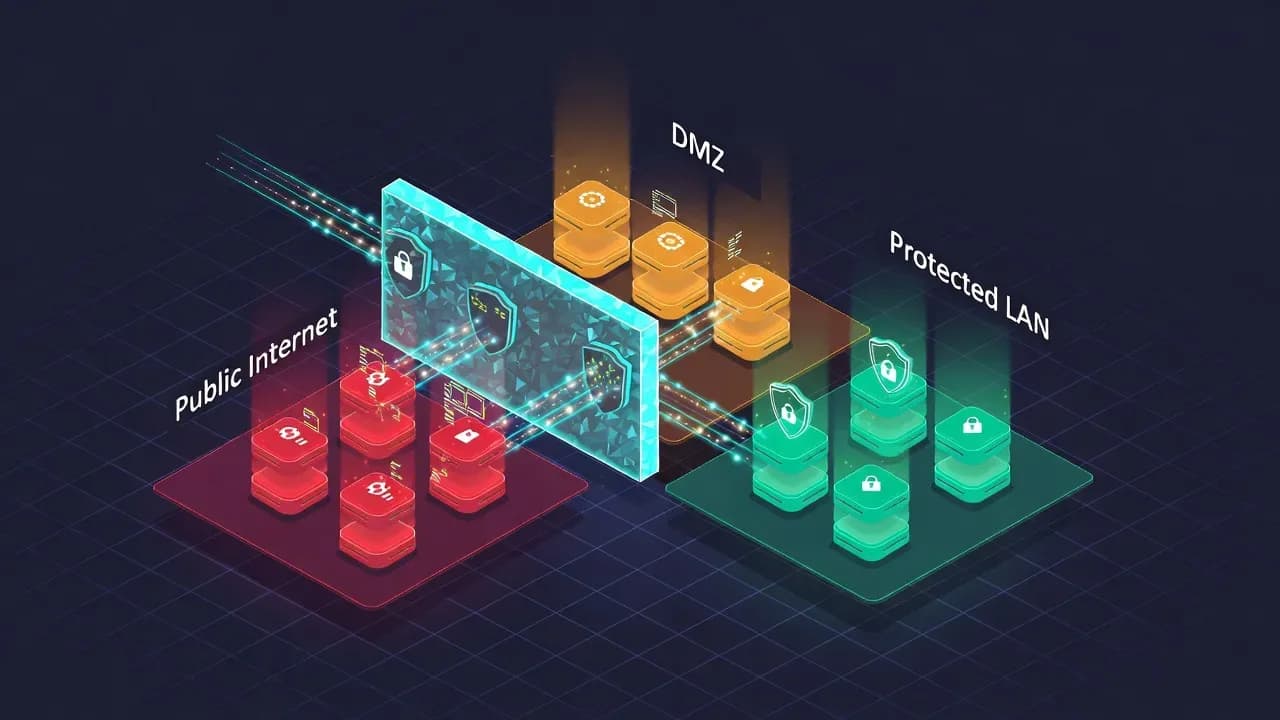
DMZ Network Explained: Architecture, Security Benefits & Implementation Guide
A Demilitarized Zone (DMZ) creates a critical security buffer between public-facing services and your internal network. With over 70% of cyberattacks targeting internet-exposed applications and 25% of data breaches involving lateral movement, proper network segmentation is essential. This guide explains DMZ architecture options, which services belong in a DMZ, firewall configuration best practices, and how modern Zero Trust approaches complement traditional perimeter security.

Summary
A Demilitarized Zone (DMZ) is a network architecture pattern that isolates public-facing services from internal corporate resources. By creating a controlled buffer zone between the internet and the private network, organizations can expose necessary services like web servers and email gateways while protecting sensitive systems from direct attack. This explanation covers DMZ fundamentals, architectural options using single or dual firewalls, security best practices, and how DMZs fit into modern defense strategies including Zero Trust Network Access.
The Origin of the Term
The term "DMZ" originates from military terminology, specifically the demilitarized zone established between North Korea and South Korea following the Korean War armistice in 1953. This 250-kilometer buffer zone separates the two nations with heavily fortified borders on each side, creating neutral territory where neither military operates freely.
Network architects adopted this concept in the 1990s as organizations began connecting internal networks to the internet. Just as the Korean DMZ creates separation between potentially hostile territories, a network DMZ establishes a controlled intermediate zone between the untrusted public internet and the trusted internal network. The metaphor is apt: traffic crossing either boundary must pass through security checkpoints, and compromise of the DMZ does not automatically grant access to the protected territory beyond.
What Is a Network DMZ?
A network DMZ is a physical or logical subnet that contains an organization's external-facing services while isolating them from internal resources. The DMZ sits between two security boundaries: an external firewall facing the internet and rules controlling access to the internal network.
From a trust perspective, the network segments have distinct security classifications. The internet represents an untrusted zone where any traffic should be considered potentially malicious. The internal LAN represents a trusted zone containing sensitive resources, user workstations, and critical business systems. The DMZ occupies a semi-trusted position, more protected than the raw internet but not granted the same access privileges as internal systems.
This layered approach implements the defense-in-depth principle. Rather than placing a single security boundary between the internet and internal resources, the DMZ creates multiple barriers an attacker must penetrate. Even if a public-facing server is compromised, the attacker faces additional obstacles before reaching high-value targets on the internal network.
Why DMZs Matter for Security
Network segmentation through DMZ architecture addresses several critical security challenges that organizations face when exposing services to the internet.
Limiting Lateral Movement
Lateral movement describes the techniques attackers use after gaining initial access to navigate through a network seeking valuable targets. Research indicates that 25% of data breaches involve lateral movement, with attackers spending weeks or months moving between systems before executing their final objective, whether data exfiltration, ransomware deployment, or infrastructure disruption.
A properly configured DMZ constrains lateral movement by limiting connectivity between zones. A compromised web server in the DMZ cannot freely scan the internal network or establish connections to arbitrary internal hosts. Firewall rules restrict traffic to specific servers on specific ports required for legitimate business functions.
Containing Breach Impact
Public-facing services carry inherent risk. Web applications may contain vulnerabilities. Email servers process potentially malicious content. DNS servers respond to queries from any source. These systems represent attractive targets precisely because they must be accessible from the internet.
Placing these high-risk services in a DMZ ensures that successful exploitation does not immediately compromise internal resources. The attacker gains access to an isolated segment where continued progress requires defeating additional security controls. This containment provides defenders time to detect the intrusion and respond before critical assets are affected.
Simplifying Security Monitoring
Concentrating public-facing services in a dedicated network segment simplifies monitoring and incident detection. Security teams can focus intensive monitoring resources on the DMZ, deploying intrusion detection systems, capturing full packet data, and analyzing logs from a limited set of systems.
Traffic patterns in a well-designed DMZ are predictable. Web servers receive HTTP and HTTPS requests. Email servers communicate using SMTP, IMAP, and related protocols. Anomalous traffic, such as a web server initiating outbound connections to unusual ports or scanning internal IP ranges, stands out against this baseline and triggers investigation.
Supporting Compliance Requirements
Regulatory frameworks including PCI DSS, HIPAA, and GDPR mandate network segmentation to protect sensitive data. Organizations processing payment cards must isolate cardholder data environments. Healthcare providers must protect patient information from unauthorized access. DMZ architecture provides documented network boundaries that demonstrate compliance with segmentation requirements.
What Services Belong in a DMZ?
The DMZ should host services that require internet accessibility while posing potential security risks to internal resources. Common DMZ residents include several categories of systems.
Web Servers
Public websites and web applications require internet accessibility by definition. Hosting web servers in the DMZ allows external users to reach the application while protecting backend databases and application servers on the internal network. The web server communicates with internal databases through controlled firewall rules permitting only necessary database protocols to specific hosts.
Email Gateways
Mail transfer agents (MTAs) that send and receive email from the internet belong in the DMZ. These servers must accept SMTP connections from any mail server worldwide, creating significant exposure. The DMZ-based mail gateway processes incoming messages, performs spam filtering and malware scanning, then relays clean mail to internal mail servers. Outbound mail follows the reverse path.
Reverse Proxies
Rather than exposing application servers directly, organizations increasingly deploy reverse proxies in the DMZ. The reverse proxy terminates external connections, inspects traffic for malicious content, and forwards legitimate requests to backend servers. This approach hides internal server details from external observation and provides a central point for applying web application firewall rules.
DNS Servers
Public DNS servers that respond to queries for an organization's domain must be internet-accessible. Placing authoritative DNS servers in the DMZ allows external resolution while protecting internal DNS infrastructure that serves employees and internal systems.
VPN Concentrators
Remote access VPN endpoints must accept connections from the internet. Positioning VPN concentrators in the DMZ creates a controlled entry point where remote users authenticate before gaining access to internal resources. The VPN server itself resides in a semi-trusted zone rather than directly on the internal network.
FTP and File Transfer Systems
Legacy file transfer systems like [FTP](/glossary/ftp "GLOSSARY:FTP:## What is FTP?
File Transfer Protocol (FTP) is a standard network protocol designed to upload, download, and manage files between a client and a server. It operates over TCP and has historically been used for website hosting, file distribution, and administrative transfers.
FTP is one of the oldest protocols still encountered in IT environments.
Why FTP matters
FTP matters because it:
- Established early standards for file transfer
- Is still present in legacy systems and workflows
- Is widely supported by tools and platforms
- Helps explain modern secure alternatives
Understanding FTP is essential for assessing legacy risk.
How FTP works (simplified)
FTP uses two separate connections:
- Control channel -- for commands and responses
- Data channel -- for file transfers
Depending on the mode, the server or client initiates the data connection.
Active vs passive mode
FTP supports two connection modes:
| Mode | Description |
|---|---|
| Active FTP | Server initiates data connection to client |
| Passive FTP | Client initiates both control and data connections |
Passive mode is more firewall-friendly and commonly used today.
Authentication in FTP
FTP typically supports:
- Username and password authentication
- Anonymous access (public downloads)
By default, credentials are sent in clear text, which poses security risks.
Security issues with FTP
FTP is considered insecure by default because:
- Credentials are transmitted unencrypted
- Data is sent in clear text
- Sessions can be intercepted
- Susceptible to credential theft and sniffing
- Often targeted in brute-force attacks
FTP should not be exposed on untrusted networks.
Secure alternatives to FTP
Modern secure alternatives include:
- FTPS -- FTP over TLS encryption
- SFTP -- File transfer over SSH
- HTTPS -- Web-based secure transfers
- Cloud storage and managed file services
Most organizations are migrating away from plain FTP.
FTP in enterprise environments
FTP is still encountered in:
- Legacy applications and integrations
- Automated batch file transfers
- Industrial or embedded systems
- Older hosting platforms
Such usage typically requires isolation and compensating controls.
FTP vs SFTP
| Aspect | FTP | SFTP |
|---|---|---|
| Encryption | No | Yes |
| Authentication | Basic | SSH-based |
| Firewall handling | Complex | Simple |
| Security | Weak | Strong |
SFTP is generally preferred for secure environments.
Common misconceptions
- 'FTP is encrypted by default'
- 'FTP and SFTP are the same'
- 'FTP is obsolete everywhere'
- 'FTP is safe on internal networks without controls' :") and modern alternatives providing external file exchange belong in the DMZ. These services accept files from external parties, representing potential malware vectors that should not have direct internal network access.
DMZ Architecture Options
Organizations can implement DMZ networks using different architectural approaches, each with distinct security and operational characteristics.
Single Firewall Architecture
The simplest DMZ implementation uses a single firewall with three or more network interfaces. One interface connects to the internet, another to the DMZ subnet, and a third to the internal network. The firewall enforces access control between all three zones through its rule base.
This architecture requires the firewall to manage traffic in multiple directions: internet to DMZ for external access to public services, DMZ to internal network for backend database access, internal network to DMZ for administrative management, and potentially internal network to internet for employee web browsing through a DMZ-based proxy.
The single-firewall approach offers simplicity and reduced hardware costs. One device handles all perimeter security functions, simplifying management and reducing licensing expenses. However, this architecture creates a single point of failure. If an attacker compromises the firewall through a vulnerability or configuration error, they potentially gain access to all three zones simultaneously.
Dual Firewall Architecture
A more robust approach deploys two separate firewalls with the DMZ positioned between them. The external firewall controls traffic between the internet and DMZ. The internal firewall controls traffic between the DMZ and the internal network.
This architecture provides defense in depth at the firewall layer itself. An attacker who compromises a DMZ server faces two distinct firewalls before reaching internal resources. Security teams can apply different rule philosophies to each firewall, with the external firewall permitting broader access to DMZ services while the internal firewall enforces strict controls on DMZ-to-internal traffic.
For maximum security, organizations deploy firewalls from different vendors for each boundary. If a vulnerability affects one vendor's product, the other firewall provides continued protection while patching occurs. This approach increases administrative complexity since teams must maintain expertise across multiple platforms, but significantly raises the bar for attackers.
Multiple DMZ Segments
Large organizations may implement multiple DMZ segments for different purposes. A public DMZ hosts customer-facing web services. A partner DMZ provides controlled access for business partners and vendors. A management DMZ contains jump servers and administrative tools for IT staff.
Segmenting DMZ functions limits blast radius further. Compromise of a public web server does not grant access to partner connectivity infrastructure or administrative systems. Each segment can have tailored firewall rules appropriate to its specific function and risk profile.
Firewall Rule Best Practices
The effectiveness of DMZ architecture depends entirely on proper firewall configuration. Poorly designed rules can negate the security benefits of network segmentation.
Default Deny Policy
Firewall rule bases should begin with a default-deny policy that blocks all traffic not explicitly permitted. This approach ensures that forgotten services, misconfigurations, or new attack vectors do not accidentally gain network access. Administrators must consciously create rules for each required traffic flow.
Principle of Least Privilege
Rules should permit only the minimum access required for legitimate business functions. If a web server needs to query a specific database server on port 3306, create a rule permitting exactly that traffic flow. Avoid rules that permit access to entire subnets, all ports, or broad service categories when specific restrictions suffice.
A common mistake occurs during troubleshooting when administrators create overly permissive rules to resolve connectivity issues, intending to tighten them later. These temporary rules frequently become permanent, undermining DMZ security. Implement change management processes that prevent such rules from persisting.
Restrict DMZ-to-Internal Traffic
The most critical rules govern traffic from the DMZ toward the internal network. DMZ servers should not initiate arbitrary connections to internal systems. A compromised DMZ server attempting internal reconnaissance or lateral movement should find its traffic blocked by explicit deny rules.
Permitted flows should specify exact source and destination hosts and ports. A web server may connect to a specific database server on port 1433 for SQL Server access. It should not have permission to connect to other internal servers or to use protocols like RDP, SSH, or SMB that could facilitate lateral movement.
Log and Monitor All Traffic
Enable logging for all firewall rules, including permitted traffic. Logs provide essential visibility for security monitoring and incident investigation. Unusual traffic patterns, failed connection attempts, and unexpected flows can indicate compromise attempts or successful breaches.
Feed firewall logs to a security information and event management (SIEM) system for correlation with other security data sources. Alert on traffic patterns that suggest lateral movement attempts, such as DMZ servers scanning internal IP ranges or connecting to internal systems outside normal business applications.
Verifying DMZ Configuration
Network and security teams should regularly verify that DMZ segmentation functions as intended. Both automated scanning and manual verification identify misconfigurations before attackers discover them.
Testing from the DMZ Perspective
Connect to a DMZ server and verify that internal network access is appropriately restricted. The following tests can identify overly permissive firewall rules.
Test network connectivity to internal systems:
# Test if ICMP is permitted to internal hosts (it usually shouldn't be)
ping 10.0.1.50

# Test connectivity to common service ports
nc -zv 10.0.1.50 22    # SSH
nc -zv 10.0.1.50 3389  # RDP
nc -zv 10.0.1.50 445   # SMB
nc -zv 10.0.1.50 1433  # SQL Server

# Scan a range to identify permitted ports
nmap -Pn -p 21,22,23,80,443,445,1433,3306,3389 10.0.1.0/24
Reviewing Firewall Rules
Periodically audit firewall rule bases to identify rules that violate DMZ security principles:
# Example: Export firewall rules for review (Windows Firewall)
Get-NetFirewallRule | Where-Object { $_.Enabled -eq 'True' } |
    Select-Object Name, Direction, Action,
        @{N='LocalPort';E={(Get-NetFirewallPortFilter -AssociatedNetFirewallRule $_).LocalPort}},
        @{N='RemoteAddress';E={(Get-NetFirewallAddressFilter -AssociatedNetFirewallRule $_).RemoteAddress}} |
    Export-Csv -Path "firewall-rules-audit.csv" -NoTypeInformation
Look for rules with these warning signs: destination addresses of "Any" or entire internal subnets, permitted protocols that include "Any" or broad port ranges, rules that have been in place for extended periods without review, and rules with descriptions indicating temporary or troubleshooting purposes.
Monitoring DMZ Traffic Patterns
Establish baseline traffic patterns for DMZ servers and alert on deviations. Normal traffic for a web server includes inbound HTTP/HTTPS from diverse sources, outbound connections to specific internal application servers, and DNS queries. Abnormal patterns requiring investigation include outbound connections to unexpected internal hosts, scanning behavior across internal IP ranges, connections using protocols not required for the server's function, and large data transfers to external destinations.
DMZ Limitations and Modern Alternatives
While DMZ architecture remains valuable, organizations should understand its limitations and how modern approaches complement traditional perimeter security.
Perimeter Erosion
The traditional DMZ model assumes a clear boundary between trusted internal networks and untrusted external networks. Modern IT environments increasingly blur this boundary through cloud services that host applications outside the traditional perimeter, remote workers connecting from home networks and public locations, SaaS applications that process corporate data entirely outside organizational control, and mobile devices that move between trusted and untrusted networks.
These factors reduce the effectiveness of perimeter-focused security models. An employee accessing a cloud application from a coffee shop never touches the corporate DMZ, yet processes sensitive business data.
Zero Trust Architecture
Zero Trust Network Access (ZTNA) addresses perimeter erosion by eliminating implicit trust based on network location. Rather than trusting traffic because it originates from the internal network, Zero Trust verifies every access request based on user identity, device health, and request context.
In a Zero Trust model, every application effectively sits in its own microsegmented zone. Firewalls and access controls restrict lateral movement regardless of network location. A compromised system cannot scan the network for other targets because it lacks implicit access to anything beyond its specific authorized resources.
Zero Trust does not eliminate the need for DMZ architecture. Public-facing services still require internet exposure and benefit from network segmentation. However, Zero Trust extends segmentation principles throughout the environment rather than concentrating security at the perimeter.
Cloud DMZ Patterns
Organizations migrating to cloud platforms implement DMZ concepts using cloud-native constructs. AWS Virtual Private Clouds (VPCs) create isolated network environments with security groups controlling traffic between instances. Azure Network Security Groups provide similar filtering capabilities. Google Cloud VPC firewall rules implement access controls at the network edge.
Cloud DMZ architectures typically place public-facing load balancers or reverse proxies in public subnets with internet gateway access. Backend application and database tiers reside in private subnets accessible only from the public tier. This pattern mirrors on-premises DMZ architecture using cloud-native building blocks.
Implementation Recommendations
Organizations implementing or reviewing DMZ architecture should follow these recommendations to maximize security benefits.
Start with Asset Classification
Identify which systems truly require internet exposure. Many organizations discover legacy services published to the internet that could be migrated behind VPN access or eliminated entirely. Reducing the DMZ footprint reduces attack surface and simplifies security management.
Document Traffic Flows
Before implementing firewall rules, document the legitimate traffic flows required between zones. Identify which DMZ servers need access to which internal resources, on which ports, for which business purposes. This documentation guides rule creation and provides justification for permitted flows during security reviews.
Implement Intrusion Detection
Deploy network intrusion detection systems (NIDS) monitoring DMZ traffic. Tools like Zeek (formerly Bro) or Suricata analyze network flows for malicious patterns and generate alerts for security team investigation. Position sensors to capture traffic at both DMZ boundaries.
Harden DMZ Systems
Systems in the DMZ face constant attack attempts and must be hardened accordingly. Apply security patches within days of release rather than weeks. Disable unnecessary services and protocols. Configure host-based firewalls as a second layer of defense. Remove or disable default accounts and credentials.
Plan for Compromise
Assume that DMZ systems will eventually be compromised and design accordingly. Implement detection capabilities that identify lateral movement attempts. Establish incident response procedures specific to DMZ breaches. Regularly test these procedures through tabletop exercises and red team engagements.
Regular Review Cycles
Schedule periodic reviews of DMZ architecture, firewall rules, and hosted services. Technology and business requirements change over time, and security configurations must evolve accordingly. Quarterly reviews identify drift from security baselines and opportunities for improvement.
Conclusion
DMZ networks implement fundamental security principles of segmentation and defense in depth that remain relevant despite evolving threat landscapes and technology architectures. By isolating public-facing services from internal resources, organizations create multiple barriers attackers must penetrate and provide defenders time to detect and respond to breaches.
Effective DMZ implementation requires thoughtful architecture decisions, carefully crafted firewall rules, and ongoing monitoring and maintenance. Single-firewall designs offer simplicity while dual-firewall architectures provide additional protection for high-security environments. Regardless of architectural choice, the core principles remain consistent: minimize permitted traffic flows, apply least-privilege access controls, and monitor for anomalous behavior.
Modern security strategies increasingly incorporate Zero Trust principles that extend segmentation beyond the traditional perimeter. However, Zero Trust complements rather than replaces DMZ architecture. Organizations still need controlled exposure points for public-facing services, and DMZ design patterns provide proven approaches for managing that exposure.
For security professionals, understanding DMZ architecture is essential for both implementing new segmented networks and evaluating the security posture of existing environments. The concepts translate directly to cloud environments, where network security groups and virtual private clouds implement the same isolation principles using cloud-native tools.
Frequently Asked Questions
A DMZ (Demilitarized Zone) is a subnet that sits between an organization's internal network and the public internet. It hosts public-facing services like web servers and email gateways while isolating them from sensitive internal resources.
Services that require internet accessibility: web servers, email gateways, reverse proxies, public DNS servers, VPN concentrators, and file transfer systems. Backend databases should remain on the internal network.
Zero Trust complements rather than replaces DMZ architecture. It extends segmentation principles by verifying every access request regardless of network location, adding microsegmentation throughout the environment.
Comments
Want to join the discussion?
Create an account to unlock exclusive member content, save your favorite articles, and join our community of IT professionals.
New here? Create a free account to get started.